

Question 51
A wireless network was installed in a warehouse for employees to scan crates with a wireless handheld scanner. The wireless network was placed in the corner of the building near the ceiling for maximum coverage However users in the offices adjacent lo the warehouse have noticed a large amount of signal overlap from the new network Additionally warehouse employees report difficulty connecting to the wireless network from the other side of the building; however they have no issues when Ihey are near the antenna Which of the following is MOST likely the cause?
Question 52
Which of the following steps of the troubleshooting methodology would most likely include checking through each level of the OSI model after the problem has been identified?
Question 53
A customer cannot reach a web application on a local server. The network consultant suspects that the server is not accepting the HTTPS connection. Which of the following commands should the consultant run on the server to determine what is occurring?
Question 54
A local firm has hired a consulting company to clean up its IT infrastructure.
The consulting company notices remote printing is accomplished by port forwarding via publicly accessible IPs through the firm's firewall.
Which of the following would be the MOST appropriate way to enable secure remote printing?
The consulting company notices remote printing is accomplished by port forwarding via publicly accessible IPs through the firm's firewall.
Which of the following would be the MOST appropriate way to enable secure remote printing?
Question 55
SIMULATION
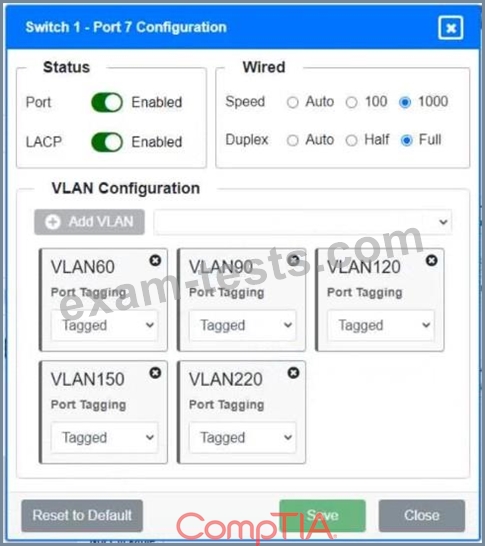
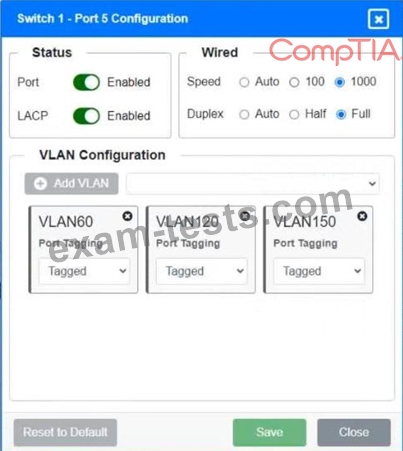
A network technician replaced a switch and needs to reconfigure it to allow the connected devices to connect to the correct networks.
INSTRUCTIONS
Click on the appropriate port(s) on Switch 1 and Switch 3 to verify or reconfigure the correct settings:
* Ensure each device accesses only its correctly associated network
* Disable all unused switch ports
* Require fault-tolerant connections between the switches
* Only make necessary changes to complete the above requirements
If at any time you would like to bring back the initial state of the simulation, please click the Reset All button.

A network technician replaced a switch and needs to reconfigure it to allow the connected devices to connect to the correct networks.
INSTRUCTIONS
Click on the appropriate port(s) on Switch 1 and Switch 3 to verify or reconfigure the correct settings:
* Ensure each device accesses only its correctly associated network
* Disable all unused switch ports
* Require fault-tolerant connections between the switches
* Only make necessary changes to complete the above requirements
If at any time you would like to bring back the initial state of the simulation, please click the Reset All button.