
- Home
- Nutanix Certification
- NCP-US-6.10 Exam
- Nutanix.NCP-US-6.10.v2025-12-19.q40 Practice Test

Question 36
An administrator has been asked to implement a solution that allows users to:
* Recover single files
* Retrieve shares
* Set snapshot frequency
Which feature should be used?
* Recover single files
* Retrieve shares
* Set snapshot frequency
Which feature should be used?
Correct Answer: D
According to the Nutanix Unified Storage Administration (NUSA) course, theSelf-Service Restore (SSR) feature empowers end-users to recover individual files and shares from file server snapshots without administrative intervention. It also allows users to configure snapshot schedules (snapshot frequency) as required.
This feature is explicitly described in the module "Configuring and Utilizing Self-Service Restore (SSR)" of the NUSA course, stating:
"Self-Service Restore enables end-users to browse available snapshots of their shares and folders, allowing them to recover individual files or entire folders independently. Snapshot frequency and retention can be configured to meet data protection requirements." In contrast:
* Protection Domainsare used for DR (Disaster Recovery) and not for per-file restore by end-users.
* Smart DRis also a DR-focused feature, not for user-level file recovery.
* Access Based Enumeration (ABE)pertains to share visibility control, not file recovery.
Reference:
Nutanix Unified Storage Administration (NUSA) course - Module: Configuring and Utilizing Self-Service Restore (SSR).
Nutanix Unified Storage (NCP-US) Study Guide - Topic: Enabling SSR for File Server Shares.
This feature is explicitly described in the module "Configuring and Utilizing Self-Service Restore (SSR)" of the NUSA course, stating:
"Self-Service Restore enables end-users to browse available snapshots of their shares and folders, allowing them to recover individual files or entire folders independently. Snapshot frequency and retention can be configured to meet data protection requirements." In contrast:
* Protection Domainsare used for DR (Disaster Recovery) and not for per-file restore by end-users.
* Smart DRis also a DR-focused feature, not for user-level file recovery.
* Access Based Enumeration (ABE)pertains to share visibility control, not file recovery.
Reference:
Nutanix Unified Storage Administration (NUSA) course - Module: Configuring and Utilizing Self-Service Restore (SSR).
Nutanix Unified Storage (NCP-US) Study Guide - Topic: Enabling SSR for File Server Shares.
Question 37
An administrator wants to use Smart DR to ensure that in the event of an unplanned loss of service, users are redirected automatically to the recovery site. What can satisfy this requirement?
Correct Answer: B
To ensure that users are automatically redirected to the recovery site during an unplanned loss of service when usingSmart DRfor Nutanix Files, the administrator mustconfigure Active Directory (AD) and DNS access for seamless client failover. Smart DR enables disaster recovery by replicating file shares between primary and recovery sites, and automatic client redirection requires proper configuration of AD and DNS to update client access to the recovery site's file server.
TheNutanix Unified Storage Administration (NUSA)course states, "For Smart DR to support seamless failover in Nutanix Files, AD and DNS must be configured to redirect clients to the recovery site's file server VIP automatically during a failover event." This involves ensuring that the file server's DNS name resolves to the recovery site's VIP and that AD authentication is available at the recovery site to maintain user access to file shares.
TheNutanix Certified Professional - Unified Storage (NCP-US)study guide elaborates that "Smart DR failover requires AD and DNS integration to update the file server's DNS records to point to the recovery site' s VIP, ensuring clients are redirected without manual intervention." This configuration allows clients to continue accessing file shares using the same DNS name, with the underlying IP address switching to the recovery site's VIP during failover.
The other options are incorrect or insufficient:
* Configure Protection Policy replication schedule: While configuring a replication schedule is necessary for Smart DR to replicate data, it does not address the requirement for automatic client redirection, which depends on AD and DNS.
* Register PE clusters to PC before enabling the Files Manager: Registering Prism Element (PE) clusters to Prism Central (PC) is a prerequisite for managing Nutanix Files, but it does not directly enable automatic client redirection for Smart DR.
* Register Nutanix Files with the same PC: While Nutanix Files instances may be managed by the same Prism Central, this does not ensure automatic client redirection, which requires AD and DNS configuration.
The NUSA course documentation highlights that "Smart DR leverages AD and DNS to provide seamless failover, ensuring clients are automatically redirected to the recovery site's file server without service interruption." References:
Nutanix Unified Storage Administration (NUSA) Course, Section on Nutanix Files: "Smart DR configuration and failover requirements." Nutanix Certified Professional - Unified Storage (NCP-US) Study Guide, Topic 2: Configure and Utilize Nutanix Unified Storage, Subtopic: "Smart DR and client failover configuration." Nutanix Documentation (https://www.nutanix.com), Nutanix Files Administration Guide: "Configuring AD and DNS for Smart DR failover."
TheNutanix Unified Storage Administration (NUSA)course states, "For Smart DR to support seamless failover in Nutanix Files, AD and DNS must be configured to redirect clients to the recovery site's file server VIP automatically during a failover event." This involves ensuring that the file server's DNS name resolves to the recovery site's VIP and that AD authentication is available at the recovery site to maintain user access to file shares.
TheNutanix Certified Professional - Unified Storage (NCP-US)study guide elaborates that "Smart DR failover requires AD and DNS integration to update the file server's DNS records to point to the recovery site' s VIP, ensuring clients are redirected without manual intervention." This configuration allows clients to continue accessing file shares using the same DNS name, with the underlying IP address switching to the recovery site's VIP during failover.
The other options are incorrect or insufficient:
* Configure Protection Policy replication schedule: While configuring a replication schedule is necessary for Smart DR to replicate data, it does not address the requirement for automatic client redirection, which depends on AD and DNS.
* Register PE clusters to PC before enabling the Files Manager: Registering Prism Element (PE) clusters to Prism Central (PC) is a prerequisite for managing Nutanix Files, but it does not directly enable automatic client redirection for Smart DR.
* Register Nutanix Files with the same PC: While Nutanix Files instances may be managed by the same Prism Central, this does not ensure automatic client redirection, which requires AD and DNS configuration.
The NUSA course documentation highlights that "Smart DR leverages AD and DNS to provide seamless failover, ensuring clients are automatically redirected to the recovery site's file server without service interruption." References:
Nutanix Unified Storage Administration (NUSA) Course, Section on Nutanix Files: "Smart DR configuration and failover requirements." Nutanix Certified Professional - Unified Storage (NCP-US) Study Guide, Topic 2: Configure and Utilize Nutanix Unified Storage, Subtopic: "Smart DR and client failover configuration." Nutanix Documentation (https://www.nutanix.com), Nutanix Files Administration Guide: "Configuring AD and DNS for Smart DR failover."
Question 38
Question:
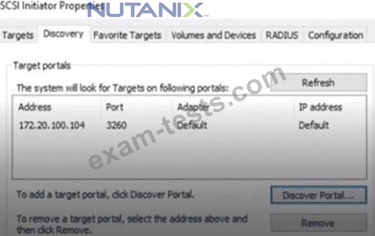
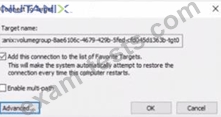
An administrator has received a complaint from a user that a Windows VM lost access to an iSCSI Volume Group (VG) during a maintenance window of an ESXi-based Nutanix cluster. The VM's iSCSI configuration shows it is connecting to a specific IP (172.20.100.104).
What recommended change should the administrator make to resolve this disruption?
An administrator has received a complaint from a user that a Windows VM lost access to an iSCSI Volume Group (VG) during a maintenance window of an ESXi-based Nutanix cluster. The VM's iSCSI configuration shows it is connecting to a specific IP (172.20.100.104).
What recommended change should the administrator make to resolve this disruption?
Correct Answer: B
When configuring iSCSI connections to Nutanix Volume Groups (VGs), Nutanix recommends using theData Services IP (DSIP)as the discovery IP in the iSCSI Initiator configuration. Here's why:
TheDSIP (172.20.100.50)in this environment is designed to be highly available andfloats across CVMs within the Nutanix cluster.
The DSIP automatically handles failover between CVMs during maintenance, software upgrades, or node failures.
Configuring the iSCSI initiator withindividual CVM IPs (like 172.20.100.104)is not recommended because:
* If the CVM goes down (maintenance, upgrade, etc.), the initiator willlose connectionto the volume group, causing the exact issue seen here.
The NUSA and NCP-US course materials specifically emphasize:
"The Data Services IP should be used as the discovery target for iSCSI Volume Groups to ensure automatic failover and eliminate connection disruptions during maintenance windows." VIPis used formanagement traffic(Prism Central/Prism Element) and is not used for iSCSI.
Enable multi-pathis important for performance but does not resolve this misconfigured discovery IP issue.
Adding all CVMsindividually also doesn't provide automated failover and isn't a best practice.
Thus, the fix is toremove the CVM IP (172.20.100.104) and configure the Windows iSCSI initiator with the DSIP (172.20.100.50)as the discovery target.
TheDSIP (172.20.100.50)in this environment is designed to be highly available andfloats across CVMs within the Nutanix cluster.
The DSIP automatically handles failover between CVMs during maintenance, software upgrades, or node failures.
Configuring the iSCSI initiator withindividual CVM IPs (like 172.20.100.104)is not recommended because:
* If the CVM goes down (maintenance, upgrade, etc.), the initiator willlose connectionto the volume group, causing the exact issue seen here.
The NUSA and NCP-US course materials specifically emphasize:
"The Data Services IP should be used as the discovery target for iSCSI Volume Groups to ensure automatic failover and eliminate connection disruptions during maintenance windows." VIPis used formanagement traffic(Prism Central/Prism Element) and is not used for iSCSI.
Enable multi-pathis important for performance but does not resolve this misconfigured discovery IP issue.
Adding all CVMsindividually also doesn't provide automated failover and isn't a best practice.
Thus, the fix is toremove the CVM IP (172.20.100.104) and configure the Windows iSCSI initiator with the DSIP (172.20.100.50)as the discovery target.
Question 39
At what level of granularity can Smart DR replicate?
Correct Answer: C
Smart DR (Disaster Recovery) is a feature within Nutanix Unified Storage (NUS), specifically designed to facilitate data replication and disaster recovery for Nutanix Files, which is the file storage service component of NUS. Nutanix Unified Storage integrates file, object, and block storage services, but Smart DR is primarily associated with the file storage functionality provided by Nutanix Files. To determine the level of granularity at which Smart DR operates, we need to examine how it handles replication within this context.
Understanding the Options
* Volume: In Nutanix terminology, a volume typically refers to a logical storage unit used in block storage services (e.g., Nutanix Volumes). It can contain multiple files or datasets and is managed at a higher abstraction level.
* Bucket: A bucket is a container used in object storage (e.g., Nutanix Objects) to store objects, akin to a directory but specific to object-based storage systems.
* Share: In Nutanix Files, a share refers to a file share (accessible via SMB or NFS protocols), which contains files and directories that are made available over a network for user access.
* File: This represents an individual file, the smallest unit of data within a storage system.
Smart DR's purpose is to ensure data availability and consistency for disaster recovery scenarios, which implies that the replication granularity should support recovering cohesive sets of data rather than fragmented pieces that could lead to inconsistencies.
Smart DR and Nutanix Files
According to the Nutanix Unified Storage documentation, Smart DR is specifically tailored for Nutanix Files to enable replication of file shares for disaster recovery. The key evidence comes from the NCP-US and NUSA course materials, which state:
"NUS also offers Smart DR to facilitateshare-level data replicationand file server-level disaster recovery." (Reference: Nutanix Unified Storage Administration (NUSA) Study Guide, Section on Disaster Recovery Features for Nutanix Files) This excerpt explicitly indicates that Smart DR performs replication at theshare level. In Nutanix Files, a share is a logical entity that groups files and directories together, accessible via protocols like SMB (Server Message Block) for Windows environments or NFS (Network File System) for UNIX/Linux environments.
When configuring Smart DR, administrators select specific shares to replicate to a remote site, ensuring that the entire share-including all its files and directory structures-is replicated as a single unit. This approach maintains data consistency and simplifies recovery by allowing the entire share to be restored in a disaster scenario.
Why Not the Other Options?
* Volume: While Nutanix Volumes (block storage) supports replication through features like Protection Domains or asynchronous replication, Smart DR is not documented as a feature for block storage replication. Protection Domains, for instance, operate at the VM or volume group level, not under the Smart DR umbrella. Thus, "Volume" is not the correct granularity for Smart DR.
* Bucket: In Nutanix Objects (object storage), replication can occur at the bucket level, but this is managed through different mechanisms, such as object replication policies, not Smart DR. The documentation does not associate Smart DR with bucket-level replication, making "Bucket" incorrect.
* File: Replicating individual files would be highly granular and impractical for disaster recovery, as it risks inconsistencies (e.g., missing related files or directory structures). While Nutanix Files supports file-level operations, Smart DR does not allow administrators to configure replication for individual files within a share. The replication unit is the share itself, ruling out "File." Configuration in Practice In the Nutanix Prism interface, when setting up Smart DR for Nutanix Files, administrators define replication policies by selecting specific file shares. The process involves:
* Identifying the source file server and the shares to replicate.
* Configuring a remote target (e.g., another Nutanix Files instance).
* Scheduling replication to ensure data is copied to the DR site.
This is consistent with the NUSA course, which emphasizes that:
"Smart DR enables administrators to configure replication at the share level, ensuring that all data within the share is protected and recoverable." (Reference: Nutanix Unified Storage (NCP-US) Study Guide, Module on Configuring Disaster Recovery) Clarifying Scope While Nutanix Unified Storage encompasses file, object, and block services, Smart DR is distinctly a feature of Nutanix Files. For object storage (Nutanix Objects), replication is handled at the bucket level via separate features, and for block storage (Nutanix Volumes), replication uses mechanisms like synchronous or asynchronous replication at the volume group level. However, the question specifically pertains to Smart DR, and the documentation consistently ties this feature to share-level replication.
Conclusion
The level of granularity for Smart DR replication is theshare, as it replicates entire file shares within Nutanix Files to ensure data consistency and effective disaster recovery. Among the provided options-Volume, Bucket, Share, and File-the correct answer is "Share," corresponding to option C.
References:
Nutanix Unified Storage (NCP-US) Study Guide, Module on Disaster Recovery and Replication.
Nutanix Unified Storage Administration (NUSA) Course, Section on Nutanix Files and Smart DR Configuration.
Understanding the Options
* Volume: In Nutanix terminology, a volume typically refers to a logical storage unit used in block storage services (e.g., Nutanix Volumes). It can contain multiple files or datasets and is managed at a higher abstraction level.
* Bucket: A bucket is a container used in object storage (e.g., Nutanix Objects) to store objects, akin to a directory but specific to object-based storage systems.
* Share: In Nutanix Files, a share refers to a file share (accessible via SMB or NFS protocols), which contains files and directories that are made available over a network for user access.
* File: This represents an individual file, the smallest unit of data within a storage system.
Smart DR's purpose is to ensure data availability and consistency for disaster recovery scenarios, which implies that the replication granularity should support recovering cohesive sets of data rather than fragmented pieces that could lead to inconsistencies.
Smart DR and Nutanix Files
According to the Nutanix Unified Storage documentation, Smart DR is specifically tailored for Nutanix Files to enable replication of file shares for disaster recovery. The key evidence comes from the NCP-US and NUSA course materials, which state:
"NUS also offers Smart DR to facilitateshare-level data replicationand file server-level disaster recovery." (Reference: Nutanix Unified Storage Administration (NUSA) Study Guide, Section on Disaster Recovery Features for Nutanix Files) This excerpt explicitly indicates that Smart DR performs replication at theshare level. In Nutanix Files, a share is a logical entity that groups files and directories together, accessible via protocols like SMB (Server Message Block) for Windows environments or NFS (Network File System) for UNIX/Linux environments.
When configuring Smart DR, administrators select specific shares to replicate to a remote site, ensuring that the entire share-including all its files and directory structures-is replicated as a single unit. This approach maintains data consistency and simplifies recovery by allowing the entire share to be restored in a disaster scenario.
Why Not the Other Options?
* Volume: While Nutanix Volumes (block storage) supports replication through features like Protection Domains or asynchronous replication, Smart DR is not documented as a feature for block storage replication. Protection Domains, for instance, operate at the VM or volume group level, not under the Smart DR umbrella. Thus, "Volume" is not the correct granularity for Smart DR.
* Bucket: In Nutanix Objects (object storage), replication can occur at the bucket level, but this is managed through different mechanisms, such as object replication policies, not Smart DR. The documentation does not associate Smart DR with bucket-level replication, making "Bucket" incorrect.
* File: Replicating individual files would be highly granular and impractical for disaster recovery, as it risks inconsistencies (e.g., missing related files or directory structures). While Nutanix Files supports file-level operations, Smart DR does not allow administrators to configure replication for individual files within a share. The replication unit is the share itself, ruling out "File." Configuration in Practice In the Nutanix Prism interface, when setting up Smart DR for Nutanix Files, administrators define replication policies by selecting specific file shares. The process involves:
* Identifying the source file server and the shares to replicate.
* Configuring a remote target (e.g., another Nutanix Files instance).
* Scheduling replication to ensure data is copied to the DR site.
This is consistent with the NUSA course, which emphasizes that:
"Smart DR enables administrators to configure replication at the share level, ensuring that all data within the share is protected and recoverable." (Reference: Nutanix Unified Storage (NCP-US) Study Guide, Module on Configuring Disaster Recovery) Clarifying Scope While Nutanix Unified Storage encompasses file, object, and block services, Smart DR is distinctly a feature of Nutanix Files. For object storage (Nutanix Objects), replication is handled at the bucket level via separate features, and for block storage (Nutanix Volumes), replication uses mechanisms like synchronous or asynchronous replication at the volume group level. However, the question specifically pertains to Smart DR, and the documentation consistently ties this feature to share-level replication.
Conclusion
The level of granularity for Smart DR replication is theshare, as it replicates entire file shares within Nutanix Files to ensure data consistency and effective disaster recovery. Among the provided options-Volume, Bucket, Share, and File-the correct answer is "Share," corresponding to option C.
References:
Nutanix Unified Storage (NCP-US) Study Guide, Module on Disaster Recovery and Replication.
Nutanix Unified Storage Administration (NUSA) Course, Section on Nutanix Files and Smart DR Configuration.
Question 40
Question:
During a Windows 2019 Failover Cluster deployment, an administrator is unable to deploy a Nutanix Files witness share.
The Nutanix Files cluster environment is as follows:
* SMB shares need to be highly available
* DFS is enabled for the cluster
* Three FSVMs are deployed
* General share type is used
* WORM is disabled
What should the administrator do to resolve the issue?
During a Windows 2019 Failover Cluster deployment, an administrator is unable to deploy a Nutanix Files witness share.
The Nutanix Files cluster environment is as follows:
* SMB shares need to be highly available
* DFS is enabled for the cluster
* Three FSVMs are deployed
* General share type is used
* WORM is disabled
What should the administrator do to resolve the issue?
Correct Answer: D
Thewitness sharein a Windows Failover Cluster environment (for cluster quorum) requires a highly available and consistent SMB share.
In the NUSA course, it's highlighted thatDistributed File System (DFS)is not compatible with witness share deployments because:
"When DFS is enabled on a Nutanix Files share, it redirects and abstracts file paths across multiple servers for redundancy and load balancing. However, Windows Failover Clustering requires direct access to a highly available SMB share without DFS interference to maintain strict cluster quorum consistency." Therefore, to deploy awitness share:
DFS must be disabled on the shareused for the cluster witness.
* Enabling DFS causes redirection and breaks direct share connections that Failover Clustering needs.
* WORM and share type are irrelevant here-DFS is the critical factor.
* NFS is not suitable because Windows Failover Clustering requires SMB for witness shares.
Thus, to resolve the deployment issue, the administrator shoulddisable DFS on the shareintended for the witness role.
In the NUSA course, it's highlighted thatDistributed File System (DFS)is not compatible with witness share deployments because:
"When DFS is enabled on a Nutanix Files share, it redirects and abstracts file paths across multiple servers for redundancy and load balancing. However, Windows Failover Clustering requires direct access to a highly available SMB share without DFS interference to maintain strict cluster quorum consistency." Therefore, to deploy awitness share:
DFS must be disabled on the shareused for the cluster witness.
* Enabling DFS causes redirection and breaks direct share connections that Failover Clustering needs.
* WORM and share type are irrelevant here-DFS is the critical factor.
* NFS is not suitable because Windows Failover Clustering requires SMB for witness shares.
Thus, to resolve the deployment issue, the administrator shoulddisable DFS on the shareintended for the witness role.
- Latest Upload
- 428PaloAltoNetworks.NGFW-Engineer.v2026-05-01.q43
- 538Nokia.4A0-113.v2026-05-01.q69
- 596EC-COUNCIL.312-49v11.v2026-04-30.q214
- 549Microsoft.MB-820.v2026-04-30.q101
- 423Salesforce.MC-202.v2026-04-30.q57
- 461BICSI.INSTC_V8.v2026-04-29.q53
- 572NMLS.MLO.v2026-04-28.q82
- 396NCARB.Project-Management.v2026-04-28.q27
- 744EMC.D-AV-DY-23.v2026-04-27.q184
- 1949ServiceNow.CSA.v2026-04-27.q483
[×]
Download PDF File
Enter your email address to download Nutanix.NCP-US-6.10.v2025-12-19.q40 Practice Test