Universal Containers develops a Salesforce application that requires frequent interaction with an external REST API. To avoid duplicating code and improve maintainability, how should they implement the APL integration for code reuse?
Correct Answer: C
The best way to implement the API integration for code reuse is to create a reusable Apex class for the API integration and invoke it from the relevant Apex classes. A reusable Apex class is a class that contains methods that can be called by other classes or triggers to perform common tasks or logic. A reusable Apex class can encapsulate the API integration logic, such as setting the endpoint URL, creating the request and response objects, handling the authentication and authorization, parsing the JSON or XML data, and handling the errors and exceptions. By creating a reusable Apex class for the API integration, the developer can avoid duplicating code and improve maintainability, as any changes to the API integration logic can be made in one place and reflected in all the classes that invoke it. Reference: [Apex Classes], [Apex Web Services and Callouts], [JSON Support], [XML Support]
Question 42
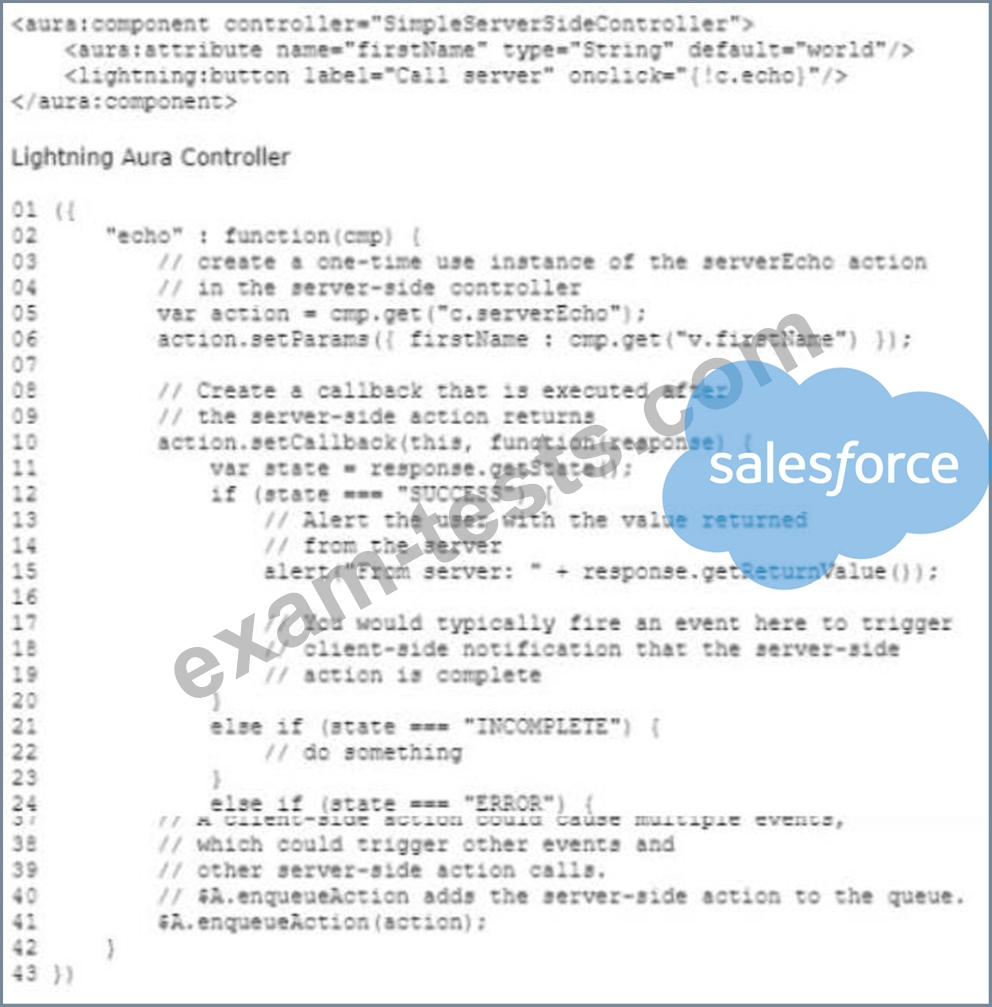
Lightning Aura Component Given the code above, which two changes need to be made in the Apex Controller for the code to work' Choose 2 answers
Correct Answer: B,C
Question 43
How could a developer create a Visualforce page for a Multilanguage organization? Choose 2 answers
Correct Answer: A,B
Question 44
What is a best practice when unit testing a controller? Choose 2 answers
Correct Answer: A,D
Question 45
Which three actions must be completed in a Lightning web component for a JavaScript file In a static resource to be loaded? Choose 3 answers
Correct Answer: A,C,D
The three actions that must be completed in a Lightning web component for a JavaScript file in a static resource to be loaded are to import the static resource, call loadScript, and import a method from the platformResourceLoader. Importing the static resource allows the developer to reference the JavaScript file by name, and use the @salesforce/resourceUrl annotation to assign the URL of the file to a property. Calling loadScript allows the developer to load the JavaScript file dynamically, and use a callback function to handle the success or failure of the loading. Importing a method from the platformResourceLoader allows the developer to use the loadScript method, which is a utility method that is part of the platformResourceLoader module. Referencing the static resource in a <script> tag will not work, as the <script> tag is not supported in the Lightning web component template, and it will not load the JavaScript file. Appending the static resource to the DOM will not work, as it is not a valid way to load a JavaScript file in a Lightning web component, and it will not execute the code in the file. Reference: [Use Third-Party JavaScript Libraries], [Lightning Web Components Developer Guide]