

Question 166
Note: This question is part of a series of questions that present the same scenario. Each question in the series contains a unique solution that might meet the stated goals. Some question sets might have more than one correct solution, while others might not have a correct solution.
After you answer a question in this section, you will NOT be able to return to it. As a result, these questions will not appear in the review screen.
You are creating a canvas app that displays a list of accounts.
Users must be able to select an account and view details for the account. The app must include a feature that brings the user back to the list of accounts.
You add a blank screen named Screen_Accounts and add a gallery named Gallery_Accounts to the screen.
You set the data source of Gallery_Accounts to Accounts and add another blank screen named Screen_AccountDetail.
You need to complete the app.
Solution:
* Add a display form to Screen_AccountDetail.
* Set the OnSelect property of Gallery_Accounts to Navigate(Screen_AccountDetail).
* Set the data source of the form to Accounts.
* Set the Item property of the form to Selected.
* Add a back icon on Screen_AccountDetail and set its OnSelect property to Navigate(Screen_Accounts).
Does the solution meet the goal?
After you answer a question in this section, you will NOT be able to return to it. As a result, these questions will not appear in the review screen.
You are creating a canvas app that displays a list of accounts.
Users must be able to select an account and view details for the account. The app must include a feature that brings the user back to the list of accounts.
You add a blank screen named Screen_Accounts and add a gallery named Gallery_Accounts to the screen.
You set the data source of Gallery_Accounts to Accounts and add another blank screen named Screen_AccountDetail.
You need to complete the app.
Solution:
* Add a display form to Screen_AccountDetail.
* Set the OnSelect property of Gallery_Accounts to Navigate(Screen_AccountDetail).
* Set the data source of the form to Accounts.
* Set the Item property of the form to Selected.
* Add a back icon on Screen_AccountDetail and set its OnSelect property to Navigate(Screen_Accounts).
Does the solution meet the goal?
Question 167
You are creating entities in a Common Data Service database to capture sales data.
You create an entity named Sales that includes the following fields:
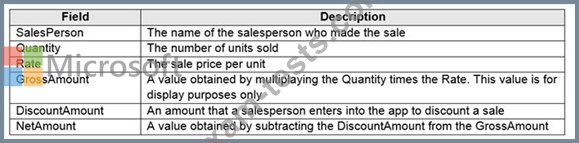
You create a new entity that includes a field named TotalSales. The field is used to capture the aggregated sales for each salesperson.
You need to configure the fields for the entities.
Which field types should you use? To answer, drag the appropriate field types to the correct field names. Each field type may be used once, more than once, or not at all. You may need to drag the split bar between panes or scroll to view content.
NOTE: Each correct selection is worth one point.

You create an entity named Sales that includes the following fields:
You create a new entity that includes a field named TotalSales. The field is used to capture the aggregated sales for each salesperson.
You need to configure the fields for the entities.
Which field types should you use? To answer, drag the appropriate field types to the correct field names. Each field type may be used once, more than once, or not at all. You may need to drag the split bar between panes or scroll to view content.
NOTE: Each correct selection is worth one point.

Question 168
You create a canvas app for a service company.
Using the Tree view, you navigate to the ViewServices screen. The screen contains a form named DetailForm1 that only contains Label controls. You add the People icon to the header of the ViewServices screen as shown below:
When you select the icon a new Activity form opens. You must set the value of the Name field on the new Activity form to the value of the name field from DetailForm1.
Use the drop-down menus to select the answer choice that answers each question based on the information presented in the graphic.
NOTE: Each correct selection is worth one point.

Using the Tree view, you navigate to the ViewServices screen. The screen contains a form named DetailForm1 that only contains Label controls. You add the People icon to the header of the ViewServices screen as shown below:
When you select the icon a new Activity form opens. You must set the value of the Name field on the new Activity form to the value of the name field from DetailForm1.
Use the drop-down menus to select the answer choice that answers each question based on the information presented in the graphic.
NOTE: Each correct selection is worth one point.

Question 169
Note: This question is part of a series of questions that present the same scenario. Each question in the series contains a unique solution that might meet the stated goals. Some question sets might have more than one correct solution, while others might not have a correct solution.
After you answer a question in this section, you will NOT be able to return to it. As a result, these questions will not appear in the review screen.
You are creating a canvas app.
You need to automatically detect bicycles in pictures taken with the camera.
Proposed solution:
* Create an Object Detection custom model in AI Builder.
* Train the model with pictures of bicycles and then publish the trained model.
* Add the Object Detector control to your canvas app.
Does the solution meet the goal?
After you answer a question in this section, you will NOT be able to return to it. As a result, these questions will not appear in the review screen.
You are creating a canvas app.
You need to automatically detect bicycles in pictures taken with the camera.
Proposed solution:
* Create an Object Detection custom model in AI Builder.
* Train the model with pictures of bicycles and then publish the trained model.
* Add the Object Detector control to your canvas app.
Does the solution meet the goal?
Question 170
You need to configure the app to meet the requirements.
Which object properties should you configure? To answer, select the appropriate options in the answer area.
NOTE: Each correct selection is worth one point.

Which object properties should you configure? To answer, select the appropriate options in the answer area.
NOTE: Each correct selection is worth one point.
