

Question 16
You create a custom field on the Account entity.
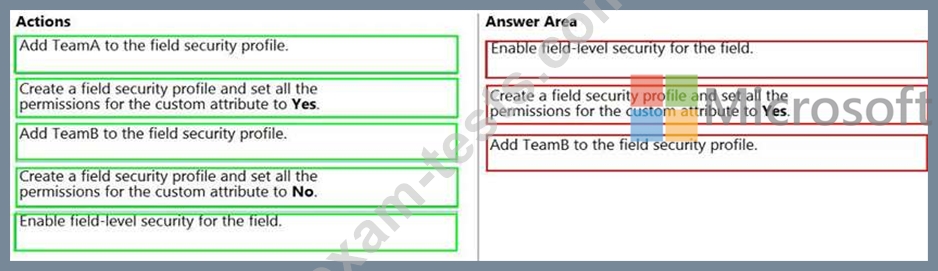
Members of TeamA must have full access to the field. Members of TeamB must have no access to the field.
You need to configure security.
Which three actions should you perform in sequence? To answer, move the appropriate actions from the list of actions to the answer area and arrange them in the correct order.

Members of TeamA must have full access to the field. Members of TeamB must have no access to the field.
You need to configure security.
Which three actions should you perform in sequence? To answer, move the appropriate actions from the list of actions to the answer area and arrange them in the correct order.
Question 17
You need to configure the app to meet the requirements.
Which object properties should you configure? To answer, select the appropriate options in the answer area.
NOTE: Each correct selection is worth one point.
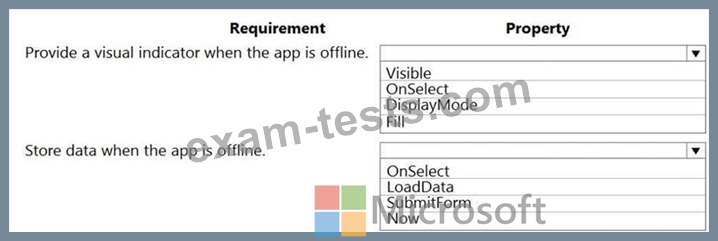
Which object properties should you configure? To answer, select the appropriate options in the answer area.
NOTE: Each correct selection is worth one point.

Question 18
Note: This question is part of a series of questions that present the same scenario. Each question in the series contains a unique solution that might meet the stated goals. Some question sets might have more than one correct solution, while others might not have a correct solution.
After you answer a question in this section, you will NOT be able to return to it. As a result, these questions will not appear in the review screen.
You build a canvas app for a manufacturing company. The company receives parts and materials from many vendors. You create a form to collect information from packing slips.
Receivers must be able to take a picture of packing slips to receive materials instead of manually entering data in the app.
You need to ensure that users can scan packing slip information into the form.
Proposed solution: Use a Category classification model.
Does the solution meet the goal?
After you answer a question in this section, you will NOT be able to return to it. As a result, these questions will not appear in the review screen.
You build a canvas app for a manufacturing company. The company receives parts and materials from many vendors. You create a form to collect information from packing slips.
Receivers must be able to take a picture of packing slips to receive materials instead of manually entering data in the app.
You need to ensure that users can scan packing slip information into the form.
Proposed solution: Use a Category classification model.
Does the solution meet the goal?

Question 19
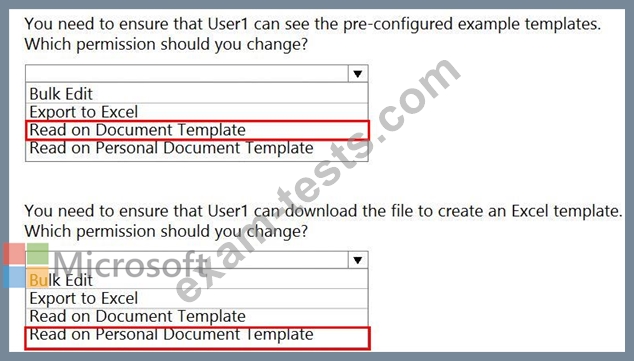
You are configuring security to enable users to analyze data by using Microsoft Excel templates.
You create a security role named TemplateAdministrator and configure the role as shown below and assign the role to a user named User1.

Use the drop-down menus to select the answer choice that answers each question based on the information presented in the graphic.
NOTE: Each correct selection is worth one point.
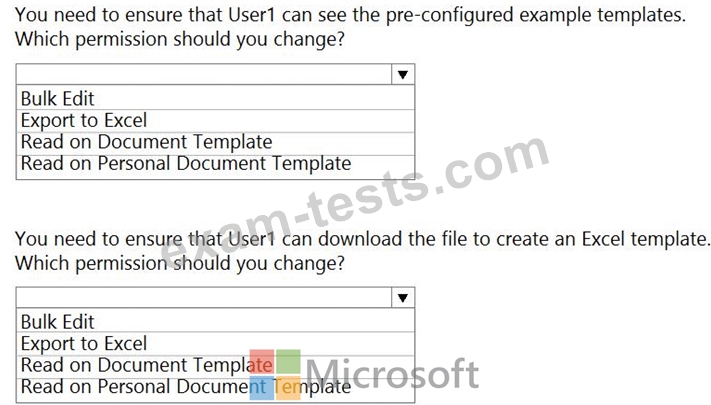
You create a security role named TemplateAdministrator and configure the role as shown below and assign the role to a user named User1.
Use the drop-down menus to select the answer choice that answers each question based on the information presented in the graphic.
NOTE: Each correct selection is worth one point.
Question 20
You create a canvas app for a store.
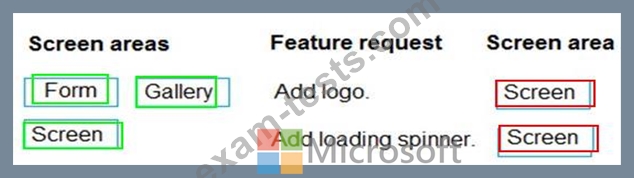
The logo must appear as the background image for the app. A loading spinner must display on the screen as the app loads.
You need to add the features to the app.
What should you modify? To answer, drag the appropriate form areas to the correct requests. Each form area may be used once, more than once, or not at all. You may need to drag the split bar between panes or scroll to view content.
NOTE: Each correct selection is worth one point.
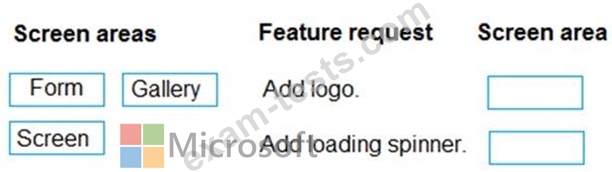
The logo must appear as the background image for the app. A loading spinner must display on the screen as the app loads.
You need to add the features to the app.
What should you modify? To answer, drag the appropriate form areas to the correct requests. Each form area may be used once, more than once, or not at all. You may need to drag the split bar between panes or scroll to view content.
NOTE: Each correct selection is worth one point.
Premium Bundle
Newest PL-100 Exam PDF Dumps shared by BraindumpsPass.com for Helping Passing PL-100 Exam! BraindumpsPass.com now offer the updated PL-100 exam dumps, the BraindumpsPass.com PL-100 exam questions have been updated and answers have been corrected get the latest BraindumpsPass.com PL-100 pdf dumps with Exam Engine here: