Question 46
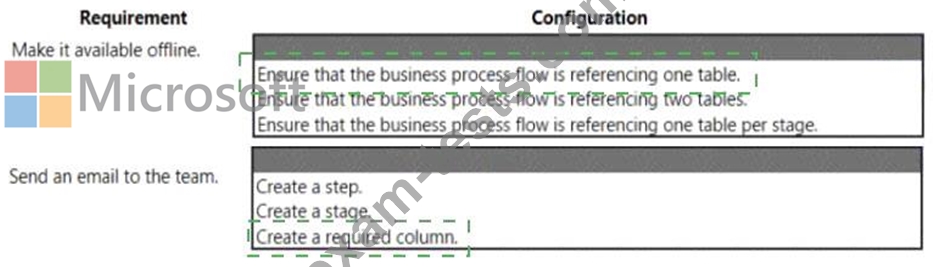
You are creating a business process flow for a Power Apps app.
The business process flow must meet the following requirements:
* Must be available offline.
* Send an email to the team when a record is created.
You need to set up business process flow.
What should you do? To answer, select the appropriate options in the answer area.
Each correct selection is worth one point

The business process flow must meet the following requirements:
* Must be available offline.
* Send an email to the team when a record is created.
You need to set up business process flow.
What should you do? To answer, select the appropriate options in the answer area.
Each correct selection is worth one point

Question 47
A company has a portal. Users sign into the portal by using a social media account.
The company wants to replace the existing portal with a Power Apps portal. users must sign up for access to the portal by using a Microsoft account and a unique invitation code that will be provided to the users.
You need to configure authentication for the home page.
Which values should you use? To answer, drag the appropriate values to the appropriate authentication settings. Each value may be used once, more than once, or not at all. You may need to drag the split bar between panes or scroll to view content.
NOTE: Each correct selection is worth one point.

The company wants to replace the existing portal with a Power Apps portal. users must sign up for access to the portal by using a Microsoft account and a unique invitation code that will be provided to the users.
You need to configure authentication for the home page.
Which values should you use? To answer, drag the appropriate values to the appropriate authentication settings. Each value may be used once, more than once, or not at all. You may need to drag the split bar between panes or scroll to view content.
NOTE: Each correct selection is worth one point.

Question 48
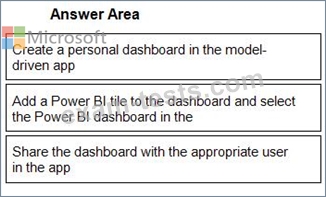
You create a report by using Power Bl Desktop and publish the report to the Power Bl service. You enable Power Bl visualization embedding in a model-driven app.
You need to configure the model-driven app to display a Power Bi tile
Which four actions should you perform in sequence? To answer, move the appropriate actions from the list of actions to the answer area and arrange them in the correct order.

You need to configure the model-driven app to display a Power Bi tile
Which four actions should you perform in sequence? To answer, move the appropriate actions from the list of actions to the answer area and arrange them in the correct order.
Question 49
You create a Power Virtual Agents chatbot to reduce the number of incoming support calls that require a live person.
The chatbot does not direct users to the correct information. You determine that this is because the chatbot is not able to identify which product a user is referring to in a conversation.
You need to present a list of products so that users can select the correct product.
What should you create?
The chatbot does not direct users to the correct information. You determine that this is because the chatbot is not able to identify which product a user is referring to in a conversation.
You need to present a list of products so that users can select the correct product.
What should you create?
Question 50
You are a Dynamics 365 Customer Service developer.
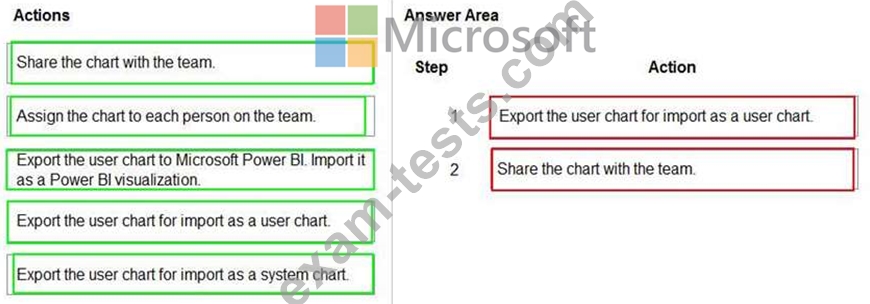
A salesperson creates a chart.
You need to ensure that the chart is available to all users on the team.
Which actions should the salesperson perform? To answer, drag the appropriate actions to the correct users. Each action may be used once, more than once, or not at all. You may need to drag the split bar between panes or scroll to view content.
NOTE: Each correct selection is worth one point.
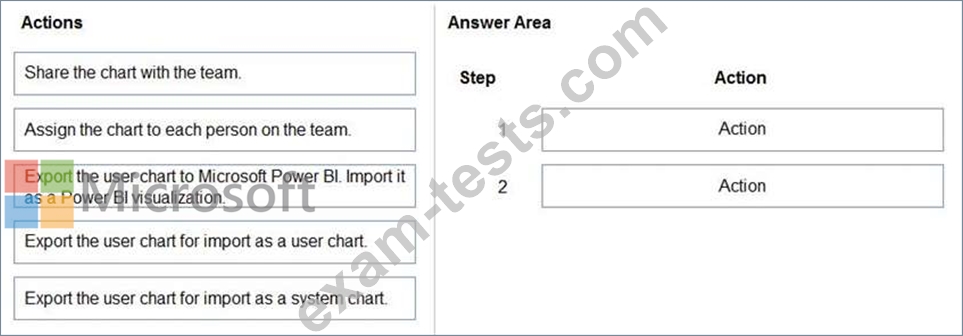
A salesperson creates a chart.
You need to ensure that the chart is available to all users on the team.
Which actions should the salesperson perform? To answer, drag the appropriate actions to the correct users. Each action may be used once, more than once, or not at all. You may need to drag the split bar between panes or scroll to view content.
NOTE: Each correct selection is worth one point.