

Question 31
You have a Power 31 data model that contains a table named Stores. The table has the following columns:
* Store Name
* Open Date
* Status
* State
* City
You need to create a calculated column named Active Store Name that meets the following requirements
* Store Name
* Open Date
* Status
* State
* City
You need to create a calculated column named Active Store Name that meets the following requirements

Question 32
You have a report in Power BI Desktop.
You add a key influencers visual as shown in the exhibit. (Click the Exhibit tab.)
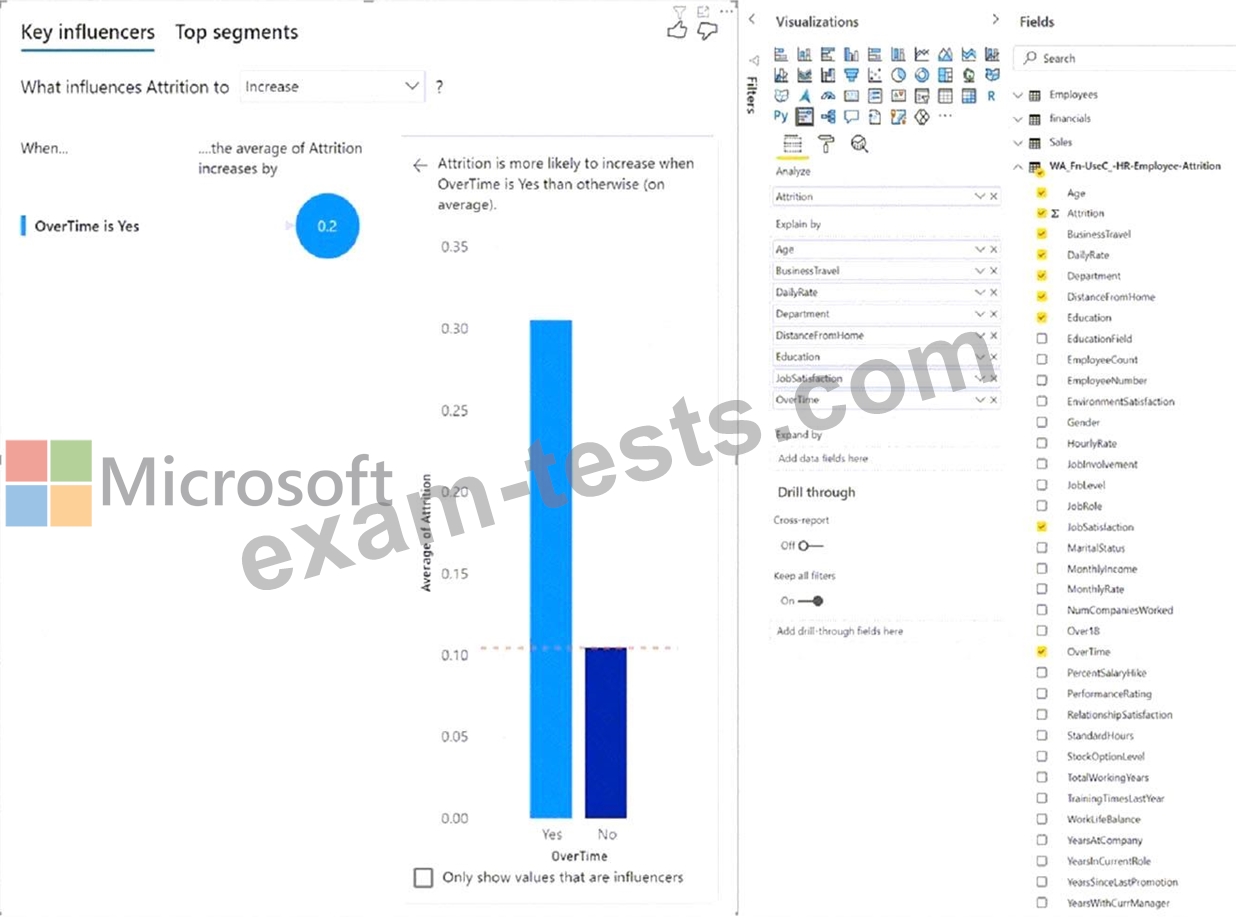
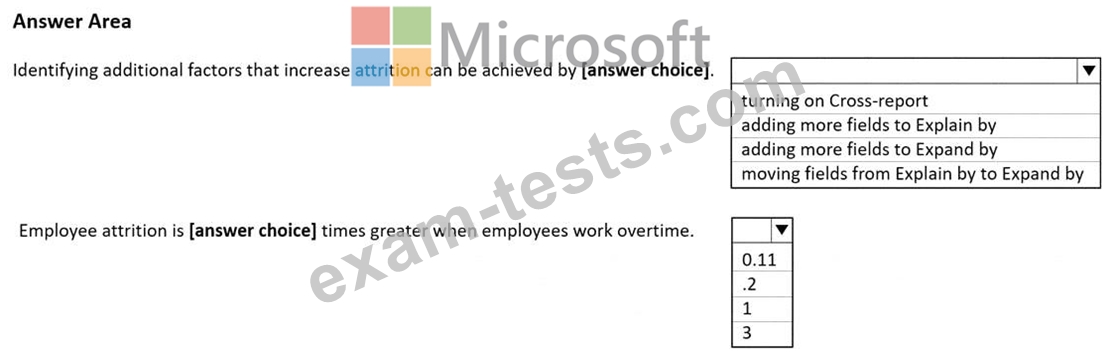
Use the drop-down menus to select the answer choice that completes each statement based on the information presented in the graphic.
NOTE: Each correct selection is worth one point.
You add a key influencers visual as shown in the exhibit. (Click the Exhibit tab.)
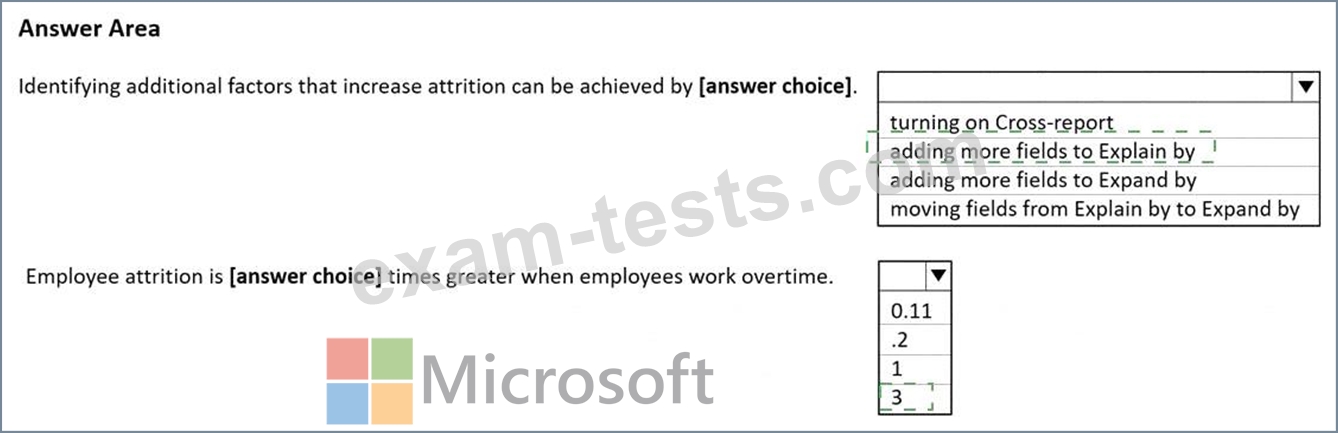
Use the drop-down menus to select the answer choice that completes each statement based on the information presented in the graphic.
NOTE: Each correct selection is worth one point.
Question 33
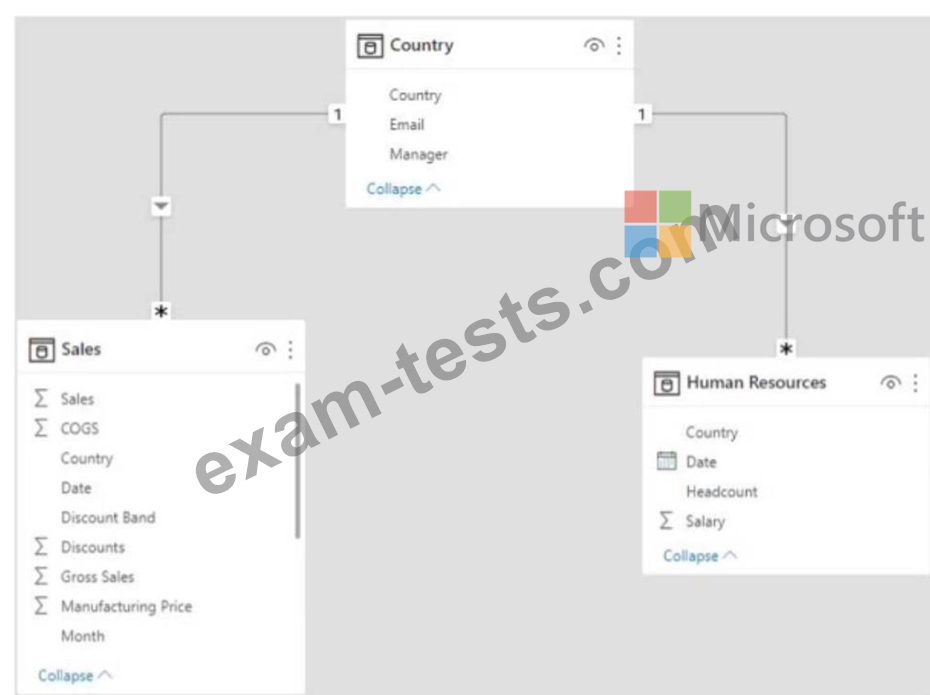
You have the Power Bl data model shown in the following exhibit.
You create two row-level security (RlS) roles named Manager and CFO.
You plan to publish the dataset to the Power Bl service.
You need to create DAX expressions for the RLS filters. The solution must meet the following requirements:
* Each manager must see only the data in the Sales and Human Resources tables for their own country.
* The CFO must be prevented from seeing the data in the Human Resources table.
* The CFO must see the sales data of all countries.
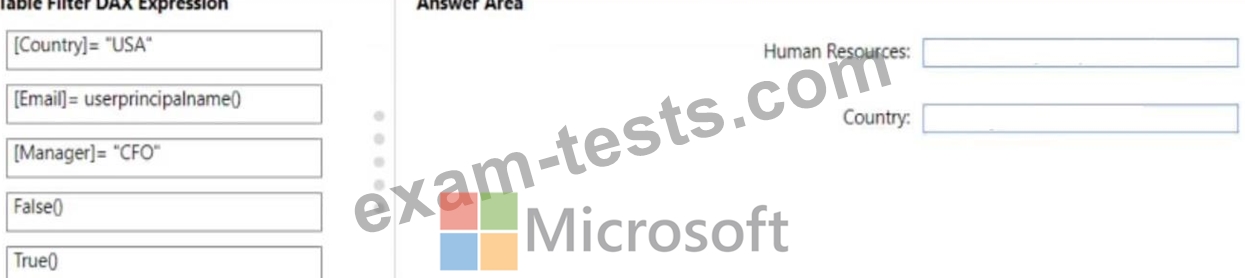
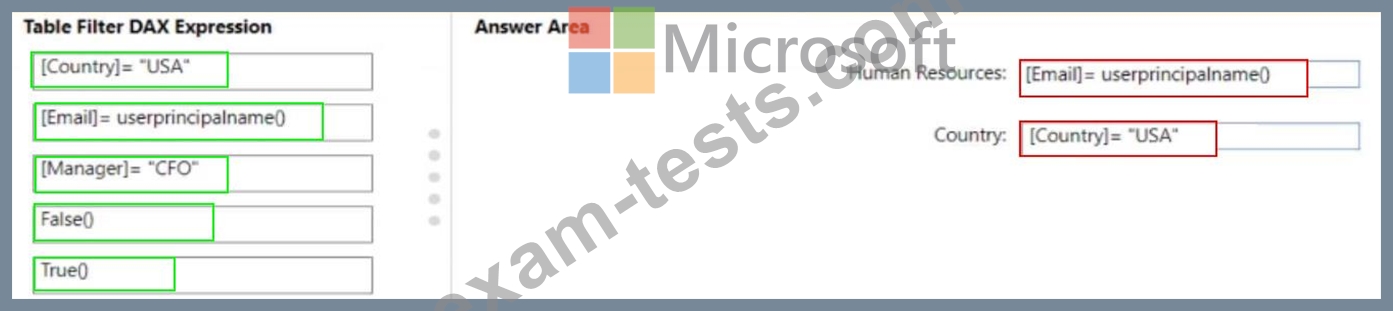
How should you complete the DAX expressions to meet the requirements? To answer, drag the appropriate expressions to the correct targets. Each expression may be used once, more than once, or not at all. You may need to drag the split bar between panes or scroll to view content.
NOTE: Each correct selection is worth one point.
The Country table contains the following data.
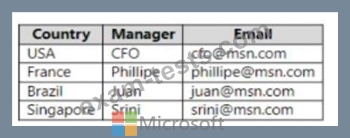
You plan to publish the dataset to the Power Bl service.
You need to create DAX expressions for the RLS filters. The solution must meet the following requirements:
* Each manager must see only the data in the Sales and Human Resources tables for their own country.
* The CFO must be prevented from seeing the data in the Human Resources table.
* The CFO must see the sales data of all countries.
How should you complete the DAX expressions to meet the requirements? To answer, drag the appropriate expressions to the correct targets. Each expression may be used once, more than once, or not at all. You may need to drag the split bar between panes or scroll to view content.
NOTE: Each correct selection is worth one point.
You create two row-level security (RlS) roles named Manager and CFO.
You plan to publish the dataset to the Power Bl service.
You need to create DAX expressions for the RLS filters. The solution must meet the following requirements:
* Each manager must see only the data in the Sales and Human Resources tables for their own country.
* The CFO must be prevented from seeing the data in the Human Resources table.
* The CFO must see the sales data of all countries.
How should you complete the DAX expressions to meet the requirements? To answer, drag the appropriate expressions to the correct targets. Each expression may be used once, more than once, or not at all. You may need to drag the split bar between panes or scroll to view content.
NOTE: Each correct selection is worth one point.
The Country table contains the following data.
You plan to publish the dataset to the Power Bl service.
You need to create DAX expressions for the RLS filters. The solution must meet the following requirements:
* Each manager must see only the data in the Sales and Human Resources tables for their own country.
* The CFO must be prevented from seeing the data in the Human Resources table.
* The CFO must see the sales data of all countries.
How should you complete the DAX expressions to meet the requirements? To answer, drag the appropriate expressions to the correct targets. Each expression may be used once, more than once, or not at all. You may need to drag the split bar between panes or scroll to view content.
NOTE: Each correct selection is worth one point.
Question 34
You have a folder of monthly transaction extracts.
You plan to create a report to analyze the transaction data.
You receive the following email message: "Hi. I've put 24 files of monthly transaction data onto the shared drive. File Transactions201901.csv through Transactions201912.csv have the latest set of columns, but files Transactions201801.csv to Transactions201812.csv have an older layout without the extra fields needed for analysis. Each file contains 10 to 50 transactions." You get data from the folder and select Combine & Load. The Combine Files dialog box is shown in the exhibit. (Click the Exhibit tab.)
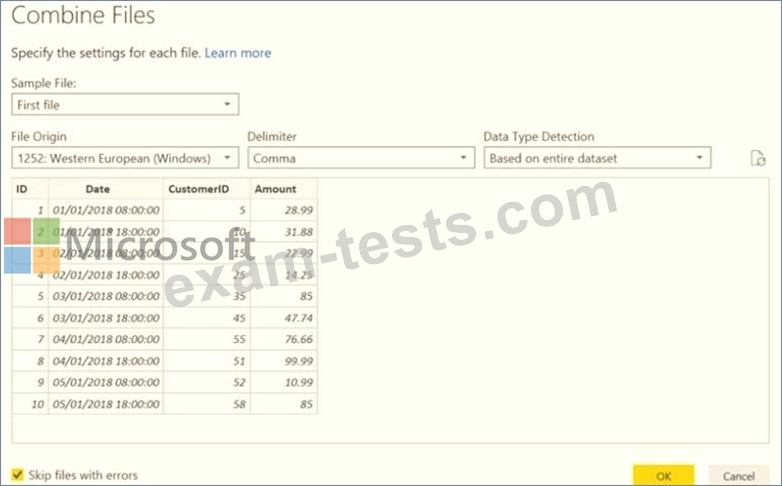
For each of the following statements, select Yes if the statement is true. Otherwise, select No.
NOTE: Each correct selection is worth one point.

You plan to create a report to analyze the transaction data.
You receive the following email message: "Hi. I've put 24 files of monthly transaction data onto the shared drive. File Transactions201901.csv through Transactions201912.csv have the latest set of columns, but files Transactions201801.csv to Transactions201812.csv have an older layout without the extra fields needed for analysis. Each file contains 10 to 50 transactions." You get data from the folder and select Combine & Load. The Combine Files dialog box is shown in the exhibit. (Click the Exhibit tab.)
For each of the following statements, select Yes if the statement is true. Otherwise, select No.
NOTE: Each correct selection is worth one point.

Question 35
You build a report to help the sales team understand its performance and the drivers of sales. The team needs to have a single visualization to identify which factors affect success. Which type of visualization should you use?