Question 26
You create a Power Platform solution to track purchasing requirements for bills of material (BOMs) and their subcomponents.
The solution must meet the following requirements:
Ensure that the BOMs are enabled to include the necessary subcomponents.
Report changes to the BOMs or their sub-components that are made by engineers.
You need to configure the solution.
What should you do to meet each requirement? To answer, select the appropriate options in the answer area.
NOTE: Each correct selection is worth one point.

The solution must meet the following requirements:
Ensure that the BOMs are enabled to include the necessary subcomponents.
Report changes to the BOMs or their sub-components that are made by engineers.
You need to configure the solution.
What should you do to meet each requirement? To answer, select the appropriate options in the answer area.
NOTE: Each correct selection is worth one point.

Question 27
You have the following JavaScript function: (Line numbers are included for reference only.)

The Annual Revenue view column is configured to call the function as shown in the Column Properties exhibit. (Click the Change Column Properties tab.)
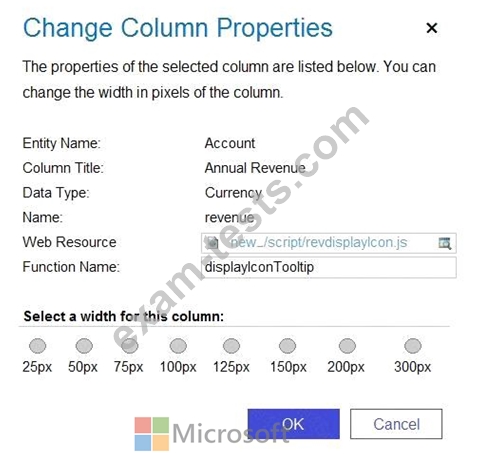
Users report that the icons that appear in the Active Account view are incorrect, as shown in the Active Accounts View exhibit. (Click the Active Accounts View tab.)

You need to determine why the incorrect icons are being displayed.
For each of the following statements, select Yes if the statement is true. Otherwise, select No.
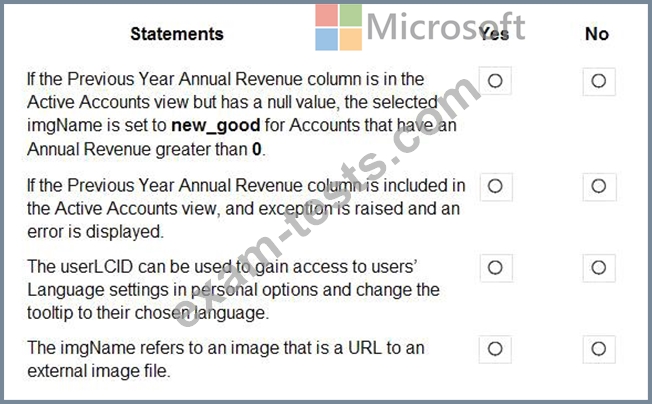
The Annual Revenue view column is configured to call the function as shown in the Column Properties exhibit. (Click the Change Column Properties tab.)
Users report that the icons that appear in the Active Account view are incorrect, as shown in the Active Accounts View exhibit. (Click the Active Accounts View tab.)
You need to determine why the incorrect icons are being displayed.
For each of the following statements, select Yes if the statement is true. Otherwise, select No.


Question 28
You need to improve warehouse counting efficiency.
What should you create?
What should you create?
Question 29
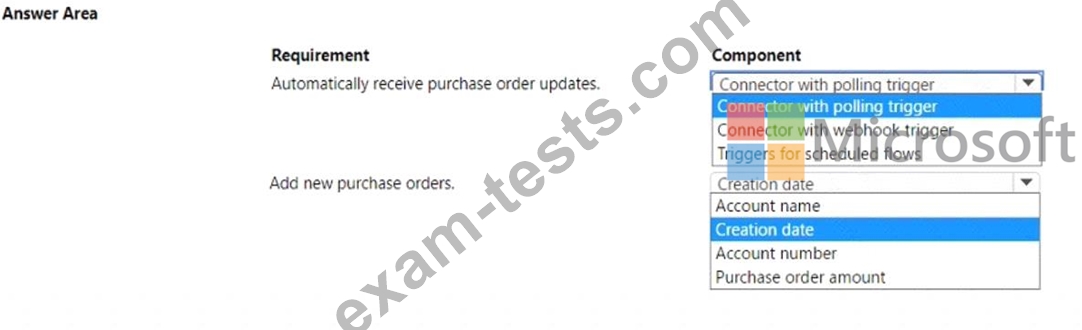
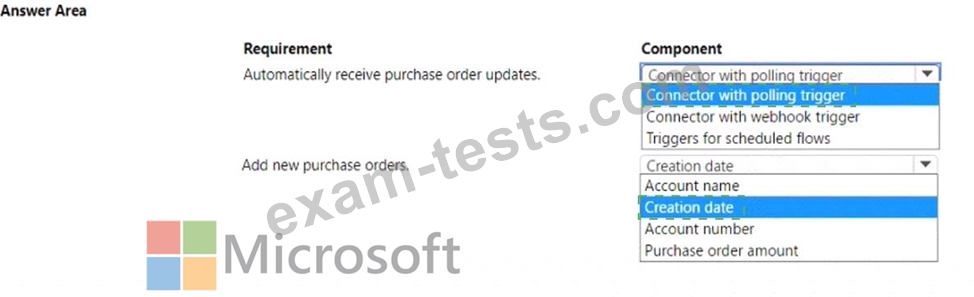
You are developing a model-driven app by using Microsoft Power Platform. The app must perform the following functions:
* Automatically receive updates from a purchase order system.
* Only add new purchase orders.
You need to implement the app.
Which components should you use? To answer, select the appropriate options in the answer area.
NOTE: Each correct selection is worth one point
* Automatically receive updates from a purchase order system.
* Only add new purchase orders.
You need to implement the app.
Which components should you use? To answer, select the appropriate options in the answer area.
NOTE: Each correct selection is worth one point

Question 30
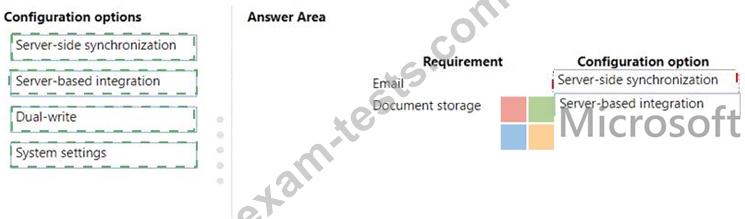
A company uses Microsoft 365. You are developing a model-driven app.
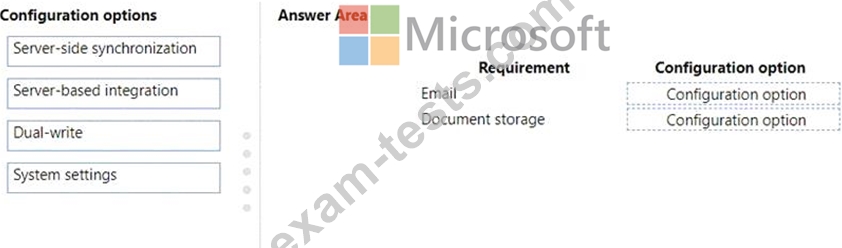
The app must meet the following requirements:
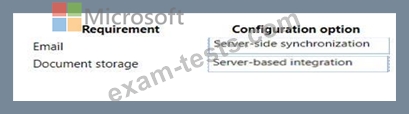
* Use SharePoint Online for document storage.
* Send emails by using Exchange Online.
You need to configure integrations.
What should you configure? To answer, drag the appropriate configuration options to the correct requirements.
Each configuration option may be used once, more than once, or not at all. You may need to drag the split bar between panes or scroll to view content.
NOTE: Each correct selection is worth one point.
The app must meet the following requirements:
* Use SharePoint Online for document storage.
* Send emails by using Exchange Online.
You need to configure integrations.
What should you configure? To answer, drag the appropriate configuration options to the correct requirements.
Each configuration option may be used once, more than once, or not at all. You may need to drag the split bar between panes or scroll to view content.
NOTE: Each correct selection is worth one point.