

Question 21
You need to create the test rule to meet the Azure Sentinel requirements.
What should you do when you create the rule?
What should you do when you create the rule?
Question 22
You have a suppression rule in Azure Security Center for 10 virtual machines that are used for testing. The virtual machines run Windows Server.
You are troubleshooting an issue on the virtual machines.
In Security Center, you need to view the alerts generated by the virtual machines during the last five days.
What should you do?
You are troubleshooting an issue on the virtual machines.
In Security Center, you need to view the alerts generated by the virtual machines during the last five days.
What should you do?
Question 23
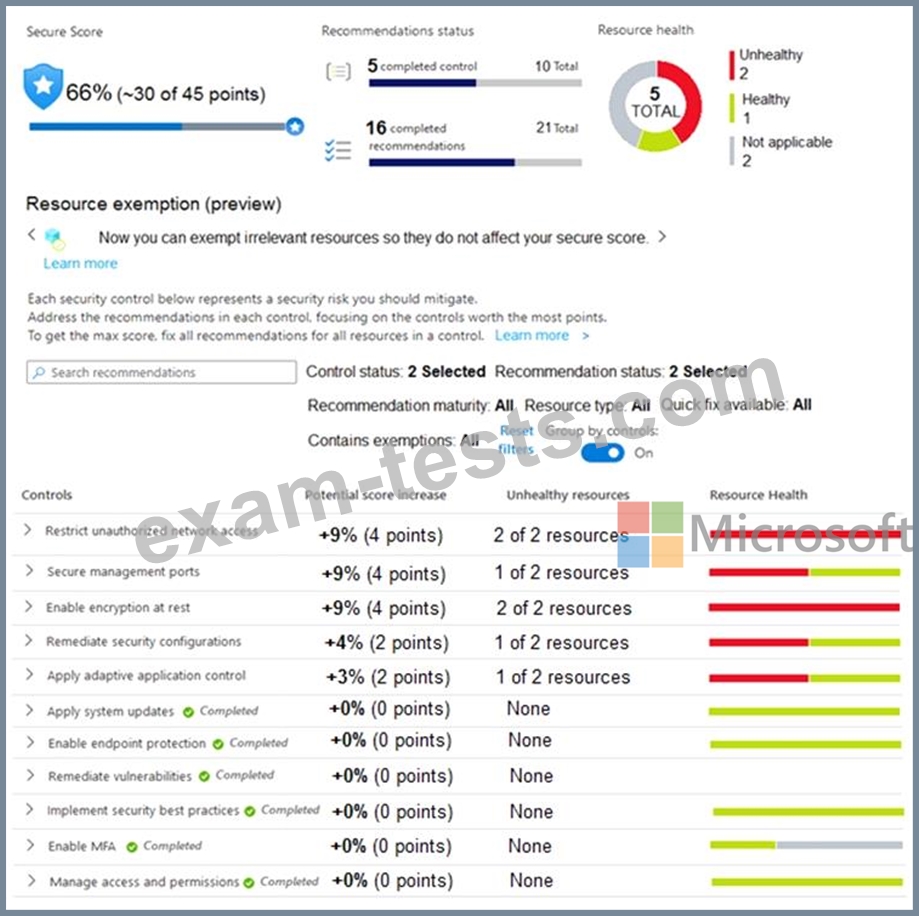
You manage the security posture of an Azure subscription that contains two virtual machines name vm1 and vm2.
The secure score in Azure Security Center is shown in the Security Center exhibit. (Click the Security Center tab.)
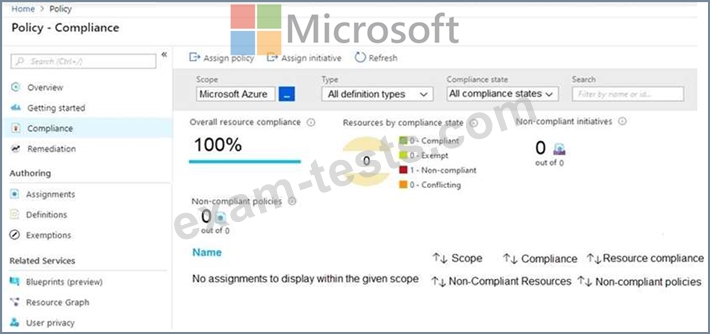
Azure Policy assignments are configured as shown in the Policies exhibit. (Click the Policies tab.)
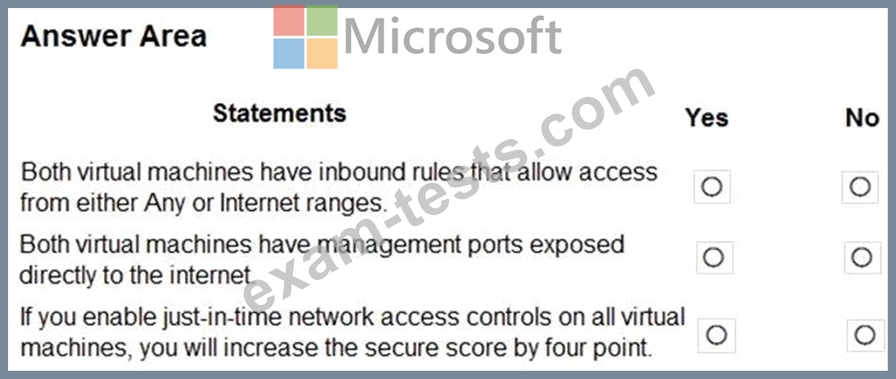
For each of the following statements, select Yes if the statement is true. Otherwise, select No.
NOTE: Each correct selection is worth one point.
The secure score in Azure Security Center is shown in the Security Center exhibit. (Click the Security Center tab.)
Azure Policy assignments are configured as shown in the Policies exhibit. (Click the Policies tab.)
For each of the following statements, select Yes if the statement is true. Otherwise, select No.
NOTE: Each correct selection is worth one point.

Question 24
You implement Safe Attachments policies in Microsoft Defender for Office 365.
Users report that email messages containing attachments take longer than expected to be received.
You need to reduce the amount of time it takes to deliver messages that contain attachments without compromising security. The attachments must be scanned for malware, and any messages that contain malware must be blocked.
What should you configure in the Safe Attachments policies?
Users report that email messages containing attachments take longer than expected to be received.
You need to reduce the amount of time it takes to deliver messages that contain attachments without compromising security. The attachments must be scanned for malware, and any messages that contain malware must be blocked.
What should you configure in the Safe Attachments policies?
Question 25
Note: This question is part of a series of questions that present the same scenario. Each question in the series contains a unique solution that might meet the stated goals. Some question sets might have more than one correct solution, while others might not have a correct solution.
After you answer a question in this section, you will NOT be able to return to it. As a result, these questions will not appear in the review screen.
You use Azure Security Center.
You receive a security alert in Security Center.
You need to view recommendations to resolve the alert in Security Center.
Solution: From Security alerts, you select the alert, select Take Action, and then expand the Mitigate the threat section.
Does this meet the goal?
After you answer a question in this section, you will NOT be able to return to it. As a result, these questions will not appear in the review screen.
You use Azure Security Center.
You receive a security alert in Security Center.
You need to view recommendations to resolve the alert in Security Center.
Solution: From Security alerts, you select the alert, select Take Action, and then expand the Mitigate the threat section.
Does this meet the goal?

