

Question 86
You have an Azure Active Directory (Azure AD) tenant that has multi-factor authentication (MFA) enabled.
The account lockout settings are configured as shown in the following exhibit.
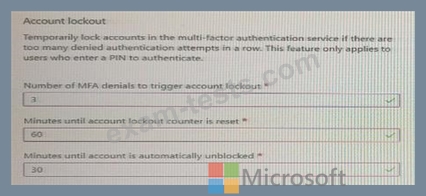
Use the drop-down menus to select the answer choice that completes each statement based on the information presented in the graphic.
NOTE: Each correct selection is worth one point.

The account lockout settings are configured as shown in the following exhibit.
Use the drop-down menus to select the answer choice that completes each statement based on the information presented in the graphic.
NOTE: Each correct selection is worth one point.

Question 87
You have an Azure subscription.
Azure AD logs are sent to a Log Analytics workspace.
You need to query the logs and graphically display the number of sign-ins per user.
How should you complete the query? To answer, select the appropriate options in the answer area.

Azure AD logs are sent to a Log Analytics workspace.
You need to query the logs and graphically display the number of sign-ins per user.
How should you complete the query? To answer, select the appropriate options in the answer area.

Question 88
Your company has an Azure Active Directory (Azure AD) tenant named contoso.com. The company has a business partner named Fabrikam, Inc.
Fabrikam uses Azure AD and has two verified domain names of fabrikam.com and litwareinc.com. Both domain names are used for Fabrikam email addresses.
You plan to create an access package named package1 that will be accessible only to the users at Fabrikam.
You create a connected organization for Fabrikam.
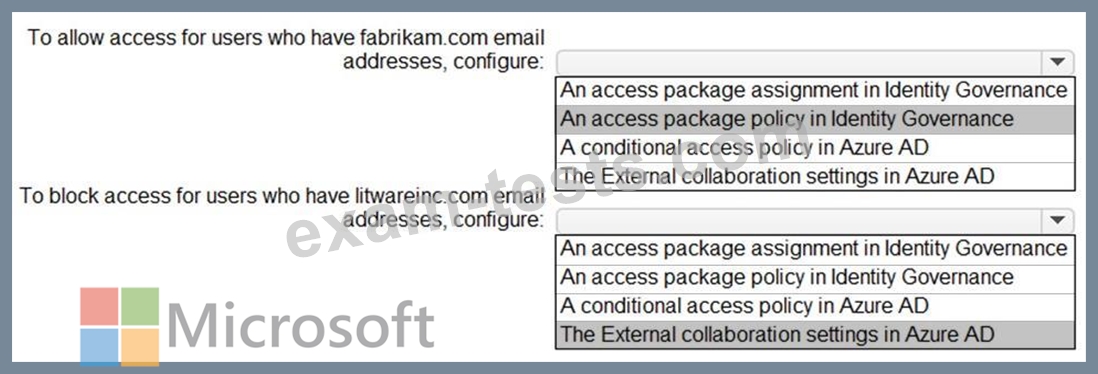
You need to ensure that the package1 will be accessible only to users who have fabrikam.com email addresses.
What should you do? To answer, select the appropriate options in the answer area.
NOTE: Each correct selection is worth one point.

Fabrikam uses Azure AD and has two verified domain names of fabrikam.com and litwareinc.com. Both domain names are used for Fabrikam email addresses.
You plan to create an access package named package1 that will be accessible only to the users at Fabrikam.
You create a connected organization for Fabrikam.
You need to ensure that the package1 will be accessible only to users who have fabrikam.com email addresses.
What should you do? To answer, select the appropriate options in the answer area.
NOTE: Each correct selection is worth one point.

Question 89
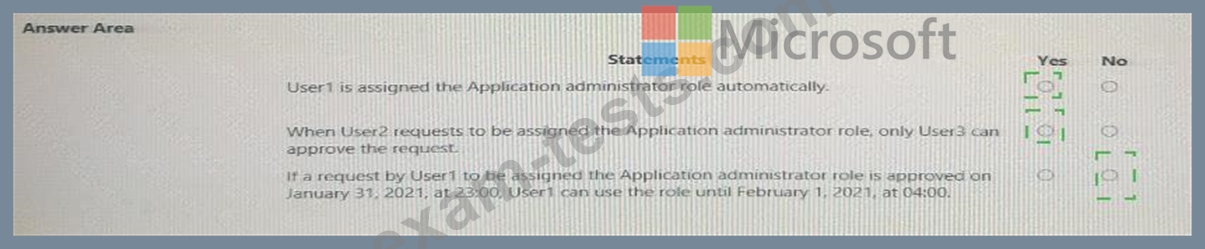
You have an Azure Active Directory (Azure AD) tenant that contains three users named User1, User1, and User3, You create a group named Group1. You add User2 and User3 to Group1.
You configure a role in Azure AD Privileged identity Management (PIM) as shown in the application administrator exhibit. (Click the application Administrator tab.)
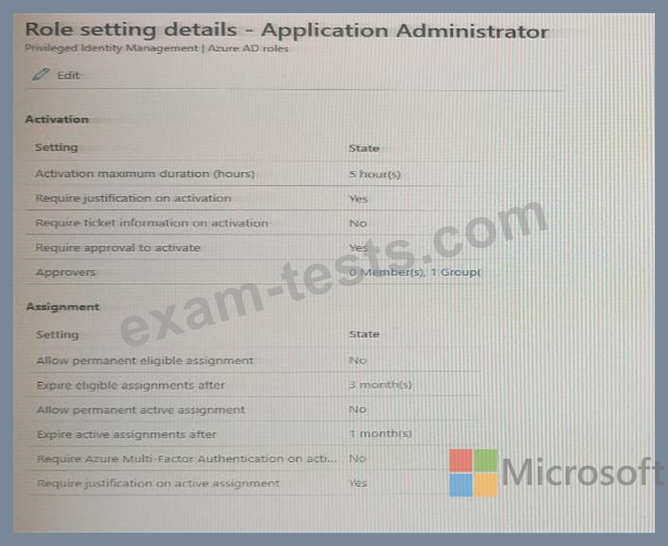
Group1 is configured as the approver for the application administrator role.
You configure User2to be eligible for the application administrator role.
For User1, you add an assignment to the Application administrator role as shown in the Assignment exhibit.
(Click Assignment tab)

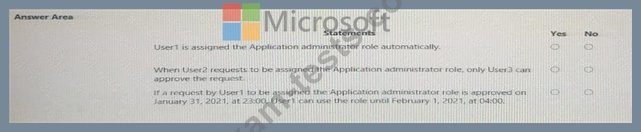
For each of the following statement, select Yes if the statement is true, Otherwise, select No.
NOTE: Each correct selection is worth one point.
You configure a role in Azure AD Privileged identity Management (PIM) as shown in the application administrator exhibit. (Click the application Administrator tab.)
Group1 is configured as the approver for the application administrator role.
You configure User2to be eligible for the application administrator role.
For User1, you add an assignment to the Application administrator role as shown in the Assignment exhibit.
(Click Assignment tab)
For each of the following statement, select Yes if the statement is true, Otherwise, select No.
NOTE: Each correct selection is worth one point.
Question 90
You have a Microsoft 365 tenant.
The Azure Active Directory (Azure AD) tenant contains the groups shown in the following table.

In Azure AD. you add a new enterprise application named Appl. Which groups can you assign to App1?
The Azure Active Directory (Azure AD) tenant contains the groups shown in the following table.
In Azure AD. you add a new enterprise application named Appl. Which groups can you assign to App1?