

Question 146
You have a Microsoft 365 tenant that contains a group named Group1 as shown in the Group1 exhibit. (Click the Group1 tab.)

You create an enterprise application named App1 as shown in the App1 Properties exhibit. (Click the App1 Properties tab.)

You configure self-service for App1 as shown in the App1 Self-service exhibit. (Click the App1 Self-service tab.)

For each of the following statements, select Yes if the statement is true. Otherwise, select No.
NOTE: Each correct selection is worth one point.

You create an enterprise application named App1 as shown in the App1 Properties exhibit. (Click the App1 Properties tab.)
You configure self-service for App1 as shown in the App1 Self-service exhibit. (Click the App1 Self-service tab.)
For each of the following statements, select Yes if the statement is true. Otherwise, select No.
NOTE: Each correct selection is worth one point.

Question 147
You have an Azure subscription that contains the resources shown in the following table.
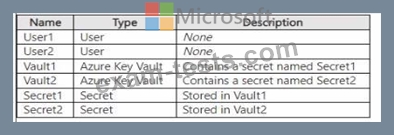
The subscription uses Privileged Identity Management (PIM).
You need to configure the following access controls by using PIM:
* Ensure that User1 can read and update Secret1.
* Ensure that User2 can read the contents of the secrets stored in Vault2.
The solution must follow the principle of least privilege.
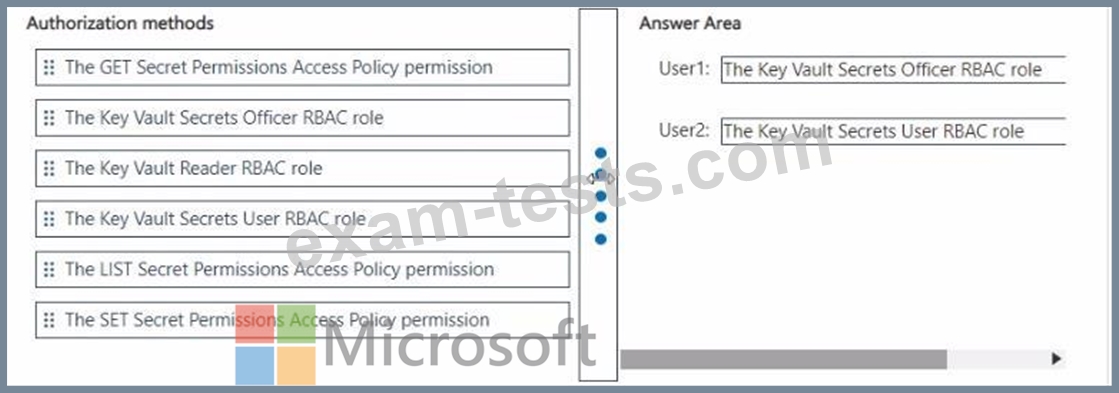
Which authorization method should you use for each user? To answer, drag the appropriate authorization methods to the correct users. Each authorization method may be used once, more than once, or not at all. You may need to drag the split bar between panes or scroll to view content.
NOTE: Each correct selection is worth one point.

The subscription uses Privileged Identity Management (PIM).
You need to configure the following access controls by using PIM:
* Ensure that User1 can read and update Secret1.
* Ensure that User2 can read the contents of the secrets stored in Vault2.
The solution must follow the principle of least privilege.
Which authorization method should you use for each user? To answer, drag the appropriate authorization methods to the correct users. Each authorization method may be used once, more than once, or not at all. You may need to drag the split bar between panes or scroll to view content.
NOTE: Each correct selection is worth one point.

Question 148
Task 8
You need to prevent all users from using legacy authentication protocols when authenticating to Microsoft Entra ID.
You need to prevent all users from using legacy authentication protocols when authenticating to Microsoft Entra ID.
Question 149
You have an on-premises Microsoft Exchange organization that uses an SMTP address space of contoso.com.
You discover that users use their email address for self-service sign-up to Microsoft 365 services.
You need to gain global administrator privileges to the Azure Active Directory (Azure AD) tenant that contains the self-signed users.
Which four actions should you perform in sequence? To answer, move the appropriate actions from the list of actions to the answer area and arrange them in the correct order.

You discover that users use their email address for self-service sign-up to Microsoft 365 services.
You need to gain global administrator privileges to the Azure Active Directory (Azure AD) tenant that contains the self-signed users.
Which four actions should you perform in sequence? To answer, move the appropriate actions from the list of actions to the answer area and arrange them in the correct order.


Question 150
You have a Microsoft Entra tenant that contains the users shown in the following table.

You have a user risk policy that has the following settings:
* Assignments:
o Include: Group1
o Exclude: Group2
* Sign-in risk Medium and above
* Access controls:
o Grant access: Require password change
When the users attempt to sign in. user risk levels are detected as shown in the following table.

For each of the following statements, select Yes if the statement is true. Otherwise, select No.

You have a user risk policy that has the following settings:
* Assignments:
o Include: Group1
o Exclude: Group2
* Sign-in risk Medium and above
* Access controls:
o Grant access: Require password change
When the users attempt to sign in. user risk levels are detected as shown in the following table.
For each of the following statements, select Yes if the statement is true. Otherwise, select No.

