

Question 96
SIMULATION
Use the following login credentials as needed:
To enter your username, place your cursor in the Sign in box and click on the username below.
To enter your password, place your cursor in the Enter password box and click on the password below.
Microsoft 365 Username:[email protected]
Microsoft 365 Password: =1122334455667788
If the Microsoft 365 portal does not load successfully in the browser, press CTRL-K to reload the portal in a new browser tab.
The following information is for technical support purposes only:
Lab Instance: 99999999
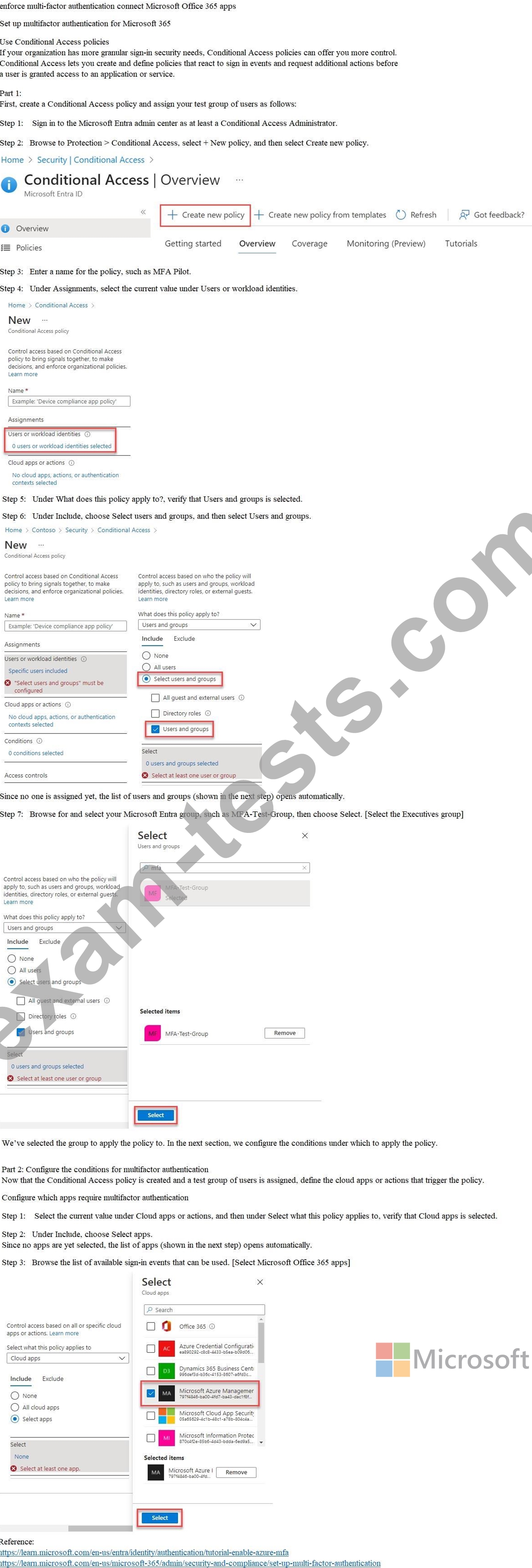
You need to enforce multi-factor authentication (MFA) for users in the Executives group when they connect to Microsoft Office 365 apps. The solution must affect only the users in the Executives group.
To complete this task, sign in to the appropriate admin center.
Use the following login credentials as needed:
To enter your username, place your cursor in the Sign in box and click on the username below.
To enter your password, place your cursor in the Enter password box and click on the password below.
Microsoft 365 Username:[email protected]
Microsoft 365 Password: =1122334455667788
If the Microsoft 365 portal does not load successfully in the browser, press CTRL-K to reload the portal in a new browser tab.
The following information is for technical support purposes only:
Lab Instance: 99999999
You need to enforce multi-factor authentication (MFA) for users in the Executives group when they connect to Microsoft Office 365 apps. The solution must affect only the users in the Executives group.
To complete this task, sign in to the appropriate admin center.
Question 97
You have an Azure Active Directory (Azure AD) tenant that contains the users shown in, the following table.

The User settings for enterprise applications have the following configurations:
- Users can consent to apps accessing company data on their behalf: No
- Users can consent to apps accessing company data for the groups they own: No
- Users can request admin consent to apps they are unable to consent to: Yes
- Who can review admin consent requests: Admin2, User2
User1 attempts, to add an app that requires consent to access company data.
Which user can provide consent?
The User settings for enterprise applications have the following configurations:
- Users can consent to apps accessing company data on their behalf: No
- Users can consent to apps accessing company data for the groups they own: No
- Users can request admin consent to apps they are unable to consent to: Yes
- Who can review admin consent requests: Admin2, User2
User1 attempts, to add an app that requires consent to access company data.
Which user can provide consent?
Question 98
Your company has an Azure Active Directory (Azure AD) tenant named contoso.com. The company has a business partner named Fabrikam, Inc.
Fabrikam uses Azure AD and has two verified domain names of fabrikam.com and litwareinc.com. Both domain names are used for Fabrikam email addresses.
You plan to create an access package named package1 that will be accessible only to the users at Fabrikam.
You create a connected organization for Fabrikam.
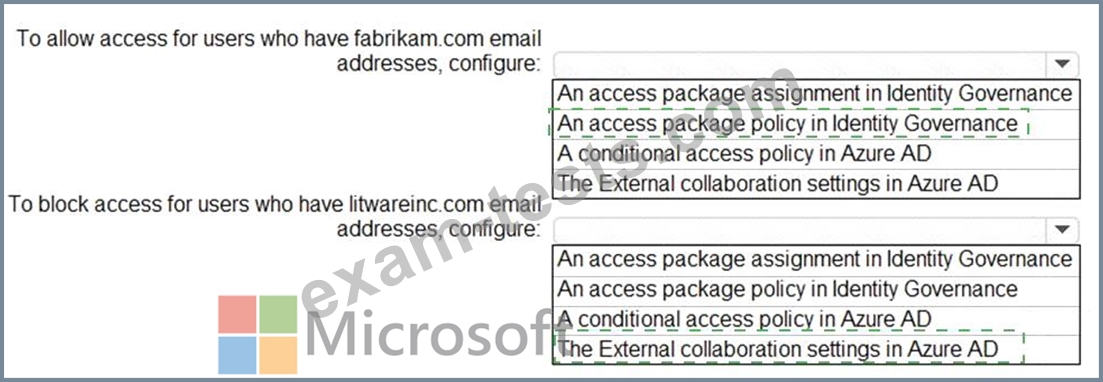
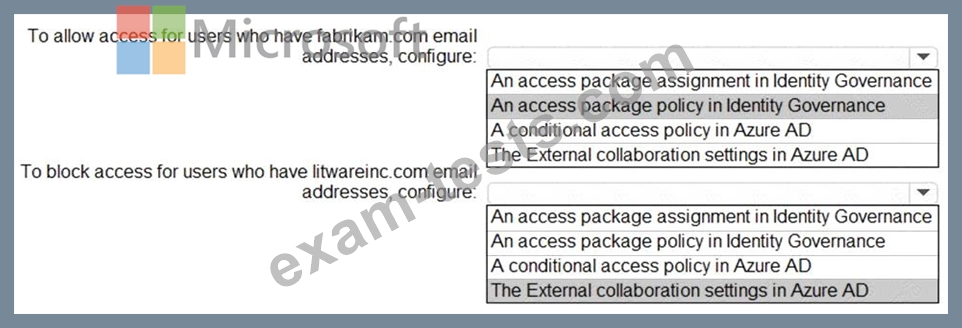
You need to ensure that the package1 will be accessible only to users who have fabrikam.com email addresses.
What should you do? To answer, select the appropriate options in the answer area.
NOTE: Each correct selection is worth one point.

Fabrikam uses Azure AD and has two verified domain names of fabrikam.com and litwareinc.com. Both domain names are used for Fabrikam email addresses.
You plan to create an access package named package1 that will be accessible only to the users at Fabrikam.
You create a connected organization for Fabrikam.
You need to ensure that the package1 will be accessible only to users who have fabrikam.com email addresses.
What should you do? To answer, select the appropriate options in the answer area.
NOTE: Each correct selection is worth one point.
Question 99
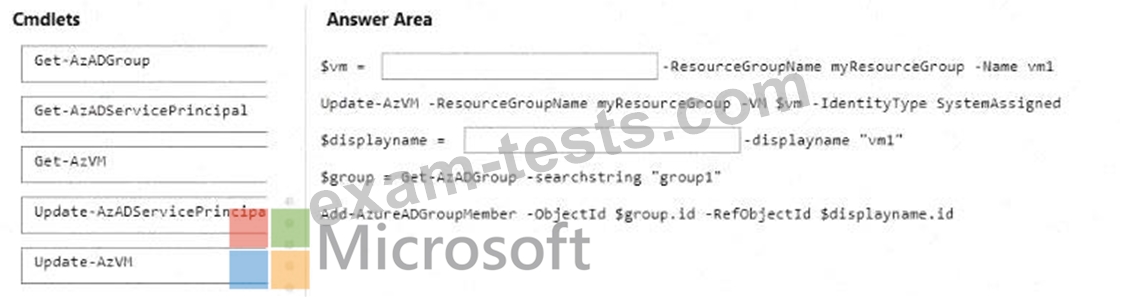
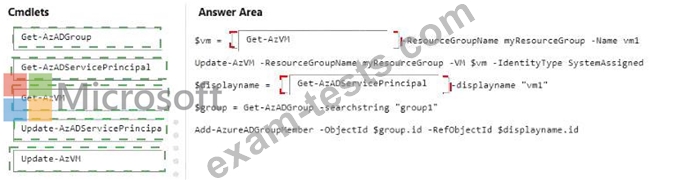
You have an Azure subscription that is linked to a Microsoft Entra tenant named contoso.com. The subscription contains a group named Group1 and a virtual machine named VM1.
You need to meet the following requirements:
* Enable a system-assigned managed identity for VM1.
* AddVM1 to Group1.
How should you complete the PowerShell script? To answer, drag the appropriate cmdlets to the correct targets. Each cmdlet may be used once, more than once, or not at all. You may need to drag the split bar between panes or scroll to view content.
NOTE: Each correct selection is worth one point.
You need to meet the following requirements:
* Enable a system-assigned managed identity for VM1.
* AddVM1 to Group1.
How should you complete the PowerShell script? To answer, drag the appropriate cmdlets to the correct targets. Each cmdlet may be used once, more than once, or not at all. You may need to drag the split bar between panes or scroll to view content.
NOTE: Each correct selection is worth one point.

Question 100
You have an Azure subscription that contains the users shown in the following table.
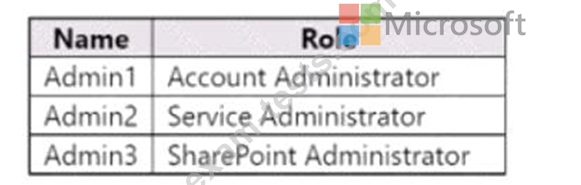
You need to implement Azure AD Privileged Identity Management (PIM).
Which users can use PIM to activate their role permissions?
You need to implement Azure AD Privileged Identity Management (PIM).
Which users can use PIM to activate their role permissions?