

Question 281
You have a Microsoft 365 tenant.
All users have mobile phones and Windows 10 laptops.
The users frequently work from remote locations that do not have Wi-Fi access or mobile phone connectivity. While working from the remote locations, the users connect their laptop to a wired network that has internet access.
You plan to implement multi-factor authentication (MFA).
Which MFA authentication method can the users use from the remote location?
All users have mobile phones and Windows 10 laptops.
The users frequently work from remote locations that do not have Wi-Fi access or mobile phone connectivity. While working from the remote locations, the users connect their laptop to a wired network that has internet access.
You plan to implement multi-factor authentication (MFA).
Which MFA authentication method can the users use from the remote location?
Question 282
You have an Azure AD tenant that contains a user named Admin1.
Admin1 uses the Require password change for high-risk user's policy template to create a new Conditional Access policy.
Who is included and excluded by default in the policy assignment? To answer, drag the appropriate options to the correct target. Each option may be used once, more than once, or not at all. You may need to drag the split bar between panes or scroll to view content.
NOTE: Each correct selection is worth one point.

Admin1 uses the Require password change for high-risk user's policy template to create a new Conditional Access policy.
Who is included and excluded by default in the policy assignment? To answer, drag the appropriate options to the correct target. Each option may be used once, more than once, or not at all. You may need to drag the split bar between panes or scroll to view content.
NOTE: Each correct selection is worth one point.


Question 283
You have an Azure Active Directory (Azure AD) tenant.
You create an enterprise application collection named HR Apps that has the following settings:
* Applications: Appl. App?, App3
* Owners: Admin 1
* Users and groups: HRUsers
AH three apps have the following Properties settings:
* Enabled for users to sign in: Yes
* User assignment required: Yes
* Visible to users: Yes
Users report that when they go to the My Apps portal, they only sue App1 and App2-You need to ensure that the users can also see App3. What should you do from App3?
What should you do from App3?
You create an enterprise application collection named HR Apps that has the following settings:
* Applications: Appl. App?, App3
* Owners: Admin 1
* Users and groups: HRUsers
AH three apps have the following Properties settings:
* Enabled for users to sign in: Yes
* User assignment required: Yes
* Visible to users: Yes
Users report that when they go to the My Apps portal, they only sue App1 and App2-You need to ensure that the users can also see App3. What should you do from App3?
What should you do from App3?
Question 284
Note: This question is part of a series of questions that present the same scenario. Each question in the series contains a unique solution that might meet the stated goals. Some question sets might have more than one correct solution, while others might not have a correct solution.
After you answer a question in this section, you will NOT be able to return to it. As a result, these questions will not appear in the review screen.
You have a Microsoft 365 tenant.
All users must use the Microsoft Authenticator app for multi-factor authentication (MFA) when accessing Microsoft 365 services.
Some users report that they received an MFA prompt on their Microsoft Authenticator app without initiating a sign-in request.
You need to block the users automatically when they report an MFA request that they did not initiate.
Solution: From the Azure portal, you configure the Notifications settings for multi-factor authentication (MFA).
Does this meet the goal?
After you answer a question in this section, you will NOT be able to return to it. As a result, these questions will not appear in the review screen.
You have a Microsoft 365 tenant.
All users must use the Microsoft Authenticator app for multi-factor authentication (MFA) when accessing Microsoft 365 services.
Some users report that they received an MFA prompt on their Microsoft Authenticator app without initiating a sign-in request.
You need to block the users automatically when they report an MFA request that they did not initiate.
Solution: From the Azure portal, you configure the Notifications settings for multi-factor authentication (MFA).
Does this meet the goal?
Question 285
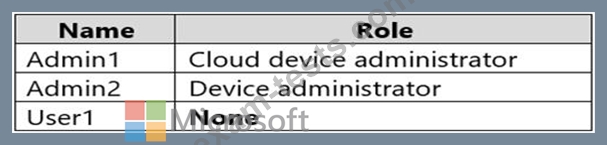
You have an Azure Active Directory (Azure AD) tenant that has an Azure Active Directory Premium Plan 2 license. The tenant contains the users shown in the following table.
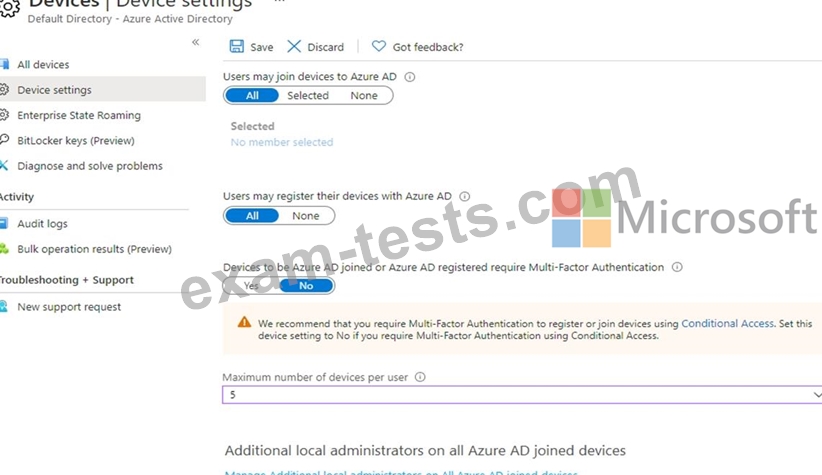
You have the Device Settings shown in the following exhibit.
User1 has the devices shown in the following table.
For each of the following statements, select Yes if the statement is true. Otherwise, select No.
NOTE: Each correct selection is worth one point.

You have the Device Settings shown in the following exhibit.
User1 has the devices shown in the following table.
For each of the following statements, select Yes if the statement is true. Otherwise, select No.
NOTE: Each correct selection is worth one point.
