

Question 31
You plan to implement a sensitive information type based on a trainable classifier. The sensitive information type will identify employment contracts.
You need to copy the required files to Microsoft SharePoint Online folders to train the classifier.
What should you use to seed content and test the classifier? To answer, select the appropriate options in the answer area.
NOTE: Each correct selection is worth one point.

You need to copy the required files to Microsoft SharePoint Online folders to train the classifier.
What should you use to seed content and test the classifier? To answer, select the appropriate options in the answer area.
NOTE: Each correct selection is worth one point.

Question 32
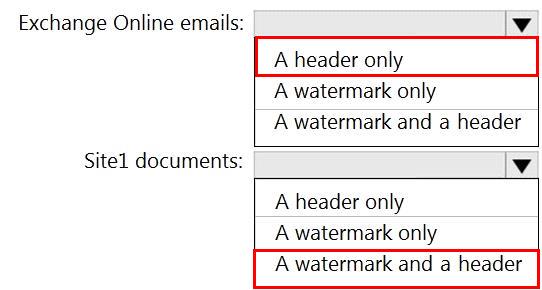
You have a Microsoft SharePoint Online site named Site1 and a sensitivity label named Sensitivity1. Sensitivity1 adds a watermark and a header to content.
You create a policy to automatically apply Sensitivity1 to emails in Microsoft Exchange Online and Site1.
How will Sensitivity1 mark matching emails and Site1 documents? To answer, select the appropriate options in the answer area.
NOTE: Each correct selection is worth one point.

You create a policy to automatically apply Sensitivity1 to emails in Microsoft Exchange Online and Site1.
How will Sensitivity1 mark matching emails and Site1 documents? To answer, select the appropriate options in the answer area.
NOTE: Each correct selection is worth one point.
Question 33
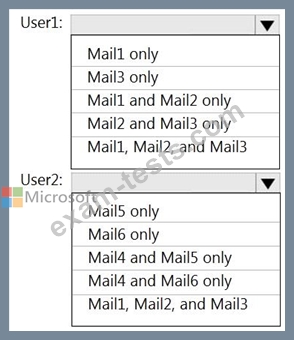
You have a Microsoft 365 tenant named contoso.com that contains two users named User1 and User2. The tenant uses Microsoft Office 365 Message Encryption (OME).
User1 plans to send emails that contain attachments as shown in the following table.

User2 plans to send emails that contain attachments as shown in the following table.

For which emails will the attachments be protected? To answer, select the appropriate options in the answer area.
NOTE: Each correct selection is worth one point.
User1 plans to send emails that contain attachments as shown in the following table.
User2 plans to send emails that contain attachments as shown in the following table.
For which emails will the attachments be protected? To answer, select the appropriate options in the answer area.
NOTE: Each correct selection is worth one point.

Question 34
You have a Microsoft 365 tenant that contains a Microsoft SharePoint Online site named Site1.
You have the users shown in the following table.

You create a data loss prevention (DLP) policy for Site1 that detects credit card number information. You configure the policy to use the following protection action:
When content matches the policy conditions, show policy tips to users and send them an email notification.
You use the default notification settings.
To Site1, User1 uploads a file that contains a credit card number.
Which users receive an email notification?
You have the users shown in the following table.
You create a data loss prevention (DLP) policy for Site1 that detects credit card number information. You configure the policy to use the following protection action:
When content matches the policy conditions, show policy tips to users and send them an email notification.
You use the default notification settings.
To Site1, User1 uploads a file that contains a credit card number.
Which users receive an email notification?
Question 35
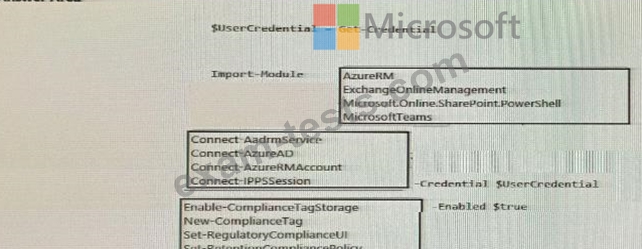
While creating a retention label, you discover that the following options are missing:
* Mark items as a record
* Mark items are a regular record
You need to ensure that the options are available when you create label in the Microsoft 365 compliance center.
How should you complete the PowerShell script? To answer, select the appropriate options in the answer area.
NOTE: Each correct selection is worth one point.
* Mark items as a record
* Mark items are a regular record
You need to ensure that the options are available when you create label in the Microsoft 365 compliance center.
How should you complete the PowerShell script? To answer, select the appropriate options in the answer area.
NOTE: Each correct selection is worth one point.
