Which of the following statements describes calculated fields?
Correct Answer: A
Question 112
Which of the following statements describes POST workflow actions?
Correct Answer: B
Question 113
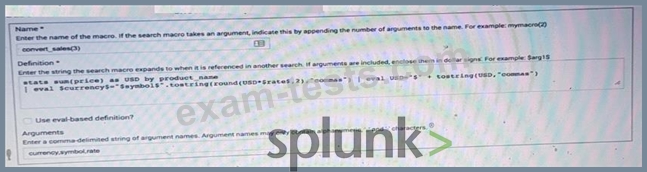
Based on the macro definition shown below, what is the correct way to execute the macro in a search string?
Correct Answer: C
Question 114
To identify all of the contributing events within a transaction that contains at least one REJECT event, which syntax is correct?
Correct Answer: B
Explanation The transaction command is used to group events that share a common value for one or more fields into transactions2. The transaction command assigns a transaction ID to each group of events and creates new fields such as duration, eventcount and eventlist for each transaction2. To identify all of the contributing events within a transaction that contains at least one REJECT event, you can use the following syntax: index=main | transaction sessionid | search REJECT2. This search will first group the events by sessionid, then filter out the transactions that do not contain REJECT in any of their events2. Therefore, option B is correct, while options A, C and D are incorrect because they do not follow the correct syntax for using the transaction command or the search command.
Question 115
Which of the following statements about tags is true? (select all that apply.)
Correct Answer: B,D
The following statements about tags are true: tags are based on field/value pairs and tags categorize events based on a search. Tags are custom labels that can be applied to fields or field values to provide additional context or meaning for your data. Tags can be used to filter or analyze your data based on common concepts or themes. Tags can be created by using various methods, such as search commands, configuration files, user interfaces, etc. Some of the characteristics of tags are: Tags are based on field/value pairs: This means that tags are associated with a specific field name and a specific field value. For example, you can create a tag called "alert" for the field name "status" and the field value "critical". This means that only events that have status=critical will have the "alert" tag applied to them. Tags categorize events based on a search: This means that tags are defined by a search string that matches the events that you want to tag. For example, you can create a tag called "web" for the search string sourcetype=access_combined. This means that only events that match the search string sourcetype=access_combined will have the "web" tag applied to them. The following statements about tags are false: tags are case-insensitive and tags are designed to make data more understandable. Tags are case-sensitive and tags are designed to make data more searchable. Tags are case-sensitive: This means that tags must match the exact case of the field name and field value that they are associated with. For example, if you create a tag called "alert" for the field name "status" and the field value "critical", it will not apply to events that have status=CRITICAL or Status=critical. Tags are designed to make data more searchable: This means that tags can help you find relevant events or patterns in your data by using common concepts or themes. For example, if you create a tag called "web" for the search string sourcetype=access_combined, you can use tag=web to find all events related to web activity.