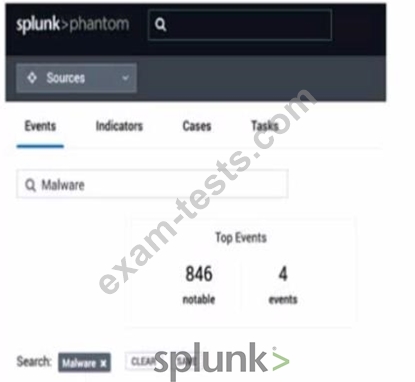
In this image, which container fields are searched for the text "Malware"?
Correct Answer: C
In the image provided, the search functionality within Splunk's Phantom Security Orchestration, Automation, and Response (SOAR) platform is shown. When you enter a search term like "Malware" in the search bar, Splunk Phantom will typically search through the container fields that are most relevant to identifying and categorizing events. Containers in Phantom are used to group related events, indicators, cases, and tasks. They contain various fields that can be searched through, such as the Event Name or ID, which are primary identifiers for a container. This search does not extend to fields such as Notes or Comments, which are ancillary text entries linked to an event or container. Artifact Names are part of the container's data structure but are not the primary search target in this context unless specifically configured to be included in the search scope.
Question 17
Which of the following are the steps required to complete a full backup of a Splunk Phantom deployment' Assume the commands are executed from /opt/phantom/bin and that no other backups have been made.
Correct Answer: B
The correct answer is B because the steps required to complete a full backup of a Splunk Phantom deployment are to first run the --backup --backup-type full command and then run the --setup command. The --backup command creates a backup file in the /opt/phantom/backup directory. The --backup-type full option specifies that the backup file includes all the data and configuration files of the Phantom server. The --setup command creates a configuration file that contains the encryption key and other information needed to restore the backup file. See Splunk SOAR Certified Automation Developer Track for more details. Performing a full backup of a Splunk Phantom deployment involves using the command-line interface, primarily because Phantom's architecture and data management processes are designed to be managed at the server level for comprehensive backup and recovery. The correct sequence involves initiating a full backup first using the --backup --backup-type full option to ensure all configurations, data, and necessary components are included in the backup. Following the completion of the backup, the --setup option might be used to configure or verify the backup settings, although typically, the setup would precede backup operations in practical scenarios. This process ensures that all aspects of the Phantom deployment are preserved, including configurations, playbooks, cases, and other data, which is crucial for disaster recovery and system migration.
Question 18
What is the main purpose of using a customized workbook?
Correct Answer: D
Question 19
An active playbook can be configured to operate on all containers that share which attribute?
Correct Answer: B
The correct answer is B because an active playbook can be configured to operate on all containers that share a label. A label is a user-defined attribute that can be applied to containers to group them by a common characteristic, such as source, type, severity, etc. Labels can be used to filter containers and trigger active playbooks based on the label value. See Splunk SOAR Documentation for more details. In Splunk SOAR, labels are used to categorize containers (such as incidents or events) based on their characteristics or the type of security issue they represent. An active playbook can be configured to trigger on all containers that share a specific label, enabling targeted automation based on the nature of the incident. This functionality allows for efficient and relevant playbook execution, ensuring that the automated response is tailored to the specific requirements of the container's category. Labels serve as a powerful organizational tool within SOAR, guiding the automated response framework to act on incidents that meet predefined criteria, thus streamlining the security operations process.
Question 20
Which app allows a user to run Splunk queries from within Phantom?
Correct Answer: C
The Phantom App for Splunk allows a user to run Splunk queries from within Phantom. This app provides actions such as run query, ingest events, and save search, which enable the user to interact with Splunk from Phantom playbooks or the Phantom UI. The other apps are not relevant for this use case. The Splunk App for Phantom is used to send data from Splunk to Phantom. The Integrated Splunk/Phantom app is a deprecated app that was replaced by the Splunk App for Phantom. The Splunk App for Phantom Reporting is used to generate reports on Phantom activity from Splunk. The Phantom App for Splunk is the application that enables Splunk users to run Splunk queries from within the Splunk Phantom platform. This app integrates Splunk's data and search capabilities into Phantom's security automation and orchestration framework, allowing users to perform actions such as running searches, creating events, and updating records in Splunk directly from Phantom.