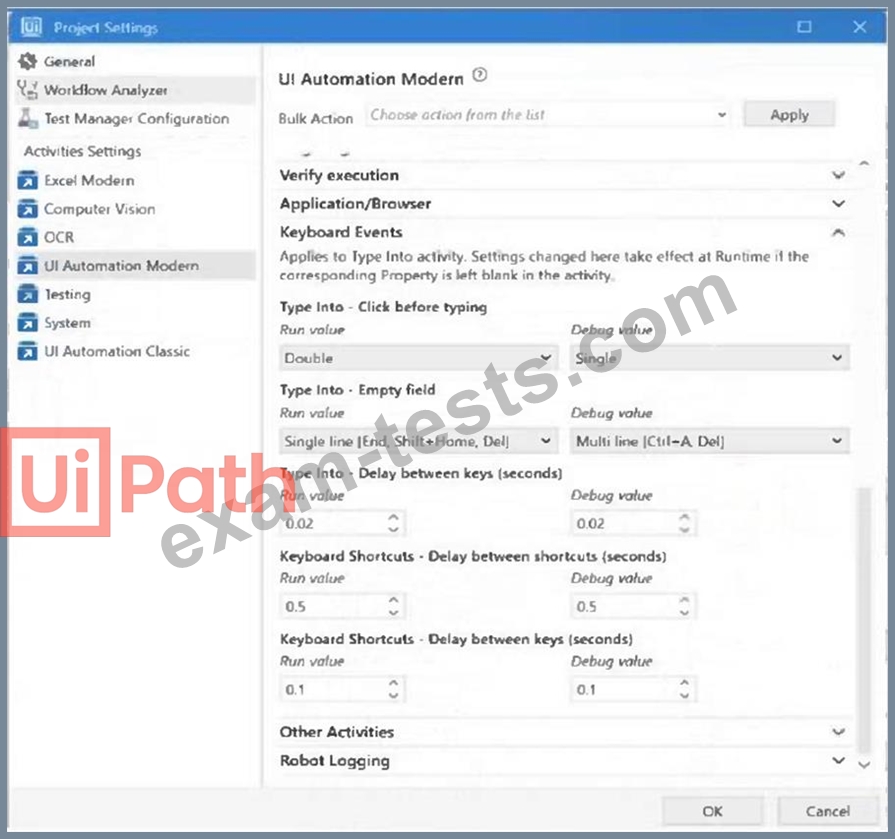
A developer is building an automation which types text into a text file. The Activity Project Settings tor UI Automation Modern activities are set as follows: The developer has configured the properties of a Type Into activity as follows: What is the behavior of the Type Into activity when executing the workflow?
Correct Answer: D
Question 87
Which of the following best describes the Alerts panel?
Correct Answer: B
The Alerts panel in UiPath is a feature designed to notify users about different types of alerts or events that occur within the UiPath ecosystem, especially within the Orchestrator. These can range from job failures, trigger notifications, to queue item alerts. The best description of the Alerts panel, considering typical functionality within such systems, would be: B: A panel that displays summaries of the alerts you subscribed to, received as error reports every ten minutes, or as daily reports. This option suggests that the Alerts panel provides a curated view of alerts based on subscriptions, which can be configured for error reports at specified intervals or for aggregate daily reports, making it a more proactive and user-specific feature. The other options either describe a panel with too broad a scope (A), suggest real-time alerting without the context of user subscriptions (C), or limit the display to only the most severe alerts without mention of subscription or reporting features (D).
Question 88
What is the purpose of credential stores in UiPath Orchestrator?
Correct Answer: C
The purpose of credential stores in UiPath Orchestrator is to securely store sensitive data such as Robot credentials and Credential Assets for use in automation processes. Credential stores are external services that provide encryption and protection for sensitive data. Orchestrator can integrate with various credential stores, such as CyberArk, Azure Key Vault, and HashiCorp Vault, and use them to store and retrieve the credentials for the Robots and the Credential Assets. Credential Assets are global variables that can store passwords, usernames, API keys, and other confidential information. By using credential stores, the developer can ensure that the sensitive data is not exposed or compromised, and that the automation processes can access the data securely and efficiently. References: [Credential Stores], [Credential Assets]
Question 89
When configuring the Max # of retries for the queue in Orchestrator to "1" for your process, and the queue has 5 transaction items. At runtime, the first transaction item throws a Business Rule Exception. How does the process proceed?
Correct Answer: B
A Business Rule Exception is a type of exception that indicates that the data or the input required for the automation process is incomplete or invalid1. For example, a Business Rule Exception can occur when a phone number is missing a digit, or when a mandatory field is left blank1. A Business Rule Exception is usually thrown by the developer using the Throw activity, and it is handled by the Set Transaction Status activity, which sets the status of the transaction item to Failed and adds the exception details to the queue item2. By default, Orchestrator does not retry transactions that are failed due to Business Rule Exceptions, regardless of the Max # of retries setting for the queue3. This is because retrying the transaction does not solve the issue, and there are other better courses of action, such as notifying the human user of the error1. Therefore, if the first transaction item throws a Business Rule Exception, the transaction is not retried, but the remaining transactions continue processing, as long as they do not encounter any other exceptions.
Question 90
When automating the process of entering values into a web form, requiring each field to be brought to the foreground, which property of the Type Into activity should be adjusted to achieve this?
Correct Answer: B
The Type Into activity is used to send keystrokes to a UI element, such as a text box1. The activity has several properties that can be adjusted to achieve different behaviors and results1. One of these properties is the Activate property, which determines whether the specified UI element is brought to the foreground and activated before the text is written1. By default, this property is not selected, which means that the activity will type into the current active window1. However, if the property is selected, the activity will first make sure that the target UI element is visible and focused, and then type the text1. Therefore, if the automation process requires each field to be brought to the foreground, the Activate property of the Type Into activity should be adjusted to achieve this