A developer has created a variable of type List of Strings named " Users_List " , and initialized it with an empty list: " Users_List = new List(Of String) " . What is printed in the log message after the following Invoke Code is executed?
Correct Answer: B
The screenshot shows an " Invoke Code " activity in UiPath with the following VB.NET code: Users_List.Add( " User1 " ) Users_List.Add( " User2 " ) According to the given information, the " Users_List " variable is a List of Strings that has been initialized with an empty list before the Invoke Code activity is run. The code within the Invoke Code activity is adding two strings: " User1 " and " User2 " to the " Users_List " . The Log Message activity following the Invoke Code is attempting to log the count of items in " Users_List " , which would be the number of elements contained in the list at that time. Given the steps that have been described, after the Invoke Code activity has run, the " Users_List " will contain two elements ( " User1 " and " User2 " ). Therefore, the log message will print the count of items in the list, which is: B). 2 So the correct answer is B, as the " Users_List " will have two elements and Users_List.Count will return the number 2. The Invoke Code activity is used to execute VB.NET or C# code within a UiPath workflow1. The activity has the following properties: * Code: The code that is to be executed. This field supports only strings and String variables1. * Language: The language that the code is written in. The available options are VBNet and CSharp1. * Arguments: The parameters that can be passed to and from the code1. In this question, the developer has created a variable of type List of Strings named "Users_List", and initialized it with an empty list: "Users_List = new List(Of String)". Then, the developer has used the Invoke Code activity to execute the following code: Users_List.Add("User1") Users_List.Add("User2") This code adds two items ("User1" and "User2") to the "Users_List" variable. After the Invoke Code activity, the developer has used the Log Message activity to print the count of items in the "Users_List" variable, using the expression "Users_List.Count.ToString". This expression returns the number of items in the list as a string2. Therefore, the log message will print "2", as there are two items in the list
Question 37
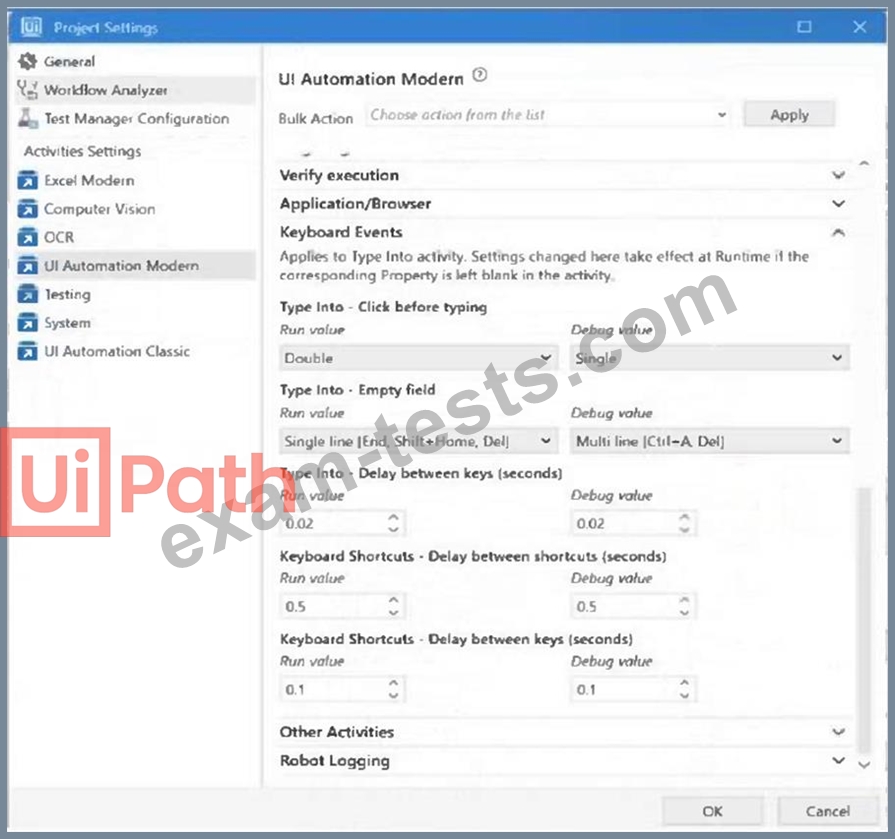
A developer is building an automation which types text into a text file. The Activity Project Settings tor UI Automation Modern activities are set as follows: The developer has configured the properties of a Type Into activity as follows: What is the behavior of the Type Into activity when executing the workflow?
Correct Answer: D
The behavior of the Type Into activity when executing the workflow is that the activity will remove a Single Line in Run mode and Multi Line in Debug mode. This is because the activity has the Empty field property set to NEmptyFieldMode.SingleLine, which means that the activity will delete the existing content in the field by sending Ctrl+A and Delete keystrokes before typing the text. However, the activity also has the Debug mode property set to NEmptyFieldMode.MultiLine, which means that the activity will delete the existing content in the field by sending Ctrl+A, Shift+Home, and Delete keystrokes before typing the text. The Debug mode property overrides the Empty field property when the workflow is executed in Debug mode. Therefore, the activity will use different keystrokes to empty the field depending on the mode of execution. References: [Type Into], [Empty Field] , [Debug Mode]
Question 38
What is a prerequisite for performing Remote Debugging using an Unattended Robot connection?
Correct Answer: D
on the prerequisite for performing Remote Debugging using an Unattended Robot connection: The prerequisite is that Studio and the remote robot must be connected to the same Orchestrator tenant. This ensures that Studio can communicate with the remote robot for debugging purposes. While having the same version and TCP/IP connectivity is beneficial, the key requirement for remote debugging is the connection to the same Orchestrator tenant.
Question 39
Given the following conditional breakpoint with count = 0 Conditional breakpoint settings: How many limes will UiPath be displayed in the Output panel before the process goes into a Paused state in Debug mode?
Correct Answer: B
Question 40
Assume we have the Verify Expression with Operator activity from the UiPath. Testing.Activities package with the properties configured as follows: The activity is used within a Try-Catch activity. The Catch block is set to System.Exception and UiPath. Testing.Exception.TestingActivitiesException as shown in the screenshot below: During the execution of the sequence shown above, which block from the Try-Catch activity will be entered first, after the Verify Expression with Operator activity is executed?
Correct Answer: C
The Verify Expression with Operator activity is used to verify an expression by asserting it in relation to a given expression with an operator1. The expressions tested with this activity must be inserted in their respective property fields. In this case, the activity is configured to verify if the expression "1" is equal to the expression "2". The result of this verification is stored in the Result property, which reflects the state of the verification activity1. If the verification fails, the activity throws a TestingActivitiesException, which is a custom exception type defined by the UiPath.Testing.Activities package2. The Try-Catch activity is used to catch a specified exception type in a sequence or activity, and either displays an error notification or dismisses it and continues the execution3. The activity has three main sections: Try, Catches, and Finally. The Try section holds the activity or set of activities that could throw an exception. The Catches section indicates the exception type and holds the activity or set of activities to be performed when the specified exception is thrown. The Finally section holds the activity or set of activities to be performed after the Try and Catches blocks are executed, regardless of the result3. In this scenario, the Verify Expression with Operator activity is placed in the Try section of the Try-Catch activity. The Catches section has two exceptions caught: System.Exception and TestingActivitiesException. The Finally section is empty. During the execution of the sequence, the Verify Expression with Operator activity will throw a TestingActivitiesException, because the expressions 1 and 2 are not equal. The Try- Catch activity will catch this exception and enter the TestingActivitiesException sequence from the Catches section, where the appropriate actions can be performed to handle the error. Therefore, the correct answer is C:The Exception sequence from the Catches block within the Try-Catch activity will be entered first, after the Verify Expression with Operator activity is executed. The other options are incorrect because: * Option A is incorrect because the Try-Catch activity will execute one of the blocks within the Catches section, depending on the type of exception thrown by the Verify Expression with Operator activity. In this case, the TestingActivitiesException sequence will be executed. * Option B is incorrect because the Finally block within the Try-Catch activity will be executed only after the Try and Catches blocks are executed, not before. The Finally block is used to perform any cleanup or final actions that are needed regardless of the outcome of the Try and Catches blocks3. * Option D is incorrect because the TestingActivitiesException sequence from the Catches block within the Try-Catch activity will be entered second, not first, after the Verify Expression with Operator activity is executed. The first block to be entered is the Try block, where the Verify Expression with Operator activity is placed. References: Activities - Verify Expression With Operator - UiPath Documentation Portal UiPath.Testing.Activities Namespace Activities - Try Catch - UiPath Documentation Portal