Which four can the SMF notification framework be configured to monitor and report?
Correct Answer: A,E,F,G
Note 1: State Transition Sets are defined as: to<state> Set of all transitions that have <state> as the final state of the transition. form-<state> Set of all transitions that have <state> as the initial state of the transition. <state> Set of all transitions that have <state> as the initial state of the transitional. Set of all transitions. (A) Valid values of state are maintenance, offline (G), disabled (E), online and degraded. An example of a transitions set definition: maintenance, from-online, to-degraded. F: In this context, events is a comma separated list of SMF state transition sets or a comma separated list of FMA (Fault Management Architecture) event classes. events cannot have a mix of SMF state transition sets and FMA event classes. For convenience, the tags problem{diagnosed, updated, repaired, resolved} describe the lifecycle of a problem diagnosed by the FMA subsystem - from initial diagnosis to interim updates and finally problem closure. Note 2: SMF allows notification by using SNMP or SMTP of state transitions. It publishes Information Events for state transitions which are consumed by notification daemons like snmp-notify(1M) and smtp-notify(1M). SMF state transitions of disabled services do not generate notifications unless the final state for the transition is disabled and there exist notification parameters for that transition. Notification is not be generated for transitions that have the same initial and final state. Reference: man svccfg setnotify
Question 142
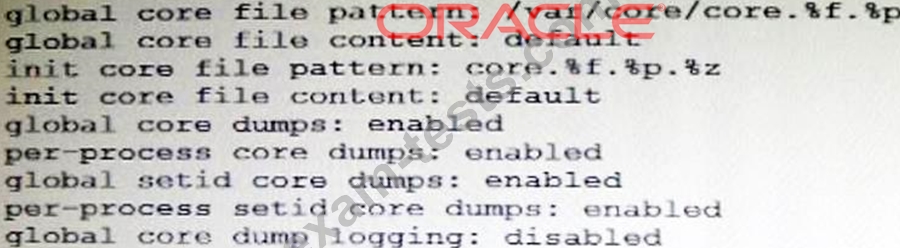
The core dump configuration for your system is: A user is running a process in the global zone and the process crashes. The process information is: User1 2663 2618 0 17:46:42 pts/2 0:00 /usr/bin/bash The server host name is: zeus What will the per-process core file be named?
Correct Answer: C
Note the first line: global core file pattern: /globalcore/core.%f.%p The program name is bash The runtime process ID is 2663 Note: By default, the global core dump is disabled. You need to use the coreadm command with the -e global option to enable it. The -g option causes the command to append the program name(%f) and the runtime process ID (%p) to the core file name.
Question 143
Given: file1 and file2 are text files. dir1 and dir2 are directories. Which two commands will be successful?
Correct Answer: C,F
C: Here the wildcard character ? is used (Matches any single character). file1 and file2 will be copied into dir1 F: the two files file1 and file2 are copied into directoy dir1. Note: cp - copy files and directories Copy SOURCE to DEST, or multiple SOURCE(s) to DIRECTORY. Cp has three principal modes of operation. These modes are inferred from the type and count of arguments presented to the program upon invocation. *When the program has two arguments of path names to files, the program copies the contents of the first file to the second file, creating the second file if necessary. *When the program has one or more arguments of path names of files and following those an argument of a path to a directory, then the program copies each source file to the destination directory, creating any files not already existing. *When the program's arguments are the path names to two directories, cp copies all files in the source directory to the destination directory, creating any files or directories needed. This mode of operation requires an additional option flag, typically r, to indicate the recursive copying of directories. If the destination directory already exists, the source is copied into the destination, while a new directory is created if the destination does not exist. Reference: man cp
Question 144
User jack logs in to host solaris and then attempts to log in to host oracle using ssh. He receives the following error message: The authenticity of host oracle (192.168.1.22) can't be established. RSA key fingerprint is 3B:23:a5:6d:ad:a5:76:83:9c:c3:c4:55:a5:18:98:a6 Are you sure you want to continue connecting (yes/no)? Which two are true?
Correct Answer: B,D
The fingerprints are used to guard against man in the middle attacks. Since ssh logins usually work over the internet (an insecure connection),someone could hijack your connection. When you try to log into yourmachine.com,he could get "in the middle" and return your challenge as if he was yourmachine.com. That way,he could get hold of your login password. To make this attack harder,ssh stores the fingerprint of the server's public key on the first connection attempt. You will see a prompt like: The authenticity of host 'eisen (137.43.366.64)' can't be established. RSA key fingerprint is cf:55:30:31:7f:f0:c4:a0:9a:02:1d:1c:41:cf:63:cf. Are you sure you want to continue connecting (yes/no) When you enter yes,ssh will add the fingerprint to your known_hosts file. you will see Code: Warning: Permanently added 'eisen,137.43.366.64' (RSA) to the list of known hosts. The next time you login,ssh will check whether the host key has changed. A changing host key usually indicates a man in the middle attack,and ssh refuses to connect.
Question 145
Your server has one zone named dbzone (hat has been configured, but not yet installed). Which command would you use to view all the options that were used to configure this zone?
Correct Answer: C
zonecfg info Display information about the current configuration. If resource-type is specified, displays only information about resources of the relevant type. If any property-name value pairs are specified, displays only information about resources meeting the given criteria. In the resource scope, any arguments are ignored, and info displays information about the resource which is currently being added or modified. Note: zonecfg -z zonename. Specify the name of a zone. Zone names are case sensitive. Zone names must begin with an alphanumeric character and can contain alphanumeric characters, the underscore (_) the hyphen (-), and the dot (.). The name global and all names beginning with SUNW are reserved and cannot be used. Incorrect answer: A: The zoneadm utility is used to administer system zones. A zone is an application container that is maintained by the operating system runtime. list option: Display the name of the current zones, or the specified zone if indicated. B: No such command. D: no such options zonecfg -icv