

Question 246
Drag and drop the characteristics of networking from the left onto the networking types on the right.


Question 247
Drag and Drop Question
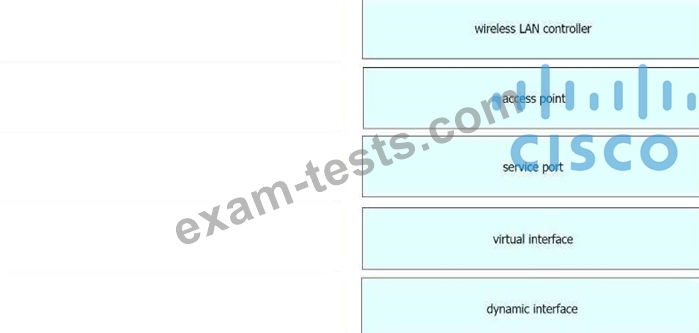
Drag and drop the WLAN components from the left onto the component details on the right.
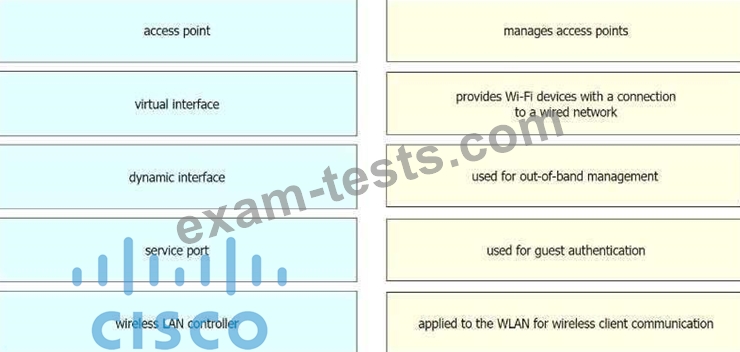
Drag and drop the WLAN components from the left onto the component details on the right.
Question 248
Refer to the exhibit.

Which format matches the Modified EUI-64 IPv6 interface address for the network 2001:db8::/64?
Which format matches the Modified EUI-64 IPv6 interface address for the network 2001:db8::/64?
Question 249
Refer to the exhibit.

Which action is expected from SW1 when the untagged frame is received on the GigabitEthernet0/1 interface?
Which action is expected from SW1 when the untagged frame is received on the GigabitEthernet0/1 interface?
Question 250
Lab Simulation 23
Guidelines
This is a lab item in which tasks will be performed on virtual devices.
- Refer to the Tasks tab to view the tasks for this lab item.
- Refer to the Topology lab to access the device console(s) and perform the tasks.
- Console access is available for all required devices by clicking the device icon or using the tab(s) above the console window.
- All necessary preconfigurations have been applied.
- Do not change the enable password or hostname for any device.
- Save your configurations to NVRAM before moving to the next item.
- Click Next at the bottom of the screen to submit this lab and move to the next question.
- When Next is clicked, the lab closes and cannot be reopened.
Topology

Tasks
All physical cabling is in place. Configurations should ensure that connectivity is established end- to-end.
1. Configure a route on R1 to ensure that R1 prefers R2 to reach the 2001:db8:41::/64 network
2. Configure a floating route on R1, and ensure that R1 uses R3 to reach the 2001 :db8:41::/64 network if the connection between R1 and R2 is down
3. Ping and traceroute should be working
Guidelines
This is a lab item in which tasks will be performed on virtual devices.
- Refer to the Tasks tab to view the tasks for this lab item.
- Refer to the Topology lab to access the device console(s) and perform the tasks.
- Console access is available for all required devices by clicking the device icon or using the tab(s) above the console window.
- All necessary preconfigurations have been applied.
- Do not change the enable password or hostname for any device.
- Save your configurations to NVRAM before moving to the next item.
- Click Next at the bottom of the screen to submit this lab and move to the next question.
- When Next is clicked, the lab closes and cannot be reopened.
Topology
Tasks
All physical cabling is in place. Configurations should ensure that connectivity is established end- to-end.
1. Configure a route on R1 to ensure that R1 prefers R2 to reach the 2001:db8:41::/64 network
2. Configure a floating route on R1, and ensure that R1 uses R3 to reach the 2001 :db8:41::/64 network if the connection between R1 and R2 is down
3. Ping and traceroute should be working
