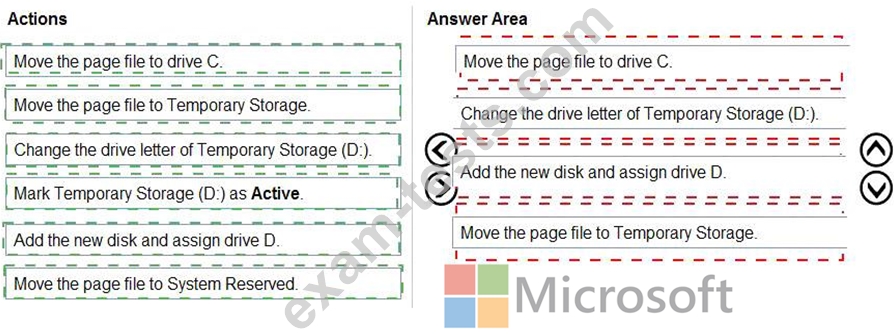
Question 1
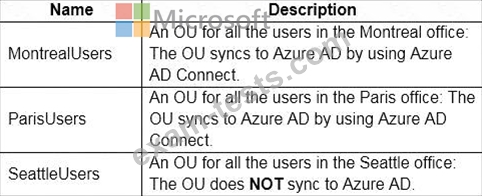
You have an Azure subscription that contains the resources shown in the following table.

Which resources can you back up by using Azure Backup?
Which resources can you back up by using Azure Backup?
Question 2
Note: This question is part of a series of questions that present the same scenario. Each question in the series contains a unique solution that might meet the stated goals. Some question sets might have more than one correct solution, while others might not have a correct solution.
After you answer a question in this section, you will NOT be able to return to it. As a result, these questions will not appear in the review screen.
You have a Windows Virtual Desktop host pool named Pool1 that is integrated with an Azure Active Directory Domain Services (Azure AD DS) managed domain.
You need to configure idle session timeout settings for users that connect to the session hosts in Pool1.
Solution: From the Azure portal, you modify the Session behavior settings in the RDP Properties of Pool1.
Does that meet the goal?
After you answer a question in this section, you will NOT be able to return to it. As a result, these questions will not appear in the review screen.
You have a Windows Virtual Desktop host pool named Pool1 that is integrated with an Azure Active Directory Domain Services (Azure AD DS) managed domain.
You need to configure idle session timeout settings for users that connect to the session hosts in Pool1.
Solution: From the Azure portal, you modify the Session behavior settings in the RDP Properties of Pool1.
Does that meet the goal?


Question 3
You have an Azure Virtual Desktop deployment that contains a host pool named Pool1.
Pool1 contains a session host named Host1 that is Azure AD-joined.
You need to verify whether a Windows license is assigned to Host1.
What should you do?
Pool1 contains a session host named Host1 that is Azure AD-joined.
You need to verify whether a Windows license is assigned to Host1.
What should you do?
Question 4
You network contains an on-premises Active Directory domain that syncs to an Azure Active Directory (Azure AD) tenant. The domain contains the users shown in the following table.

You have a Windows Virtual Desktop deployment that contains the application groups shown in the following table.

You have the workspaces shown in the following table.

For each of the following statements, select Yes if the statement is true. Otherwise, select No.
NOTE: Each correct selection is worth one point.

You have a Windows Virtual Desktop deployment that contains the application groups shown in the following table.
You have the workspaces shown in the following table.
For each of the following statements, select Yes if the statement is true. Otherwise, select No.
NOTE: Each correct selection is worth one point.


Question 5
You have an Azure subscription that contains the virtual machines shown in the following table.

You create a shared image gallery as shown in the SharedGallery1 exhibit. (Click the SharedGallery1 tab.)

You create an image definition as shown in the Image1 exhibit. (Click the Image1 tab.)

For each of the following statements, select Yes if the statement is true. Otherwise, select No.
NOTE: Each correct selection is worth one point.

You create a shared image gallery as shown in the SharedGallery1 exhibit. (Click the SharedGallery1 tab.)
You create an image definition as shown in the Image1 exhibit. (Click the Image1 tab.)
For each of the following statements, select Yes if the statement is true. Otherwise, select No.
NOTE: Each correct selection is worth one point.