

Question 21
Use the following login credentials as needed:
To enter your username, place your cursor in the Sign in box and click on the username below.
To enter your password, place your cursor in the Enter password box and click on the password below.
Azure Username: [email protected]
Azure Password: Ag1Bh9!#Bd
The following information is for technical support purposes only:
Lab Instance: 10598168


You need to ensure that a user named user21059868 can manage the properties of the virtual machines in the RG1lod10598168 resource group. The solution must use the principle of least privilege.
To complete this task, sign in to the Azure portal.
To enter your username, place your cursor in the Sign in box and click on the username below.
To enter your password, place your cursor in the Enter password box and click on the password below.
Azure Username: [email protected]
Azure Password: Ag1Bh9!#Bd
The following information is for technical support purposes only:
Lab Instance: 10598168
You need to ensure that a user named user21059868 can manage the properties of the virtual machines in the RG1lod10598168 resource group. The solution must use the principle of least privilege.
To complete this task, sign in to the Azure portal.

Question 22
You have a file named File1.yaml that contains the following contents.

You create an Azure container instance named container1 by using File1.yaml.
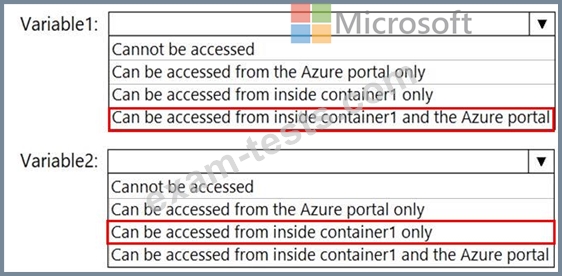
You need to identify where you can access the values of Variable1 and Variable2.
What should you identify? To answer, select the appropriate options in the answer area.
NOTE: Each correct selection is worth one point.

You create an Azure container instance named container1 by using File1.yaml.
You need to identify where you can access the values of Variable1 and Variable2.
What should you identify? To answer, select the appropriate options in the answer area.
NOTE: Each correct selection is worth one point.
Question 23
You have an Azure Active Directory (Azure AD) tenant that contains the users shown in the following table.

From Azure AD Privileged Identity Management (PIM), you configure the settings for the Security Administrator role as shown in the following exhibit.

From PIM, you assign the Security Administrator role to the following groups:
Group1: Active assignment type, permanently assigned
Group2: Eligible assignment type, permanently eligible
For each of the following statements, select Yes if the statement is true. Otherwise, select No.
NOTE: Each correct selection is worth one point.

From Azure AD Privileged Identity Management (PIM), you configure the settings for the Security Administrator role as shown in the following exhibit.
From PIM, you assign the Security Administrator role to the following groups:
Group1: Active assignment type, permanently assigned
Group2: Eligible assignment type, permanently eligible
For each of the following statements, select Yes if the statement is true. Otherwise, select No.
NOTE: Each correct selection is worth one point.

Question 24
You are evaluating the security of the network communication between the virtual machines in Sub2.
For each of the following statements, select Yes if the statement is true. Otherwise, select No.
NOTE: Each correct selection is worth one point.

For each of the following statements, select Yes if the statement is true. Otherwise, select No.
NOTE: Each correct selection is worth one point.

Question 25
You assign User8 the Owner role for RG4, RG5, and RG6.
In which resource groups can User8 create virtual networks and NSGs? To answer, select the appropriate options in the answer area.
NOTE: Each correct selection is worth one point.

In which resource groups can User8 create virtual networks and NSGs? To answer, select the appropriate options in the answer area.
NOTE: Each correct selection is worth one point.

