

Question 61
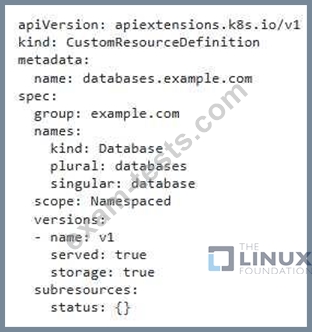
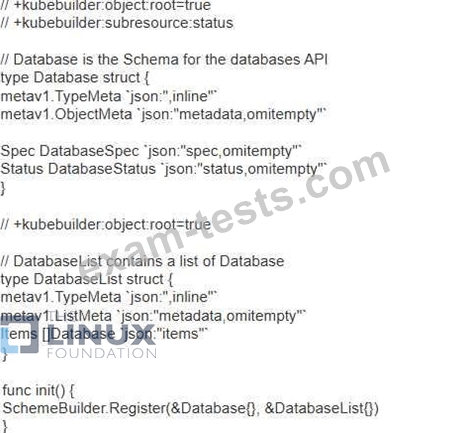
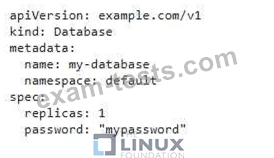
You have a custom resource definition (CRD) named that represents a database resource in your Kubernetes cluster. You want to create a custom operator that automates the creation and management of these database instances. The operator should handle the following:
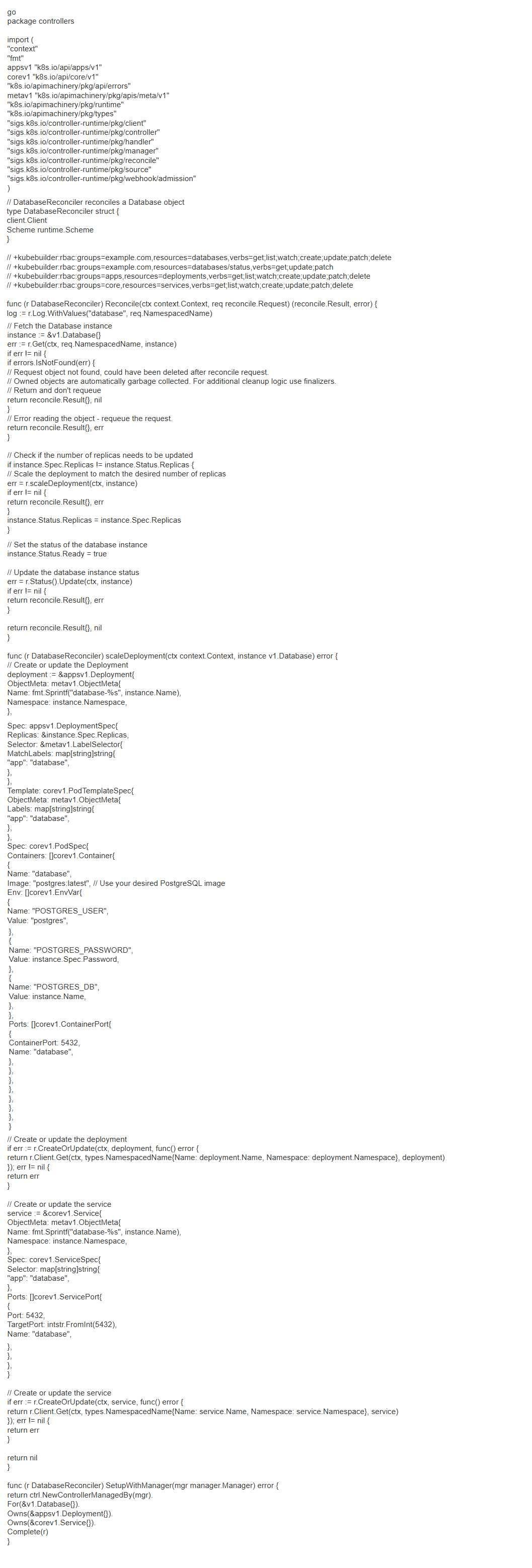
- Creation: When a new 'database.example.com' resource is created, the operator should provision a new PostgreSQL database instance on the cluster-
- Deletion: When a 'database.example_com' resource is deleted, the operator should clean up the corresponding PostgreSQL database instance.
- Scaling: If the 'spec-replicas' field of the 'database-example.com' resource is updated, the operator should scale the number of database instances accordingly.
Provide the necessary Kubernetes resources, custom operator code, and steps to implement this operator. You should use the 'Operator Framework' to build and deploy this operator
- Creation: When a new 'database.example.com' resource is created, the operator should provision a new PostgreSQL database instance on the cluster-
- Deletion: When a 'database.example_com' resource is deleted, the operator should clean up the corresponding PostgreSQL database instance.
- Scaling: If the 'spec-replicas' field of the 'database-example.com' resource is updated, the operator should scale the number of database instances accordingly.
Provide the necessary Kubernetes resources, custom operator code, and steps to implement this operator. You should use the 'Operator Framework' to build and deploy this operator




Question 62
Context

Task:
1) Fix any API depreciation issues in the manifest file -/credible-mite/www.yaml so that this application can be deployed on cluster K8s.

2) Deploy the application specified in the updated manifest file -/credible-mite/www.yaml in namespace cobra
Task:
1) Fix any API depreciation issues in the manifest file -/credible-mite/www.yaml so that this application can be deployed on cluster K8s.
2) Deploy the application specified in the updated manifest file -/credible-mite/www.yaml in namespace cobra


Question 63
You have a web application that uses two different services: 'frontend' and 'backend'. You want to restrict access to the 'backend' service from all pods except those with the label 'app: frontend'. How would you configure NetworkPolicy to achieve this?

Question 64
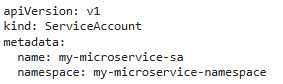
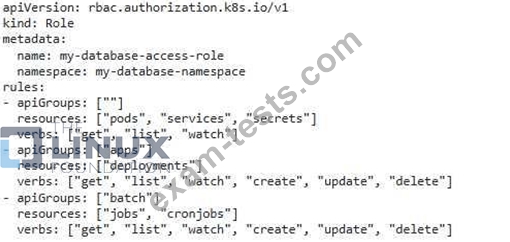
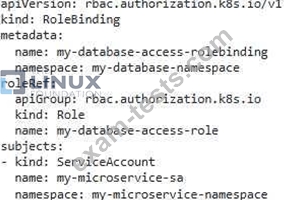
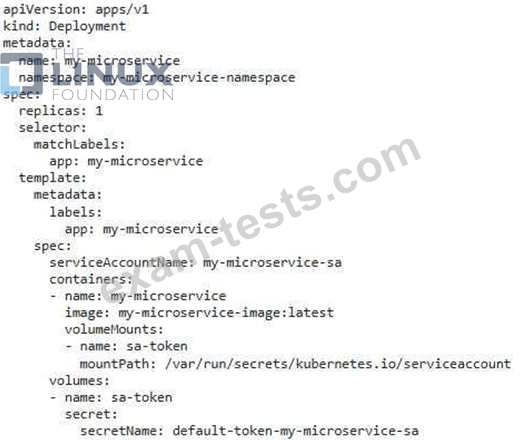
You are developing a new microservice that requires access to a database deployed in a different namespace. You want to configure a ServiceAccount and RoleBinding to provide the necessary permissions for the microservice to connect to the database.
Question 65
Refer to Exhibit.
Set Configuration Context:
[student@node-1] $ | kubectl
Config use-context k8s
Context
You sometimes need to observe a pod's logs, and write those logs to a file for further analysis.
Task
Please complete the following;
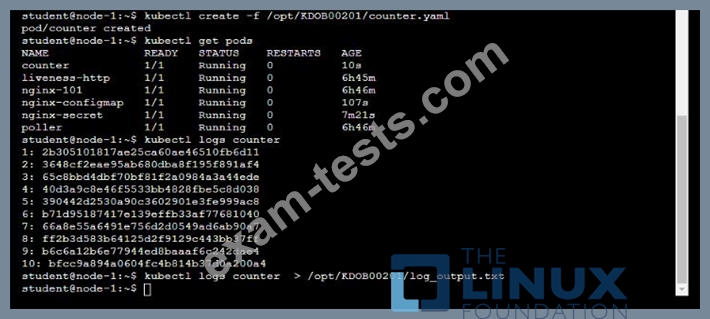
* Deploy the counter pod to the cluster using the provided YAMLspec file at /opt/KDOB00201/counter.yaml
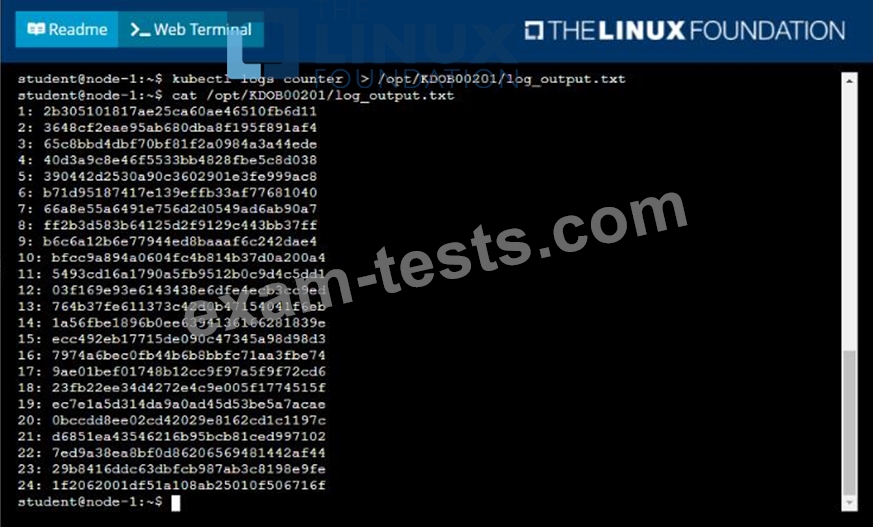
* Retrieve all currently available application logs from the running pod and store them in the file /opt/KDOB0020l/log_Output.txt, which has already been created
Set Configuration Context:
[student@node-1] $ | kubectl
Config use-context k8s
Context
You sometimes need to observe a pod's logs, and write those logs to a file for further analysis.
Task
Please complete the following;
* Deploy the counter pod to the cluster using the provided YAMLspec file at /opt/KDOB00201/counter.yaml
* Retrieve all currently available application logs from the running pod and store them in the file /opt/KDOB0020l/log_Output.txt, which has already been created

Premium Bundle
Newest CKAD Exam PDF Dumps shared by BraindumpsPass.com for Helping Passing CKAD Exam! BraindumpsPass.com now offer the updated CKAD exam dumps, the BraindumpsPass.com CKAD exam questions have been updated and answers have been corrected get the latest BraindumpsPass.com CKAD pdf dumps with Exam Engine here: