

Question 31
SIMULATION
Create a RuntimeClass named untrusted using the prepared runtime handler named runsc.
Create a Pods of image alpine:3.13.2 in the Namespace default to run on the gVisor runtime class.
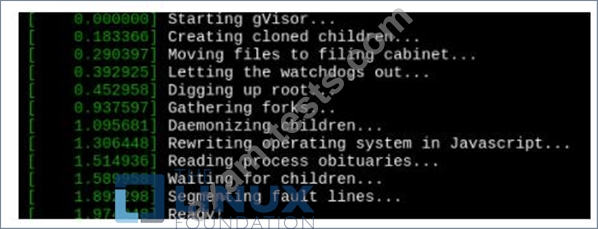
Verify: Exec the pods and run the dmesg, you will see output like this:-
Create a RuntimeClass named untrusted using the prepared runtime handler named runsc.
Create a Pods of image alpine:3.13.2 in the Namespace default to run on the gVisor runtime class.
Verify: Exec the pods and run the dmesg, you will see output like this:-
Question 32
Context:
Cluster: prod
Master node: master1
Worker node: worker1
You can switch the cluster/configuration context using the following command:
[desk@cli] $ kubectl config use-context prod
Task:
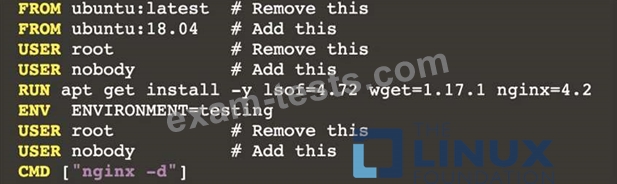
Analyse and edit the given Dockerfile (based on the ubuntu:18:04 image)
/home/cert_masters/Dockerfile fixing two instructions present in the file being prominent security/best-practice issues.
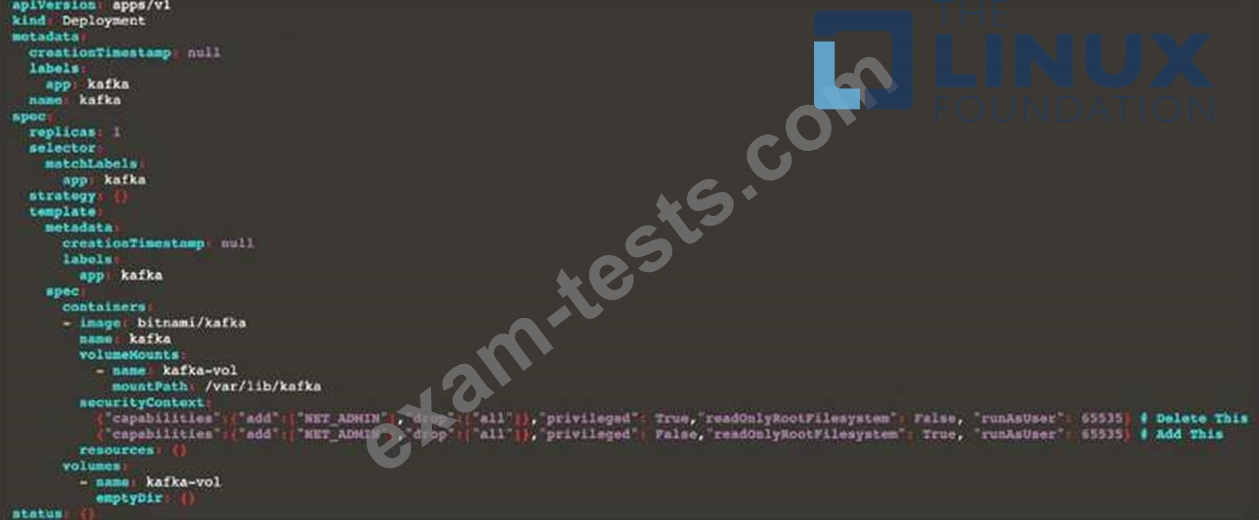
Analyse and edit the given manifest file
/home/cert_masters/mydeployment.yaml fixing two fields present in the file being prominent security/best-practice issues.
Note: Don't add or remove configuration settings; only modify the existing configuration settings, so that two configuration settings each are no longer security/best-practice concerns.
Should you need an unprivileged user for any of the tasks, use user nobody with user id 65535
Cluster: prod
Master node: master1
Worker node: worker1
You can switch the cluster/configuration context using the following command:
[desk@cli] $ kubectl config use-context prod
Task:
Analyse and edit the given Dockerfile (based on the ubuntu:18:04 image)
/home/cert_masters/Dockerfile fixing two instructions present in the file being prominent security/best-practice issues.
Analyse and edit the given manifest file
/home/cert_masters/mydeployment.yaml fixing two fields present in the file being prominent security/best-practice issues.
Note: Don't add or remove configuration settings; only modify the existing configuration settings, so that two configuration settings each are no longer security/best-practice concerns.
Should you need an unprivileged user for any of the tasks, use user nobody with user id 65535
Question 33
SIMULATION
Create a RuntimeClass named gvisor-rc using the prepared runtime handler named runsc.
Create a Pods of image Nginx in the Namespace server to run on the gVisor runtime class
Create a RuntimeClass named gvisor-rc using the prepared runtime handler named runsc.
Create a Pods of image Nginx in the Namespace server to run on the gVisor runtime class
Question 34
You must complete this task on the following cluster/nodes: Cluster: immutable-cluster Master node: master1 Worker node: worker1 You can switch the cluster/configuration context using the following command:
[desk@cli] $ kubectl config use-context immutable-cluster
Context: It is best practice to design containers to be stateless and immutable.
Task:
Inspect Pods running in namespace prod and delete any Pod that is either not stateless or not immutable.
Use the following strict interpretation of stateless and immutable:
1. Pods being able to store data inside containers must be treated as not stateless.
Note: You don't have to worry whether data is actually stored inside containers or not already.
2. Pods being configured to be privileged in any way must be treated as potentially not stateless or not immutable.
[desk@cli] $ kubectl config use-context immutable-cluster
Context: It is best practice to design containers to be stateless and immutable.
Task:
Inspect Pods running in namespace prod and delete any Pod that is either not stateless or not immutable.
Use the following strict interpretation of stateless and immutable:
1. Pods being able to store data inside containers must be treated as not stateless.
Note: You don't have to worry whether data is actually stored inside containers or not already.
2. Pods being configured to be privileged in any way must be treated as potentially not stateless or not immutable.


Question 35
You must complete this task on the following cluster/nodes:
Cluster: apparmor
Master node: master
Worker node: worker1
You can switch the cluster/configuration context using the following command:
[desk@cli] $ kubectl config use-context apparmor
Given: AppArmor is enabled on the worker1 node.
Task:
On the worker1 node,
1. Enforce the prepared AppArmor profile located at: /etc/apparmor.d/nginx
2. Edit the prepared manifest file located at /home/cert_masters/nginx.yaml to apply the apparmor profile
3. Create the Pod using this manifest
Cluster: apparmor
Master node: master
Worker node: worker1
You can switch the cluster/configuration context using the following command:
[desk@cli] $ kubectl config use-context apparmor
Given: AppArmor is enabled on the worker1 node.
Task:
On the worker1 node,
1. Enforce the prepared AppArmor profile located at: /etc/apparmor.d/nginx
2. Edit the prepared manifest file located at /home/cert_masters/nginx.yaml to apply the apparmor profile
3. Create the Pod using this manifest
