

Question 26
Context:
Cluster: prod
Master node: master1
Worker node: worker1
You can switch the cluster/configuration context using the following command:
[desk@cli] $ kubectl config use-context prod
Task:
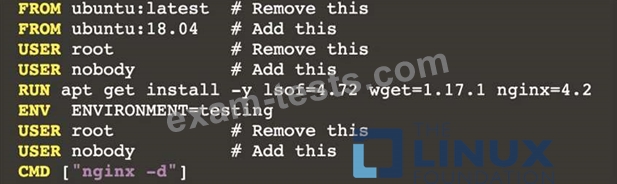
Analyse and edit the given Dockerfile (based on the ubuntu:18:04 image)
/home/cert_masters/Dockerfile fixing two instructions present in the file being prominent security/best-practice issues.
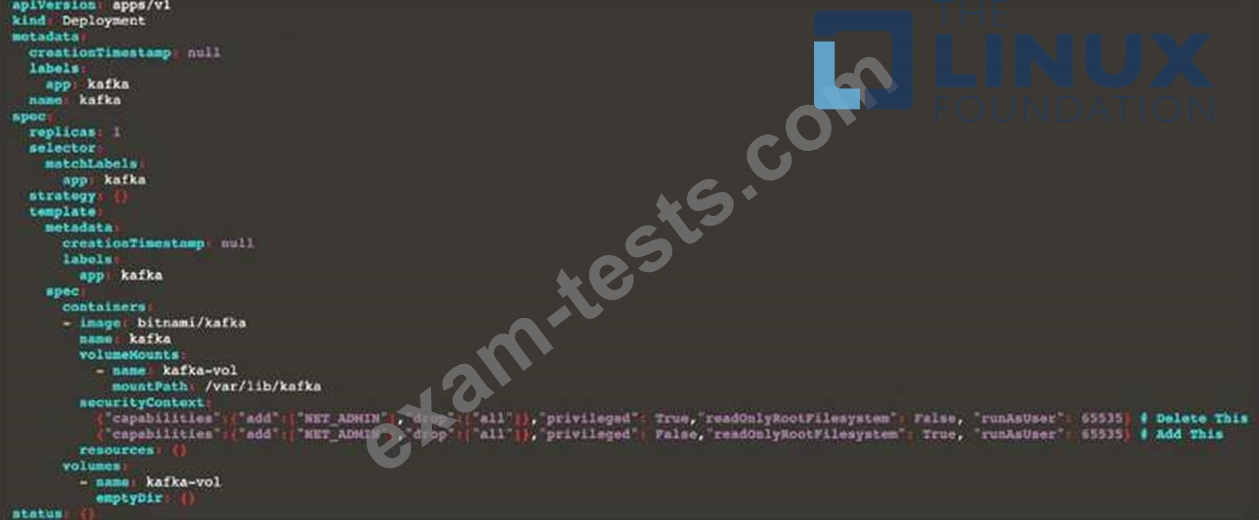
Analyse and edit the given manifest file
/home/cert_masters/mydeployment.yaml fixing two fields present in the file being prominent security/best-practice issues.
Note: Don't add or remove configuration settings; only modify the existing configuration settings, so that two configuration settings each are no longer security/best-practice concerns.
Should you need an unprivileged user for any of the tasks, use user nobody with user id 65535
Cluster: prod
Master node: master1
Worker node: worker1
You can switch the cluster/configuration context using the following command:
[desk@cli] $ kubectl config use-context prod
Task:
Analyse and edit the given Dockerfile (based on the ubuntu:18:04 image)
/home/cert_masters/Dockerfile fixing two instructions present in the file being prominent security/best-practice issues.
Analyse and edit the given manifest file
/home/cert_masters/mydeployment.yaml fixing two fields present in the file being prominent security/best-practice issues.
Note: Don't add or remove configuration settings; only modify the existing configuration settings, so that two configuration settings each are no longer security/best-practice concerns.
Should you need an unprivileged user for any of the tasks, use user nobody with user id 65535
Question 27
Service is running on port 389 inside the system, find the process-id of the process, and stores the names of all the open-files inside the /candidate/KH77539/files.txt, and also delete the binary.
Question 28
A container image scanner is set up on the cluster.
Given an incomplete configuration in the directory
/etc/kubernetes/confcontrol and a functional container image scanner with HTTPS endpoint https://test-server.local.8081/image_policy
Given an incomplete configuration in the directory
/etc/kubernetes/confcontrol and a functional container image scanner with HTTPS endpoint https://test-server.local.8081/image_policy
Question 29
SIMULATION
Using the runtime detection tool Falco, Analyse the container behavior for at least 20 seconds, using filters that detect newly spawning and executing processes in a single container of Nginx.
store the incident file art /opt/falco-incident.txt, containing the detected incidents. one per line, in the format
[timestamp],[uid],[processName]
Using the runtime detection tool Falco, Analyse the container behavior for at least 20 seconds, using filters that detect newly spawning and executing processes in a single container of Nginx.
store the incident file art /opt/falco-incident.txt, containing the detected incidents. one per line, in the format
[timestamp],[uid],[processName]
Question 30
SIMULATION
Given an existing Pod named test-web-pod running in the namespace test-system Edit the existing Role bound to the Pod's Service Account named sa-backend to only allow performing get operations on endpoints.
Create a new Role named test-system-role-2 in the namespace test-system, which can perform patch operations, on resources of type statefulsets.
Create a new RoleBinding named test-system-role-2-binding binding the newly created Role to the Pod's ServiceAccount sa-backend.
Given an existing Pod named test-web-pod running in the namespace test-system Edit the existing Role bound to the Pod's Service Account named sa-backend to only allow performing get operations on endpoints.
Create a new Role named test-system-role-2 in the namespace test-system, which can perform patch operations, on resources of type statefulsets.
Create a new RoleBinding named test-system-role-2-binding binding the newly created Role to the Pod's ServiceAccount sa-backend.