

Question 11
Fix all issues via configuration and restart the affected components to ensure the new setting takes effect.
Fix all of the following violations that were found against the API server:- a. Ensure that the RotateKubeletServerCertificate argument is set to true.
b. Ensure that the admission control plugin PodSecurityPolicy is set.
c. Ensure that the --kubelet-certificate-authority argument is set as appropriate.
Fix all of the following violations that were found against the Kubelet:- a. Ensure the --anonymous-auth argument is set to false.
b. Ensure that the --authorization-mode argument is set to Webhook.
Fix all of the following violations that were found against the ETCD:-
a. Ensure that the --auto-tls argument is not set to true
b. Ensure that the --peer-auto-tls argument is not set to true
Hint: Take the use of Tool Kube-Bench
Fix all of the following violations that were found against the API server:- a. Ensure that the RotateKubeletServerCertificate argument is set to true.
b. Ensure that the admission control plugin PodSecurityPolicy is set.
c. Ensure that the --kubelet-certificate-authority argument is set as appropriate.
Fix all of the following violations that were found against the Kubelet:- a. Ensure the --anonymous-auth argument is set to false.
b. Ensure that the --authorization-mode argument is set to Webhook.
Fix all of the following violations that were found against the ETCD:-
a. Ensure that the --auto-tls argument is not set to true
b. Ensure that the --peer-auto-tls argument is not set to true
Hint: Take the use of Tool Kube-Bench
Question 12
You can switch the cluster/configuration context using the following command: [desk@cli] $ kubectl config use-context qa Context: A pod fails to run because of an incorrectly specified ServiceAccount Task: Create a new service account named backend-qa in an existing namespace qa, which must not have access to any secret. Edit the frontend pod yaml to use backend-qa service account Note: You can find the frontend pod yaml at /home/cert_masters/frontend-pod.yaml
Question 13
Create a Pod name Nginx-pod inside the namespace testing, Create a service for the Nginx-pod named nginx-svc, using the ingress of your choice, run the ingress on tls, secure port.
Question 14
You must complete this task on the following cluster/nodes:
Cluster: trace
Master node: master
Worker node: worker1
You can switch the cluster/configuration context using the following command:
[desk@cli] $ kubectl config use-context trace
Given: You may use Sysdig or Falco documentation.
Task:
Use detection tools to detect anomalies like processes spawning and executing something weird frequently in the single container belonging to Pod tomcat.
Two tools are available to use:
1. falco
2. sysdig
Tools are pre-installed on the worker1 node only.
Analyse the container's behaviour for at least 40 seconds, using filters that detect newly spawning and executing processes.
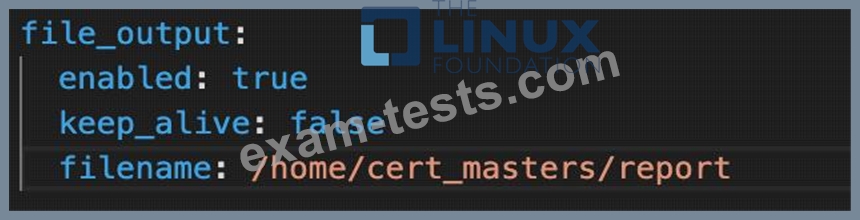
Store an incident file at /home/cert_masters/report, in the following format:
[timestamp],[uid],[processName]
Note: Make sure to store incident file on the cluster's worker node, don't move it to master node.
Cluster: trace
Master node: master
Worker node: worker1
You can switch the cluster/configuration context using the following command:
[desk@cli] $ kubectl config use-context trace
Given: You may use Sysdig or Falco documentation.
Task:
Use detection tools to detect anomalies like processes spawning and executing something weird frequently in the single container belonging to Pod tomcat.
Two tools are available to use:
1. falco
2. sysdig
Tools are pre-installed on the worker1 node only.
Analyse the container's behaviour for at least 40 seconds, using filters that detect newly spawning and executing processes.
Store an incident file at /home/cert_masters/report, in the following format:
[timestamp],[uid],[processName]
Note: Make sure to store incident file on the cluster's worker node, don't move it to master node.
Question 15
Context:
Cluster: gvisor
Master node: master1
Worker node: worker1
You can switch the cluster/configuration context using the following command:
[desk@cli] $ kubectl config use-context gvisor
Context: This cluster has been prepared to support runtime handler, runsc as well as traditional one.
Task:
Create a RuntimeClass named not-trusted using the prepared runtime handler names runsc.
Update all Pods in the namespace server to run on newruntime.
Cluster: gvisor
Master node: master1
Worker node: worker1
You can switch the cluster/configuration context using the following command:
[desk@cli] $ kubectl config use-context gvisor
Context: This cluster has been prepared to support runtime handler, runsc as well as traditional one.
Task:
Create a RuntimeClass named not-trusted using the prepared runtime handler names runsc.
Update all Pods in the namespace server to run on newruntime.
