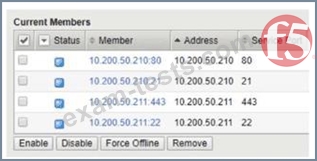
Refer to the exhibit. A BIG-IP Administrator needs to configure health monitors for a newly configured server pool named Pool_B. Which health monitor settings will ensure that all pool members will be accurately marked as available or unavailable?
Correct Answer: A
The pool member list in the exhibit shows servers listening on four distinct service ports: 80 (HTTP), 21 (FTP), 443 (HTTPS), and 22 (SSH). To accurately monitor a pool where members provide different services, the administrator must apply monitors that correspond to each of those specific services. The key to this configuration is the Availability Requirement (also known as "Monitor Rule"). If the administrator sets the requirement to "All health monitors," every single monitor (HTTP, HTTPS, FTP, and SSH) must pass for a member to be marked "Up." This would cause an immediate failure: for example, a server listening only on port 80 would fail the HTTPS, FTP, and SSH checks, resulting in the member being marked "Down" even if the HTTP service is healthy. To ensure accuracy, the administrator should apply all four relevant monitors and set the Availability Requirement to at least one monitor. With this setting, the BIG-IP marks a member as "Up" if any of the assigned monitors return a successful response. Therefore, the member at 10.200.50.210:80 will stay "Up" as long as the HTTP monitor passes, even though it fails the FTP, HTTPS, and SSH monitors. This configuration allows a single pool to contain diverse service types while ensuring that the specific port defined for each member is verified correctly. Option C is incorrect because ICMP only checks if the IP is alive, not if the specific service port is functioning.
Question 47
A BIG-IP Administrator creates an HTTP Virtual Server using an iApp template. After the Virtual Server is created, the user requests to change the destination IP addresses. The BIG-IP Administrator tries to change the destination IP address from 10.1.1.1 to 10.2.1.1 in Virtual Server settings, but receives the following error: " The application service must be updated using an application management interface. " What is causing this error?
Correct Answer: A
In F5 BIG-IP administration, iApps are designed to manage complex application configurations as a single unit. When an iApp is deployed, it creates an " Application Service " object that owns all the associated LTM objects, such as Virtual Servers, Pools, and Nodes. By default, these iApps are created with Strict Updates enabled. Strict Updates is a safety mechanism that prevents administrators from making manual " out-of-band " changes to the individual objects created by the iApp. The system enforces this because manual changes would be overwritten the next time the iApp template is updated or re-entered. When the administrator attempts to change the destination IP address directly on the Virtual Server object, the BIG-IP system checks the " Strict Updates " flag. If it is set to " Enabled, " the system blocks the modification and generates the error message stating the service must be updated via the application management interface. To resolve this, the administrator must navigate to the iApp > > Application Services menu, select the specific application service, and go to the " Reconfigure " tab. Within the iApp configuration form, the destination IP can be safely changed. Alternatively, if the administrator specifically wants to manage the objects manually and forgo the benefits of the iApp template management, they could disable " Strict Updates " in the iApp properties, though this is generally discouraged as it breaks the template ' s logic. The error is not related to subnetting or duplicate IPs, but strictly to the configuration authority assigned to the iApp service.
Question 48
How can a BIG-IP Administrator identify a configuration object that has been configured within an iApp?
Correct Answer: C
In F5 BIG-IP systems, an iApp is a template-driven framework used to deploy and manage application- specific configurations. When an iApp is deployed, the system creates a specialized folder or "Application Service" container to hold all the resulting Local Traffic Manager (LTM) objects, such as virtual servers, pools, and profiles. This container is visually and programmatically identified by the .app extension in its path name. The naming convention for these objects follows a specific hierarchical structure: /<partition>/<iapp_name>. app/<object_name>. For example, if an administrator creates an iApp named "testhttp" in the "/Common" partition, the virtual server created by that iApp would be identified in the configuration (TMSH) and the GUI as /Common/testhttp.app/testhttp. This structure allows the BIG-IP system to distinguish between manually created objects and those managed by the iApp's automation logic. This identification is crucial because iApp-managed objects typically have Strict Updates enabled, which prevents administrators from making direct manual changes to the object settings outside of the iApp's reconfigure interface. Attempting to modify such an object directly will result in an error message stating that the application service must be updated using an application management interface. By recognizing the .app path and the repeated name within the structure, an administrator can immediately identify that the object belongs to an iApp and should be managed through the iApp's specific management screen rather than standard LTM configuration menus.
Newest F5CAB3 Exam PDF Dumps shared by BraindumpsPass.com for Helping Passing F5CAB3 Exam! BraindumpsPass.com now offer the updated F5CAB3 exam dumps, the BraindumpsPass.com F5CAB3 exam questions have been updated and answers have been corrected get the latest BraindumpsPass.com F5CAB3 pdf dumps with Exam Engine here: