

Question 106
A company uses Dynamics 365 Supply Chain Management. The company plans to streamline their receiving process for shipments that arrive daily.
You need to set up inbound shipment processing.
In which order should you perform the actions? To answer, move the appropriate actions from the list of actions to the answer area and arrange them in the correct order.
NOTE: More than one order of answer choices is correct. You will receive credit for any of the correct orders you select.

You need to set up inbound shipment processing.
In which order should you perform the actions? To answer, move the appropriate actions from the list of actions to the answer area and arrange them in the correct order.
NOTE: More than one order of answer choices is correct. You will receive credit for any of the correct orders you select.

Question 107
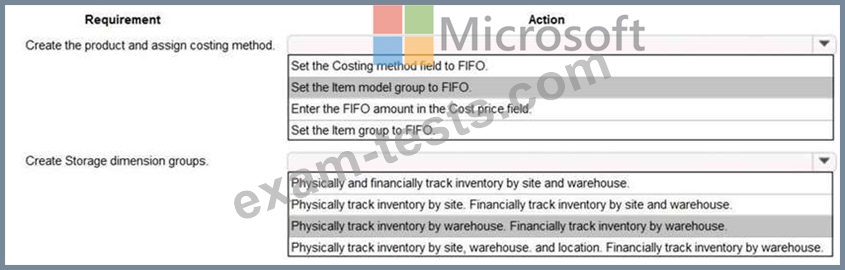
A company plans to stock new items and value those items by using FIFO principle. The company has multiple sites set up. There are multiple warehouses for each site.
You must be able to view the value and quantity of these items at each warehouse.
You need to apply FIFO costing per warehouse.
How should you complete the costing setup? To answer, select the appropriate options in the answer area.
NOTE: Each correct selection is worth one point.


You must be able to view the value and quantity of these items at each warehouse.
You need to apply FIFO costing per warehouse.
How should you complete the costing setup? To answer, select the appropriate options in the answer area.
NOTE: Each correct selection is worth one point.

Question 108
A company uses Dynamics 365 Supply Chain Management.
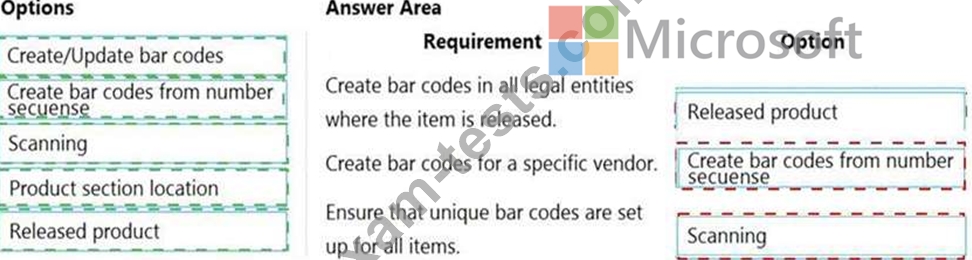
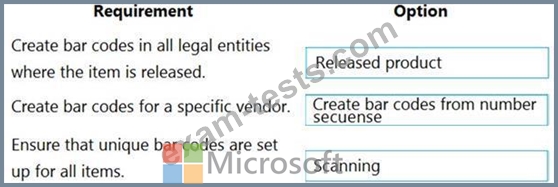
The company needs to maintain item bar codes.
You need to set up bar codes for the items.
Which option should you use for each requirement? To answer, drag the appropriate options to the correct requirements. Each option may be used once, more than once, or not at all. You may need to drag the split bar between panes or scroll to view content.
NOTE: Each correct selection is worth one point.

The company needs to maintain item bar codes.
You need to set up bar codes for the items.
Which option should you use for each requirement? To answer, drag the appropriate options to the correct requirements. Each option may be used once, more than once, or not at all. You may need to drag the split bar between panes or scroll to view content.
NOTE: Each correct selection is worth one point.
Question 109
You are a functional consultant for a company named Contoso Entertainment System USA (USMF).
From sales order number 000720, you need to ensure that a product named Projector Television is delivered directly to a customer.
To complete this task, sign in to Dynamics 365 portal.
From sales order number 000720, you need to ensure that a product named Projector Television is delivered directly to a customer.
To complete this task, sign in to Dynamics 365 portal.

Question 110
SIMULATION
You are a functional consultant for a company named Contoso Entertainment System USA (USMF).
USMF recently experienced issues with a transport company. Many packages were returned because the boxes were opened during delivery.
Users in the sales department are creating sales order returns for the returned open boxes.
You need to configure the system to ensure that the sales department users can select a predefined description of Open Box for each sales order return.
To complete this task, sign in to Dynamics 365 portal.
You are a functional consultant for a company named Contoso Entertainment System USA (USMF).
USMF recently experienced issues with a transport company. Many packages were returned because the boxes were opened during delivery.
Users in the sales department are creating sales order returns for the returned open boxes.
You need to configure the system to ensure that the sales department users can select a predefined description of Open Box for each sales order return.
To complete this task, sign in to Dynamics 365 portal.