

Question 1
Note: This question is part of a series of questions that present the same scenario. Each question in the series contains a unique solution that might meet the stated goals. Some question sets might have more than one correct solution, while others might not have a correct solution.
After you answer a question in this section, you will NOT be able to return to it. As a result, these questions will not appear in the review screen.
You create a new form in a project.
You need to display tabs in a vertical alignment.
Solution: Apply the Details Master pattern.
Does the solution meet the goal?
After you answer a question in this section, you will NOT be able to return to it. As a result, these questions will not appear in the review screen.
You create a new form in a project.
You need to display tabs in a vertical alignment.
Solution: Apply the Details Master pattern.
Does the solution meet the goal?
Question 2
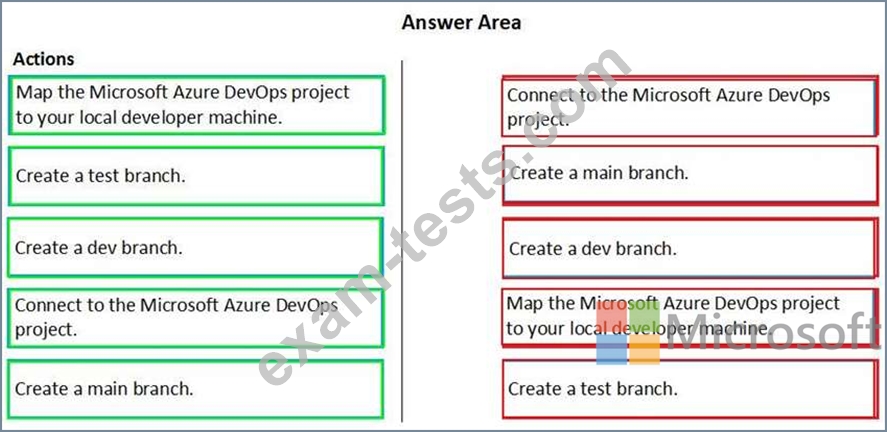
You are configuring your developer environment by using Team Explorer.
There are several developers working on a customization.
You need to ensure that all code is checked in and then merged to the appropriate branches.
In which order should you perform the actions? To answer, move all actions from the list of actions to the answer area and arrange them in the correct order.
NOTE: More than one order of answer choices is correct. You will receive credit for any of the correct orders you select.

There are several developers working on a customization.
You need to ensure that all code is checked in and then merged to the appropriate branches.
In which order should you perform the actions? To answer, move all actions from the list of actions to the answer area and arrange them in the correct order.
NOTE: More than one order of answer choices is correct. You will receive credit for any of the correct orders you select.
Question 3
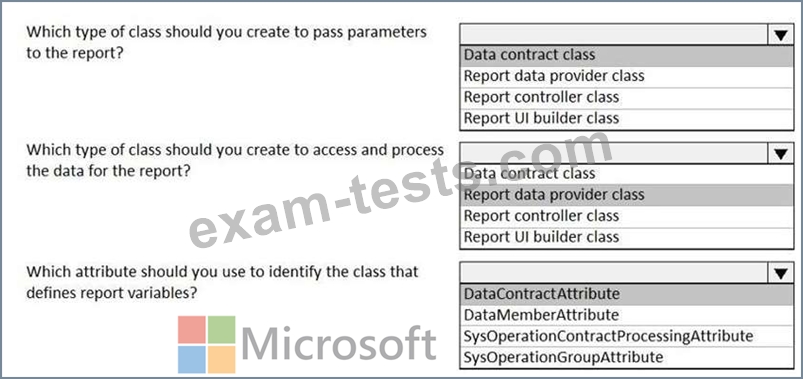
You are creating a Dynamics 365 Finance and Operations report. You cannot query the data for the report directly.
You must include parameters to specify data for the report.
You need to create the report.
What should you use? To answer, select the appropriate options in the answer area.
NOTE: Each correct selection is worth one point.

You must include parameters to specify data for the report.
You need to create the report.
What should you use? To answer, select the appropriate options in the answer area.
NOTE: Each correct selection is worth one point.


Question 4
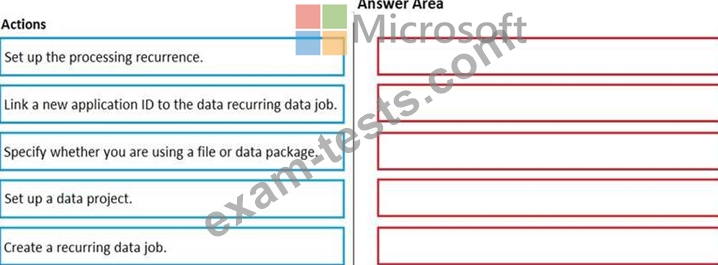
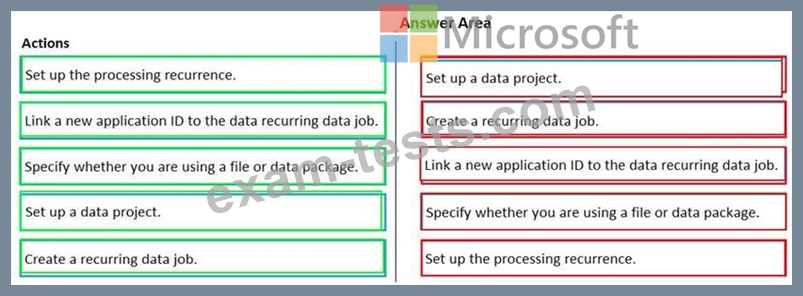
You need to set up a recurring integration to enable file exchanges between Dynamics 365 Finance and a third-party system.
In which order should you perform the actions? To answer, move all actions from the list of actions to the answer area and arrange them in the correct order.
In which order should you perform the actions? To answer, move all actions from the list of actions to the answer area and arrange them in the correct order.
Question 5
Note: This question is part of a series of questions that present the same scenario. Each question in the series contains a unique solution that might meet the stated goals. Some question sets might have more than one correct solution, while others might not have a correct solution.
After you answer a question in this section, you will NOT be able to return to it. As a result, these questions will not appear in the review screen.
You are adding a new field to the SalesTable form.
You must use an extension to add a status field onto the form.
You need to create the extension in the Application Object Tree (AOT) and add the extension to the demoExtensions model.
Solution: Navigate to the Visual Studio user interface forms extensions section for the SalesTable form and create an extension.
Does the solution meet the goal?
After you answer a question in this section, you will NOT be able to return to it. As a result, these questions will not appear in the review screen.
You are adding a new field to the SalesTable form.
You must use an extension to add a status field onto the form.
You need to create the extension in the Application Object Tree (AOT) and add the extension to the demoExtensions model.
Solution: Navigate to the Visual Studio user interface forms extensions section for the SalesTable form and create an extension.
Does the solution meet the goal?