

Question 16
Note: This question is part of a series of questions that present the same scenario. Each question in the series contains a unique solution that might meet the stated goals. Some question sets might have more than one correct solution, while others might not have a correct solution.
After you answer a question in this section, you will NOT be able to return to it. As a result, these questions will not appear in the review screen.
You have an enumeration named truckStatus that has the following statuses:
* Empty
* Loaded
* Completed
You have the following code:

You need to extend this enumeration and add the following statuses to the enumeration: Quarantine, InTransit.
You must then modify code that validates the switch statement.
Solution: Add a post handler to the method that checks the enumeration and logic for your new enumeration values using the enumeration value.

Does the solution meet the goal?
After you answer a question in this section, you will NOT be able to return to it. As a result, these questions will not appear in the review screen.
You have an enumeration named truckStatus that has the following statuses:
* Empty
* Loaded
* Completed
You have the following code:
You need to extend this enumeration and add the following statuses to the enumeration: Quarantine, InTransit.
You must then modify code that validates the switch statement.
Solution: Add a post handler to the method that checks the enumeration and logic for your new enumeration values using the enumeration value.
Does the solution meet the goal?
Question 17
You need to create the outstanding invoice report for the CFO.
Which attributes should you use? To answer, drag the appropriate attributes to the requirements. Each attribute answer may be used once, more than once, or not at all. You may need to drag the split between panes or scroll to view content.
NOTE: Each correct selection is worth one point.

Which attributes should you use? To answer, drag the appropriate attributes to the requirements. Each attribute answer may be used once, more than once, or not at all. You may need to drag the split between panes or scroll to view content.
NOTE: Each correct selection is worth one point.


Question 18
You need to set up a recurring integration to enable file exchanges between Dynamics 365 Finance and a third-party system.
In which order should you perform the actions? To answer, move all actions from the list of actions to the answer area and arrange them in the correct order.
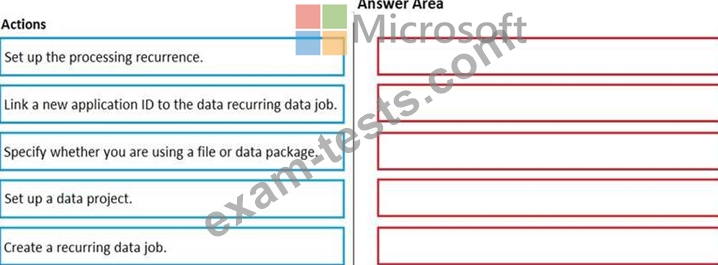
In which order should you perform the actions? To answer, move all actions from the list of actions to the answer area and arrange them in the correct order.

Question 19
You need to prepare to deploy a software deployable package to a test environment. What are two possible ways to achieve the goal?
Each correct answer presents a complete solution.
NOTE: Each correct selection is worth one point.
Each correct answer presents a complete solution.
NOTE: Each correct selection is worth one point.
Question 20
A company uses Dynamics 365 Unified Operations.
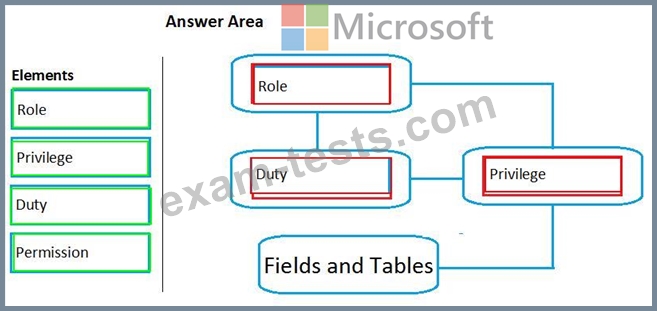
You need to implement role-based security for a set of fields in a table.
How should you arrange the security elements? To answer, drag the appropriate security elements to the correct locations. Each element may be used once, more than once, or not at all. You may need to drag the split bar between panes or scroll to view content.
NOTE: Each correct selection is worth one point.

You need to implement role-based security for a set of fields in a table.
How should you arrange the security elements? To answer, drag the appropriate security elements to the correct locations. Each element may be used once, more than once, or not at all. You may need to drag the split bar between panes or scroll to view content.
NOTE: Each correct selection is worth one point.
Premium Bundle
Newest MB-500 Exam PDF Dumps shared by BraindumpsPass.com for Helping Passing MB-500 Exam! BraindumpsPass.com now offer the updated MB-500 exam dumps, the BraindumpsPass.com MB-500 exam questions have been updated and answers have been corrected get the latest BraindumpsPass.com MB-500 pdf dumps with Exam Engine here: