Question 51
Your company has a Microsoft 365 subscription.
You need to identify which users performed the following privileged administration tasks:
*Deleted a folder from the second-stage Recycle Bin of Microsoft SharePoint
*Opened a mailbox of which the user was not the owner
*Reset a user password
What should you use?
You need to identify which users performed the following privileged administration tasks:
*Deleted a folder from the second-stage Recycle Bin of Microsoft SharePoint
*Opened a mailbox of which the user was not the owner
*Reset a user password
What should you use?
Question 52
You have a Microsoft 365 subscription that links to an Azure Active Directory (Azure AD) tenant named contoso.onmicrosoft.com.
A user named User1 stores documents in Microsoft OneDrive.
You need to place the contents of User1's OneDrive account on an eDiscovery hold.
Which URL should you use for the eDiscovery hold? To answer, select the appropriate options in the answer area.
NOTE: Each correct selection is worth one point.

A user named User1 stores documents in Microsoft OneDrive.
You need to place the contents of User1's OneDrive account on an eDiscovery hold.
Which URL should you use for the eDiscovery hold? To answer, select the appropriate options in the answer area.
NOTE: Each correct selection is worth one point.

Question 53
You have a Microsoft 365 subscription that uses a default domain named contoso.com.
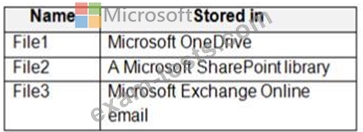
Three files were created on February 1, 2019, as shown in the following table.
On March 1, 2019, you create two retention labels named Label1 and Label2.
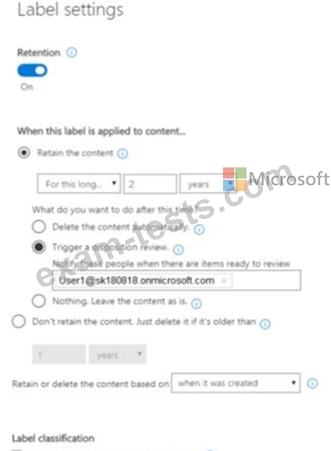
The settings for Lable1 are configured as shown in the Label1 exhibit. (Click the Label1 tab.)
The settings for Lable2 are configured as shown in the Label2 exhibit. (Click the Label2 tab.)

You apply the retention labels to Exchange email, SharePoint sites, and OneDrive accounts.
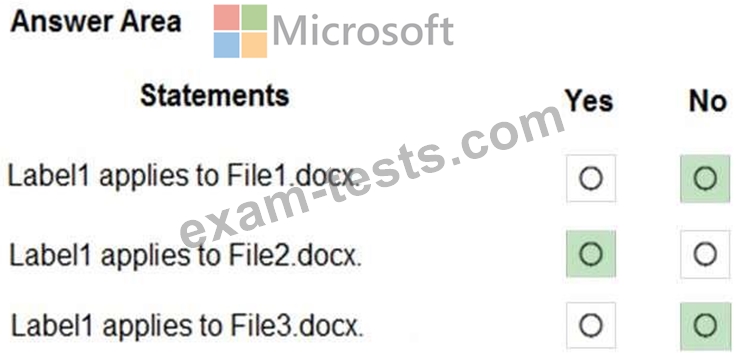
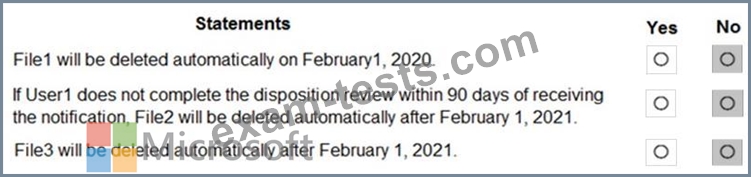
For each of the following statements, select Yes if the statement is true. Otherwise, select No.
NOTE: Each correct selection is worth one point.

Three files were created on February 1, 2019, as shown in the following table.
On March 1, 2019, you create two retention labels named Label1 and Label2.
The settings for Lable1 are configured as shown in the Label1 exhibit. (Click the Label1 tab.)
The settings for Lable2 are configured as shown in the Label2 exhibit. (Click the Label2 tab.)
You apply the retention labels to Exchange email, SharePoint sites, and OneDrive accounts.
For each of the following statements, select Yes if the statement is true. Otherwise, select No.
NOTE: Each correct selection is worth one point.

Question 54
You have a Microsoft 365 subscription that uses a default domain named contoso.com. The domain contains the users shown in the following table.

The domain contains the devices shown in the following table.

The domain contains conditional access policies that control access to a cloud app named App1. The policies are configured as shown in the following table.
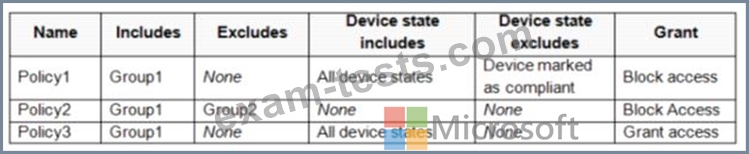
For each of the following statements, select Yes if the statement is true. Otherwise, select No.
NOTE: Each correct selection is worth one point.
The domain contains the devices shown in the following table.
The domain contains conditional access policies that control access to a cloud app named App1. The policies are configured as shown in the following table.
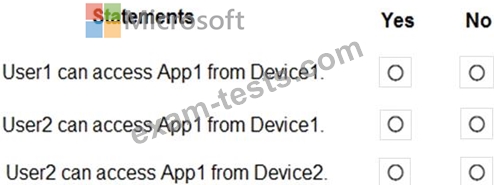
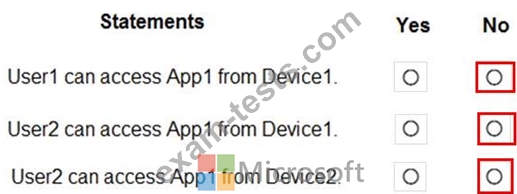
For each of the following statements, select Yes if the statement is true. Otherwise, select No.
NOTE: Each correct selection is worth one point.
Question 55
HOTSPOT
You have a Microsoft Azure Active Directory (Azure AD) tenant named contoso.com.
A user named User1 has files on a Windows 10 device as shown in the following table.

In Azure Information Protection, you create a label named Label1 that is configured to apply automatically.
Label1 is configured as shown in the following exhibit.
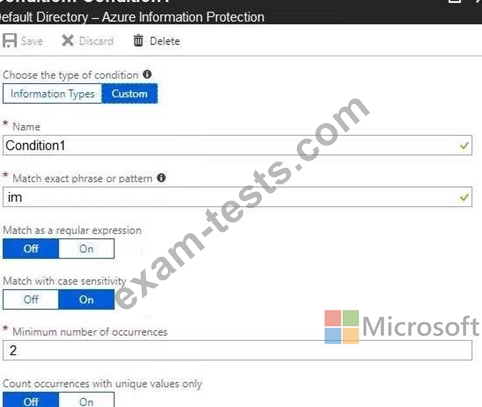
For each of the following statements, select Yes if the statement is true. Otherwise, select No.
NOTE: Each correct selection is worth one point.
Hot Area:

You have a Microsoft Azure Active Directory (Azure AD) tenant named contoso.com.
A user named User1 has files on a Windows 10 device as shown in the following table.
In Azure Information Protection, you create a label named Label1 that is configured to apply automatically.
Label1 is configured as shown in the following exhibit.
For each of the following statements, select Yes if the statement is true. Otherwise, select No.
NOTE: Each correct selection is worth one point.
Hot Area: