

Question 66
<lightning:layout multipleRows="true">
<lightning:layoutItem size="12">{!v.account.Name}
</lightning:layoutItem>
<lightning:layoutItem size="12">{!v.account.AccountNumber}
</lightning:layoutItem>
<lightning:layoutItem size="12">{!v.account.Industry}
</lightning:layoutItem>
</lightning:layout>
Refer to the component code above. The information displays as expected (in three rows) on a mobile device.
However, the information is not displaying as desired (in a single row) on a desktop or tablet.
Which option has the correct component changes to display correctly on desktops and tablets?
<lightning:layout multipleRows="true">
<lightning:layoutItem size="12">{!v.account.Name}
</lightning:layoutItem>
<lightning:layoutItem size="12">{!v.account.AccountNumber}
</lightning:layoutItem>
<lightning:layoutItem size="12">{!v.account.Industry}
</lightning:layoutItem>
</lightning:layout>
Refer to the component code above. The information displays as expected (in three rows) on a mobile device.
However, the information is not displaying as desired (in a single row) on a desktop or tablet.
Which option has the correct component changes to display correctly on desktops and tablets?
<lightning:layout multipleRows="true">
Question 67
A developer created a Lightning web component that uses a lightning-record-edit-form to collect information about Leads. Users complain that they only see one error message at a time about their input when trying to save a Lead record.
What is the recommended approach to perform validations on more than one field, and display multiple error messages simultaneously with minimal JavaScript intervention?
What is the recommended approach to perform validations on more than one field, and display multiple error messages simultaneously with minimal JavaScript intervention?
Question 68
A company wants to run different logic based on an Opportunity's record type. Which code segment handles this request and follows best practices?
A)
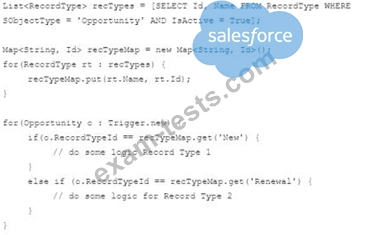
B)
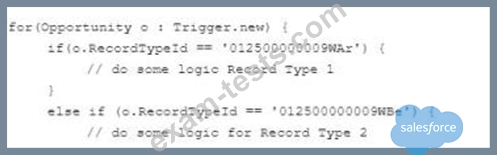
A)
B)
Question 69
A developer is creating a Lightning web component that displays a list of records in a lightning-datatable.
After saving a new record to the database, the list is not updating.

What should the developer change in the code above for this to
happen?
After saving a new record to the database, the list is not updating.
What should the developer change in the code above for this to
happen?
Question 70
A developer gets an error saying 'Maximum Trigger Depth Exceeded.' What is a possible reason to get this error message?