
- Home
- Microsoft Certification
- PL-100 Exam
- Microsoft.PL-100.v2022-06-03.q117 Practice Test

Question 76
You need to configure functionality for submitting status reports.
What should you do?
What should you do?
Correct Answer: C
Scenario: The app must be able to run both online and offline. If the mobile device on which the app runs is connected to the internet, the app must immediately submit the status report.
When data is submitted offline, the data must be stored in the app until the app is back online.
Mobile users often need to be productive even when they have limited or no connectivity.
LoadData and SaveData combine to form a simple mechanism to store small amounts of data on a local device. By using these functions, you can add simple offline capabilities to your app.
The SaveData function stores a collection for later use under a name.
The LoadData function reloads a collection by name that was previously saved with SaveData. You can't use this function to load a collection from another source.
Reference:
https://docs.microsoft.com/en-us/powerapps/maker/canvas-apps/functions/function-savedata-loaddata This is a case study. Case studies are not timed separately. You can use as much exam time as you would like to complete each case. However, there may be additional case studies and sections on this exam. You must manage your time to ensure that you are able to complete all questions included on this exam in the time provided.
To answer the questions included in a case study, you will need to reference information that is provided in the case study. Case studies might contain exhibits and other resources that provide more information about the scenario that is described in the case study. Each question is independent of the other questions in this case study.
At the end of this case study, a review screen will appear. This screen allows you to review your answers and to make changes before you move to the next section of the exam. After you begin a new section, you cannot return to this section.
To start the case study
To display the first question in this case study, click the Next button. Use the buttons in the left pane to explore the content of the case study before you answer the questions. Clicking these buttons displays information such as business requirements, existing environment, and problem statements. When you are ready to answer a question, click the Question button to return to the question.
Background
Current environment
Overview
Operations for the company are managed very informally. Only a small number of long-term employees are aware of all manufacturing processes.
When data is submitted offline, the data must be stored in the app until the app is back online.
Mobile users often need to be productive even when they have limited or no connectivity.
LoadData and SaveData combine to form a simple mechanism to store small amounts of data on a local device. By using these functions, you can add simple offline capabilities to your app.
The SaveData function stores a collection for later use under a name.
The LoadData function reloads a collection by name that was previously saved with SaveData. You can't use this function to load a collection from another source.
Reference:
https://docs.microsoft.com/en-us/powerapps/maker/canvas-apps/functions/function-savedata-loaddata This is a case study. Case studies are not timed separately. You can use as much exam time as you would like to complete each case. However, there may be additional case studies and sections on this exam. You must manage your time to ensure that you are able to complete all questions included on this exam in the time provided.
To answer the questions included in a case study, you will need to reference information that is provided in the case study. Case studies might contain exhibits and other resources that provide more information about the scenario that is described in the case study. Each question is independent of the other questions in this case study.
At the end of this case study, a review screen will appear. This screen allows you to review your answers and to make changes before you move to the next section of the exam. After you begin a new section, you cannot return to this section.
To start the case study
To display the first question in this case study, click the Next button. Use the buttons in the left pane to explore the content of the case study before you answer the questions. Clicking these buttons displays information such as business requirements, existing environment, and problem statements. When you are ready to answer a question, click the Question button to return to the question.
Background
Current environment
Overview
Operations for the company are managed very informally. Only a small number of long-term employees are aware of all manufacturing processes.
Question 77
You need to implement logic in the app for lost sales.
What should you do?
What should you do?
Correct Answer: B
Scenario: Requests for quotes are currently stored in a Sales Log workbook. The workbook includes the following information:
* Status of the Request for Quote (RFQ) with the values of Won, Lost, No Bid, and Cancelled Salespeople often do not set status of RFQs in the Sales Log to Won when a sale is closed and the customer purchase order is received.
You can create business rules and recommendations to apply logic and validations without writing code or creating plug-ins. Business rules provide a simple interface to implement and maintain fast-changing and commonly used rules.
Business rules defined for an entity apply to both canvas apps and model-driven apps if the entity is used in the app.
Reference:
https://docs.microsoft.com/en-us/powerapps/maker/common-data-service/data-platform-create-business- rule Create solutions Testlet 3 This is a case study. Case studies are not timed separately. You can use as much exam time as you would like to complete each case. However, there may be additional case studies and sections on this exam. You must manage your time to ensure that you are able to complete all questions included on this exam in the time provided.
To answer the questions included in a case study, you will need to reference information that is provided in the case study. Case studies might contain exhibits and other resources that provide more information about the scenario that is described in the case study. Each question is independent of the other questions in this case study.
At the end of this case study, a review screen will appear. This screen allows you to review your answers and to make changes before you move to the next section of the exam. After you begin a new section, you cannot return to this section.
To start the case study
To display the first question in this case study, click the Next button. Use the buttons in the left pane to explore the content of the case study before you answer the questions. Clicking these buttons displays information such as business requirements, existing environment, and problem statements. When you are ready to answer a question, click the Question button to return to the question.
Background
Current environment
Sales representatives submit weekly status reports to regional managers. There is no standardized format for these status reports. The process for managing status reports is challenging.
Wide World Importers has decided to use Microsoft 365, Microsoft Azure, and Power Platform for future app development. Both Wide World Importers and Tailwind Traders have identical Microsoft SharePoint and Azure configurations. Both companies use separate tenants.
Requirements
Application
You must create a mobile app to streamline the creation of status reports by sales representatives. You must make the same app available to Tailwind Traders. The mobile app must meet the following requirements:
* Minimize the use of code.
* Use formulas and expressions when necessary.
* Support a variety of visual layouts.
* Use a SharePoint list to store information about regional managers and sales representatives.
* Use Azure SQL Database to store other data.
Status reports
* Sales representatives must provide a weekly status report for all work processes each Monday.
* Representatives must enter the following information for each process:

* If a sales representative submits a status report and assigns the At Risk status to a process, the app must prompt the sales representative to enter a detailed description for the risk. This information must be emailed to the regional manager. If the category is Work/life balance, the information must be carbon copied to the human resources department.
* If a sales representative does not submit a weekly status report by an agreed upon deadline, the system must send an email to remind the sales representative.
* The app must be able to run both online and offline. If the mobile device on which the app runs is connected to the internet, the app must immediately submit the status report.
* You must display a visual indicator in the app so that sales representatives know whether the app is offline before submitting reports.
* When data is submitted offline, the data must be stored in the app until the app is back online.
Technical
Regardless of the UI layouts, the data recorded must be standardized in the Azure DB tables. You must use global variables in the app.
Deployment
* Before deploying the app to production, you must ensure that the app conforms to Microsoft accessibility and performance guidelines.
* The completed app and all supporting components must be provided to Tailwind Traders.
* Tailwind Traders must not be able to make changes to any of the components.
* You must use the following version control numbering scheme:
* Major: The last two digits of the year the app is packaged
* Minor: Two digits that represent the month when the app is packaged
* Build: A number that is incremented to represent significant changes to the app
* Revision: The incremented revision for a package
* New versions of the application must completely replace previous versions of the app.
* When identifying versions of the app solution, all dependencies, entities, and user interfaces components must be identified to avoid any unintentional issues caused by reverting individual components to a previous version.
* Previous versions of the mobile app must be available for roll back purposes.
* All versions of software that have been used in production must be retained for five years.
Issues
The mobile app has been live for several months. Eight versions of the app have been released since the initial version of the app was deployed to sales representatives. You must revert the app to an earlier version and redesign some features.
User1 often works in a warehouse that does not have internet connectivity. User1 needs to edit an existing status report and submit a new status report.
Several sales representatives have accessibility restrictions. User2 is visually impaired and cannot see images. User3 is unable to use a mouse.
* Status of the Request for Quote (RFQ) with the values of Won, Lost, No Bid, and Cancelled Salespeople often do not set status of RFQs in the Sales Log to Won when a sale is closed and the customer purchase order is received.
You can create business rules and recommendations to apply logic and validations without writing code or creating plug-ins. Business rules provide a simple interface to implement and maintain fast-changing and commonly used rules.
Business rules defined for an entity apply to both canvas apps and model-driven apps if the entity is used in the app.
Reference:
https://docs.microsoft.com/en-us/powerapps/maker/common-data-service/data-platform-create-business- rule Create solutions Testlet 3 This is a case study. Case studies are not timed separately. You can use as much exam time as you would like to complete each case. However, there may be additional case studies and sections on this exam. You must manage your time to ensure that you are able to complete all questions included on this exam in the time provided.
To answer the questions included in a case study, you will need to reference information that is provided in the case study. Case studies might contain exhibits and other resources that provide more information about the scenario that is described in the case study. Each question is independent of the other questions in this case study.
At the end of this case study, a review screen will appear. This screen allows you to review your answers and to make changes before you move to the next section of the exam. After you begin a new section, you cannot return to this section.
To start the case study
To display the first question in this case study, click the Next button. Use the buttons in the left pane to explore the content of the case study before you answer the questions. Clicking these buttons displays information such as business requirements, existing environment, and problem statements. When you are ready to answer a question, click the Question button to return to the question.
Background
Current environment
Sales representatives submit weekly status reports to regional managers. There is no standardized format for these status reports. The process for managing status reports is challenging.
Wide World Importers has decided to use Microsoft 365, Microsoft Azure, and Power Platform for future app development. Both Wide World Importers and Tailwind Traders have identical Microsoft SharePoint and Azure configurations. Both companies use separate tenants.
Requirements
Application
You must create a mobile app to streamline the creation of status reports by sales representatives. You must make the same app available to Tailwind Traders. The mobile app must meet the following requirements:
* Minimize the use of code.
* Use formulas and expressions when necessary.
* Support a variety of visual layouts.
* Use a SharePoint list to store information about regional managers and sales representatives.
* Use Azure SQL Database to store other data.
Status reports
* Sales representatives must provide a weekly status report for all work processes each Monday.
* Representatives must enter the following information for each process:
* If a sales representative submits a status report and assigns the At Risk status to a process, the app must prompt the sales representative to enter a detailed description for the risk. This information must be emailed to the regional manager. If the category is Work/life balance, the information must be carbon copied to the human resources department.
* If a sales representative does not submit a weekly status report by an agreed upon deadline, the system must send an email to remind the sales representative.
* The app must be able to run both online and offline. If the mobile device on which the app runs is connected to the internet, the app must immediately submit the status report.
* You must display a visual indicator in the app so that sales representatives know whether the app is offline before submitting reports.
* When data is submitted offline, the data must be stored in the app until the app is back online.
Technical
Regardless of the UI layouts, the data recorded must be standardized in the Azure DB tables. You must use global variables in the app.
Deployment
* Before deploying the app to production, you must ensure that the app conforms to Microsoft accessibility and performance guidelines.
* The completed app and all supporting components must be provided to Tailwind Traders.
* Tailwind Traders must not be able to make changes to any of the components.
* You must use the following version control numbering scheme:
* Major: The last two digits of the year the app is packaged
* Minor: Two digits that represent the month when the app is packaged
* Build: A number that is incremented to represent significant changes to the app
* Revision: The incremented revision for a package
* New versions of the application must completely replace previous versions of the app.
* When identifying versions of the app solution, all dependencies, entities, and user interfaces components must be identified to avoid any unintentional issues caused by reverting individual components to a previous version.
* Previous versions of the mobile app must be available for roll back purposes.
* All versions of software that have been used in production must be retained for five years.
Issues
The mobile app has been live for several months. Eight versions of the app have been released since the initial version of the app was deployed to sales representatives. You must revert the app to an earlier version and redesign some features.
User1 often works in a warehouse that does not have internet connectivity. User1 needs to edit an existing status report and submit a new status report.
Several sales representatives have accessibility restrictions. User2 is visually impaired and cannot see images. User3 is unable to use a mouse.
Question 78
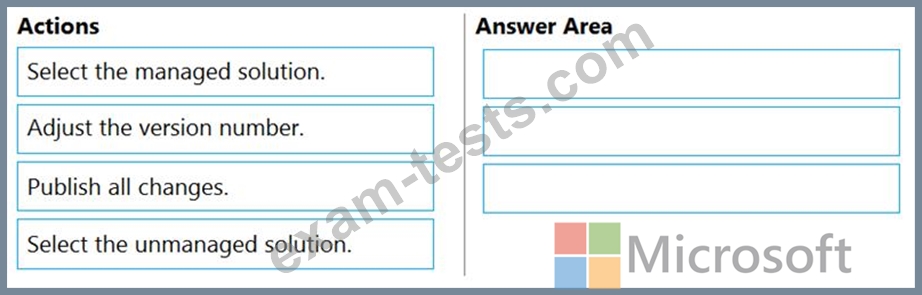
You have a solution that contains a Power Automate flow, an environment variable, and a model-driven app.
Which three steps should you perform in sequence? To answer, move the appropriate actions from the list of actions to the answer area and arrange them in the correct order.
Which three steps should you perform in sequence? To answer, move the appropriate actions from the list of actions to the answer area and arrange them in the correct order.
Correct Answer:

Explanation:
Step 1: Adjust the version number.
Step 2: Select the managed solution.
Managed Solution: A managed solution is a finalized solution that can be distributed and installed. They are created by exporting an unmanaged solution by setting restrictions to prevent any further customizations. The whole point of Managed is locking down the Component states so they cannot be edited. Deleting the Managed Solution will remove all its customisations as well as data contained. Managed Solutions become read only once deployed so they cannot be manipulated.
Step 3: Publish all changes.
Reference:
https://powerusers.microsoft.com/t5/Power-Apps-Pro-Dev-ISV/Managed-vs-Unmanaged/td-p/495685
Question 79
A company is consolidating communications processes by using Microsoft Teams and Microsoft Power Platform technologies.
A Power Automate flow monitors social media channels to identify high-impact trends.
When the Power Automate flow identifies the trends, consistently formatted and standardized feedback must be collected from the channel members within Teams.
You need to streamline the Power Automate and Teams communication process.
What should you use?
A Power Automate flow monitors social media channels to identify high-impact trends.
When the Power Automate flow identifies the trends, consistently formatted and standardized feedback must be collected from the channel members within Teams.
You need to streamline the Power Automate and Teams communication process.
What should you use?
Correct Answer: A
"Microsoft Power Platform and AI Builder components allowed us to quickly deliver an innovative and well-integrated solution within our Dynamics 365 platform for our marketing and sales business partners. The platform is a game-changer in this new world of rapid app delivery." Jim Parker: Web and Collaboration Services Manager Reference:
https://customers.microsoft.com/en-au/story/810656-hexion-manufacturing-power-platform
https://customers.microsoft.com/en-au/story/810656-hexion-manufacturing-power-platform
Question 80
You have a Power Automate flow that processes files in a Microsoft SharePoint document library. The flow only needs to be run as required. You add steps to the flow to process the files.
Before leaving the office for the day, the manager must initiate the flow. The flow must not start processing files before 11:00 PM.
You need to configure the flow.
Which two actions should you perform? Each correct answer presents part of the solution.
NOTE: Each correct selection is worth one point.
Before leaving the office for the day, the manager must initiate the flow. The flow must not start processing files before 11:00 PM.
You need to configure the flow.
Which two actions should you perform? Each correct answer presents part of the solution.
NOTE: Each correct selection is worth one point.
Correct Answer: C,D
Delay an action until a specific timestamp.
Note: The Microsoft Dataverse connector provides four ways to add wait conditions. Use these wait conditions when you need to delay processing in your flows until a particular condition is met.
Postpone triggering the flow and the first action until a specific time: Wait condition using Postpone Until.
Add a fixed delay before the next step.
Delay an action until a specific timestamp.
Delay an action until a specific event occurs.
Reference:
https://docs.microsoft.com/en-us/power-automate/dataverse/wait-conditions
Topic 1, Contoso, Ltd
Accounting system and purchasing
The company has a cloud-based ERP/accounting system and uses the General Ledger, Accounts Receivable, and Accounts Payable modules. The current system does not have any modules that handle shop floor or manufacturing planning functionality.
Employee information is maintained only within the accounting system. Access to the information is strictly controlled due to privacy regulations and company policies.
All purchasing of raw materials is performed based on bills of material (BOMs) generated by the engineering department when engineering prints are created.
The corporate office uses Dynamics 365 Finance. The operations manager reports that Dynamics 365 Finance will not be implemented for the manufacturing plants for at least five years.
Manufacturing and planning
The plant that Contoso, Ltd. acquires uses Microsoft Excel workbooks and Microsoft Word documents to track the sales pipeline, requests for quote responses, and work estimates. The documents are stored on shared network drives.
Printed engineering drawings are sometimes accidently used across orders. This results in rework, cost over runs, and missed deliveries.
The company uses Job Traveler documents to detail the operations that need to be performed and the materials needed for a given job number.
Sales
Requests for quotes are currently stored in a Sales Log workbook. The workbook includes the following information:
Customer request number
Customer name
Description
Estimated value of the sale
Status of the Request for Quote (RFQ) with the values of Won, Lost, No Bid, and Cancelled Names of the sales manager, salesperson, and estimator Name of the product line Date the quote was sent to the customer Approximate start and finish dates of the project Date the order was received, if won Job number, which is assigned if won The company has a formal process in place for managing estimates. Some sales quotes lack required supporting documentation including estimates for labor and materials even though a formal process is in place. The company wants to incorporate the formal process as part of an app.
Salespeople often do not set status of RFQs in the Sales Log to Won when a sale is closed and the customer purchase order is received.
An accurate sales pipeline and win/loss information cannot currently be reported because the close probability field in the Sales Log is being set to 100% when a sale is closed and 0% when a sale is lost.
Setting up a folder system on the network drive by a customer had not improved the hand-off of the current version of the sales quote to manufacturing.
Requirements
Solution
You plan to create a solution that uses Microsoft Teams and Power Platform.
You must convert the Sales Log workbook to a Common Data Service database.
Each department will have a separate Teams channel. Employees must only be able to access the channel for their department. All employees and management will have read access to a general company channel. The Teams site must include the following channels:
Sales
The Sales dashboard must reside in the Sales channel and must include information about active quotes, sales pipeline, and year-to-date sales KPIs for sales quotas by region.
All Sales-related documents must be stored in folders in the files location for this channel. Document versioning will be enabled. You must store the 10 most recent versions of a document.
Manufacturing
A dashboard that shows a capacity Heat map by month as well as expected sales that are likely to close for the next month.
A sortable listing of all in-process jobs from the Job Setup table, by customer, start date, and product.
Printed paper drawings must no longer be used. The drawings must be stored in folders in the files location for the manufacturing channel.
General
You must create the following apps:
Time Tracking
You must create a canvas app to track time for each employee on mobile devices. The app must include the following:
a Sign-in screen
a screen to list the week's time entries for the employee
a screen to edit current time entries for the employee
The app must meet the following requirements:
The app must store its data in the existing on-premises Microsoft SQL Server instance.
Employees must only be able to access their own time tracking records from the app.
Employees must record all time spent in the fabrication of each customer job.
Employees must only be able to modify time records for the current and previous day.
Employees must be able to scan their badges to check in and out of work. Each badge contains the employee name and a current picture.
A QR code must be added to all employee badges. The code must include the employee's number.
Job Traveler documents must be printed as PDF documents and must include UPC E barcodes for the job number and task number. The barcodes will be used with the time tracking application.
Sales
The Sales app must meet the following requirements:
Provide a central location for all sales pipeline and quote information that is easily accessible and maintains all of the versions of the estimate, quote, and engineering documents.
Include a dashboard that shows all currently active quotes, their status in the sales cycle, the probability of closing, and estimated manufacturing and installation dates, by customer, product division, status, and salesperson.
The Sales Log app must enforce process standards related to the completion of estimates and supporting materials needed during the sales lifecycle.
Automatically perform the following actions immediately when a sale is won:
Generate a sequential job number.
Copy key sales information to the Job Setup entity used by manufacturing.
If the sale is lost, the Status field must be set to Lost and the reason for the loss must be entered into a provided text field. The reason must be added to the end of the description field.
Ensure that employees can easily update the Sales Log even if they are at a customer site.
Manufacturing and planning
The app must meet the following requirements:
Provides features to plan and predict capacity resource requirements for current and upcoming orders in the pipeline.
Replace paper timesheets and track check-in, check-out, breaks, and the time spent on each job task.
Record time elapsed while performing work and for viewing of engineering drawings.
The Job Setup entity must store its data in the existing on-premises SQL Server instance.
Job Traveler documents must be generated as a PDF document and printed from the Job Setup entity.
Issues
Uses report that the customer request number is difficult to interpret. They request that you change the number to a system generated sequential number.
The operations manager reports that users often incorrectly sign in to the time tracking app. The operations manager asks that the time tracking app display the employee's photo once they have scanned their badge.
Users want to be able to see their weekly total time entered from all screens.
Testers report that they can see time entries in the Time Tracker app, not just their own. Additionally, they can also edit any existing time entries.
Note: The Microsoft Dataverse connector provides four ways to add wait conditions. Use these wait conditions when you need to delay processing in your flows until a particular condition is met.
Postpone triggering the flow and the first action until a specific time: Wait condition using Postpone Until.
Add a fixed delay before the next step.
Delay an action until a specific timestamp.
Delay an action until a specific event occurs.
Reference:
https://docs.microsoft.com/en-us/power-automate/dataverse/wait-conditions
Topic 1, Contoso, Ltd
Accounting system and purchasing
The company has a cloud-based ERP/accounting system and uses the General Ledger, Accounts Receivable, and Accounts Payable modules. The current system does not have any modules that handle shop floor or manufacturing planning functionality.
Employee information is maintained only within the accounting system. Access to the information is strictly controlled due to privacy regulations and company policies.
All purchasing of raw materials is performed based on bills of material (BOMs) generated by the engineering department when engineering prints are created.
The corporate office uses Dynamics 365 Finance. The operations manager reports that Dynamics 365 Finance will not be implemented for the manufacturing plants for at least five years.
Manufacturing and planning
The plant that Contoso, Ltd. acquires uses Microsoft Excel workbooks and Microsoft Word documents to track the sales pipeline, requests for quote responses, and work estimates. The documents are stored on shared network drives.
Printed engineering drawings are sometimes accidently used across orders. This results in rework, cost over runs, and missed deliveries.
The company uses Job Traveler documents to detail the operations that need to be performed and the materials needed for a given job number.
Sales
Requests for quotes are currently stored in a Sales Log workbook. The workbook includes the following information:
Customer request number
Customer name
Description
Estimated value of the sale
Status of the Request for Quote (RFQ) with the values of Won, Lost, No Bid, and Cancelled Names of the sales manager, salesperson, and estimator Name of the product line Date the quote was sent to the customer Approximate start and finish dates of the project Date the order was received, if won Job number, which is assigned if won The company has a formal process in place for managing estimates. Some sales quotes lack required supporting documentation including estimates for labor and materials even though a formal process is in place. The company wants to incorporate the formal process as part of an app.
Salespeople often do not set status of RFQs in the Sales Log to Won when a sale is closed and the customer purchase order is received.
An accurate sales pipeline and win/loss information cannot currently be reported because the close probability field in the Sales Log is being set to 100% when a sale is closed and 0% when a sale is lost.
Setting up a folder system on the network drive by a customer had not improved the hand-off of the current version of the sales quote to manufacturing.
Requirements
Solution
You plan to create a solution that uses Microsoft Teams and Power Platform.
You must convert the Sales Log workbook to a Common Data Service database.
Each department will have a separate Teams channel. Employees must only be able to access the channel for their department. All employees and management will have read access to a general company channel. The Teams site must include the following channels:
Sales
The Sales dashboard must reside in the Sales channel and must include information about active quotes, sales pipeline, and year-to-date sales KPIs for sales quotas by region.
All Sales-related documents must be stored in folders in the files location for this channel. Document versioning will be enabled. You must store the 10 most recent versions of a document.
Manufacturing
A dashboard that shows a capacity Heat map by month as well as expected sales that are likely to close for the next month.
A sortable listing of all in-process jobs from the Job Setup table, by customer, start date, and product.
Printed paper drawings must no longer be used. The drawings must be stored in folders in the files location for the manufacturing channel.
General
You must create the following apps:
Time Tracking
You must create a canvas app to track time for each employee on mobile devices. The app must include the following:
a Sign-in screen
a screen to list the week's time entries for the employee
a screen to edit current time entries for the employee
The app must meet the following requirements:
The app must store its data in the existing on-premises Microsoft SQL Server instance.
Employees must only be able to access their own time tracking records from the app.
Employees must record all time spent in the fabrication of each customer job.
Employees must only be able to modify time records for the current and previous day.
Employees must be able to scan their badges to check in and out of work. Each badge contains the employee name and a current picture.
A QR code must be added to all employee badges. The code must include the employee's number.
Job Traveler documents must be printed as PDF documents and must include UPC E barcodes for the job number and task number. The barcodes will be used with the time tracking application.
Sales
The Sales app must meet the following requirements:
Provide a central location for all sales pipeline and quote information that is easily accessible and maintains all of the versions of the estimate, quote, and engineering documents.
Include a dashboard that shows all currently active quotes, their status in the sales cycle, the probability of closing, and estimated manufacturing and installation dates, by customer, product division, status, and salesperson.
The Sales Log app must enforce process standards related to the completion of estimates and supporting materials needed during the sales lifecycle.
Automatically perform the following actions immediately when a sale is won:
Generate a sequential job number.
Copy key sales information to the Job Setup entity used by manufacturing.
If the sale is lost, the Status field must be set to Lost and the reason for the loss must be entered into a provided text field. The reason must be added to the end of the description field.
Ensure that employees can easily update the Sales Log even if they are at a customer site.
Manufacturing and planning
The app must meet the following requirements:
Provides features to plan and predict capacity resource requirements for current and upcoming orders in the pipeline.
Replace paper timesheets and track check-in, check-out, breaks, and the time spent on each job task.
Record time elapsed while performing work and for viewing of engineering drawings.
The Job Setup entity must store its data in the existing on-premises SQL Server instance.
Job Traveler documents must be generated as a PDF document and printed from the Job Setup entity.
Issues
Uses report that the customer request number is difficult to interpret. They request that you change the number to a system generated sequential number.
The operations manager reports that users often incorrectly sign in to the time tracking app. The operations manager asks that the time tracking app display the employee's photo once they have scanned their badge.
Users want to be able to see their weekly total time entered from all screens.
Testers report that they can see time entries in the Time Tracker app, not just their own. Additionally, they can also edit any existing time entries.
- Other Version
- 1987Microsoft.PL-100.v2024-08-06.q291
- 1018Microsoft.PL-100.v2024-06-25.q106
- 2642Microsoft.PL-100.v2023-09-08.q241
- 4295Microsoft.PL-100.v2022-02-11.q116
- 55Microsoft.Trainingdump.PL-100.v2021-09-21.by.dinah.72q.pdf
- Latest Upload
- 200PaloAltoNetworks.NGFW-Engineer.v2026-05-01.q43
- 292Nokia.4A0-113.v2026-05-01.q69
- 251EC-COUNCIL.312-49v11.v2026-04-30.q214
- 227Microsoft.MB-820.v2026-04-30.q101
- 207Salesforce.MC-202.v2026-04-30.q57
- 204BICSI.INSTC_V8.v2026-04-29.q53
- 332NMLS.MLO.v2026-04-28.q82
- 241NCARB.Project-Management.v2026-04-28.q27
- 457EMC.D-AV-DY-23.v2026-04-27.q184
- 1109ServiceNow.CSA.v2026-04-27.q483
[×]
Download PDF File
Enter your email address to download Microsoft.PL-100.v2022-06-03.q117 Practice Test