Question 56
You are an app builder for a medical office. The medical office uses activities to book appointments and business process flows to track patient status. The cleaning staff wants the app to connect directly to a Microsoft Excel workbook to track cleaning tasks. The office does not have access to reporting tools including Power BI.
You need to create apps for the following groups of users. Apps must not require customizations or the use of additional products.

Which type of app should you build for each group? To answer, drag the appropriate app types to the correct groups. Each app type may be used once, more than once, or not at all. You may need to drag the split bar between panes or scroll to view content.
NOTE: Each correct selection is worth one point.

You need to create apps for the following groups of users. Apps must not require customizations or the use of additional products.
Which type of app should you build for each group? To answer, drag the appropriate app types to the correct groups. Each app type may be used once, more than once, or not at all. You may need to drag the split bar between panes or scroll to view content.
NOTE: Each correct selection is worth one point.

Question 57
You have a model-driven app that has an entity named Marinas. You have an entity named Boats that list the boats associated with each marina.
You must add a list of boats to the Marinas form. You must also add an option for users to select different views including boat owners and marina members.
You need to embed the list of boats associated with a Marina record in the entity form.
In which order should you perform the actions? To answer, move all actions from the list of actions to the answer area and arrange them in the correct order.

You must add a list of boats to the Marinas form. You must also add an option for users to select different views including boat owners and marina members.
You need to embed the list of boats associated with a Marina record in the entity form.
In which order should you perform the actions? To answer, move all actions from the list of actions to the answer area and arrange them in the correct order.

Question 58
You create a new solution publisher and include a publisher prefix value.
Which two actions can you perform? Each correct answer presents a complete solution.
NOTE: Each correct selection is worth one point.
Which two actions can you perform? Each correct answer presents a complete solution.
NOTE: Each correct selection is worth one point.
Question 59
HOTSPOT
A coworker creates a canvas app.
The canvas app contains the following formula. The formula is attached to the OnVisible property of the first screen that users see:
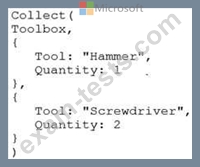
You are updating the canvas app.
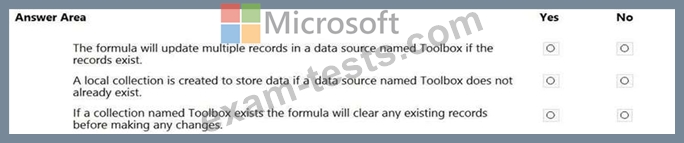
For each of the following statements, select Yes if the statement is true. Otherwise, select No.
NOTE: Each correct selection is worth one point.
Hot Area:
A coworker creates a canvas app.
The canvas app contains the following formula. The formula is attached to the OnVisible property of the first screen that users see:
You are updating the canvas app.
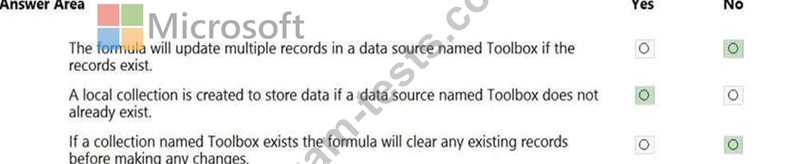
For each of the following statements, select Yes if the statement is true. Otherwise, select No.
NOTE: Each correct selection is worth one point.
Hot Area:
Question 60
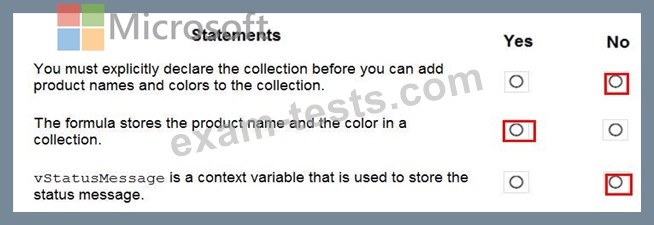
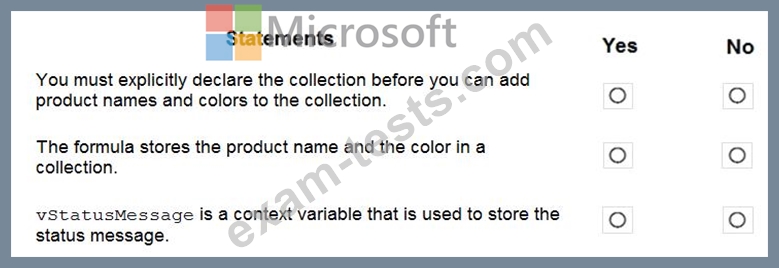
You need to store a list of products and their colors. You have a Power Apps app that includes the following elements:
a text box for the product name
a drop-down list for the product color
a button to add a product to the list
a status message that shows whether the addition of a product to the list was successful The button uses the following formula:

For each of the following statements, select Yes if the statement is true. Otherwise, select No.
NOTE: Each correct selection is worth one point.
a text box for the product name
a drop-down list for the product color
a button to add a product to the list
a status message that shows whether the addition of a product to the list was successful The button uses the following formula:
For each of the following statements, select Yes if the statement is true. Otherwise, select No.
NOTE: Each correct selection is worth one point.