

Question 51
You configure and test a user interface (Ul) flow. You plan to run the flow as a scheduled flow.
The Ul flow must run on a Windows 10 device. As part of process automation, the Ul flow must sign into the Windows 10 device with the credentials for a user account named User1.
You need to ensure that the flow runs during non-peak hours and requires no physical user intervention.
What should you do?
The Ul flow must run on a Windows 10 device. As part of process automation, the Ul flow must sign into the Windows 10 device with the credentials for a user account named User1.
You need to ensure that the flow runs during non-peak hours and requires no physical user intervention.
What should you do?
Question 52
You are a Dynamics 365 for Customer Service administrator.
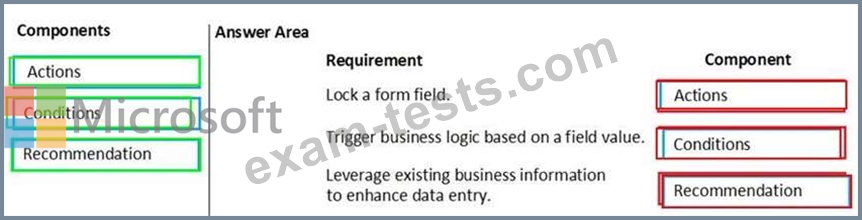
You must create a form for team members to use. The form must provide the ability to:
Lock a field on a form.
Trigger business logic based on a field value.
Use existing business information to enhance data entry.
You need to implement business rule components to create the form.
Which components should you use? To answer, drag the appropriate components to the correct requirements. Each component may be used once, more than once, or not at all. You may need to drag the split bar between panes or scroll to view content.
NOTE: Each correct selection is worth one point.

You must create a form for team members to use. The form must provide the ability to:
Lock a field on a form.
Trigger business logic based on a field value.
Use existing business information to enhance data entry.
You need to implement business rule components to create the form.
Which components should you use? To answer, drag the appropriate components to the correct requirements. Each component may be used once, more than once, or not at all. You may need to drag the split bar between panes or scroll to view content.
NOTE: Each correct selection is worth one point.
Question 53
Note: This question is part of a series of questions that present the same scenario. Each question in the series contains a unique solution that might meet the stated goals. Some question sets might have more than one correct solution, while others might not have a correct solution.
After you answer a question in this section, you will NOT be able to return to it. As a result, these questions will not appear in the review screen.
You are creating Power Virtual Agents chatbot that captures demographic information about customers.
The chatbot must determine the group a customer belongs to based on their age. The age groups are:
* 0 - 17
* 18 - 25
* 26 - 35
* 36 - 55
* 55 - 100
You need to configure the chatbot to ask a question that can be used to determine the correct age group.
Solution: Create a custom Age group entity and synonyms for each individual age in the corresponding item. Use Age group for Identify in the question.
Does this meet the goal?
After you answer a question in this section, you will NOT be able to return to it. As a result, these questions will not appear in the review screen.
You are creating Power Virtual Agents chatbot that captures demographic information about customers.
The chatbot must determine the group a customer belongs to based on their age. The age groups are:
* 0 - 17
* 18 - 25
* 26 - 35
* 36 - 55
* 55 - 100
You need to configure the chatbot to ask a question that can be used to determine the correct age group.
Solution: Create a custom Age group entity and synonyms for each individual age in the corresponding item. Use Age group for Identify in the question.
Does this meet the goal?
Question 54
Note: This question is part of a series of questions that present the same scenario. Each question in the series contains a unique solution that might meet the stated goals. Some question sets might have more than one correct solution, while others might not have a correct solution.
After you answer a question in this section, you will NOT be able to return to it. As a result, these questions will not appear in the review screen.
You are creating Power Virtual Agents chatbot that captures demographic information about customers.
The chatbot must determine the group a customer belongs to based on their age. The age groups are:
* 0 - 17
* 18 - 25
* 26 - 35
* 36 - 55
* 55 - 100
You need to configure the chatbot to ask a question that can be used to determine the correct age group.
Solution: Use age for Identify in the question and then add branches for each group that use conditional logic.
Does this meet the goal?
After you answer a question in this section, you will NOT be able to return to it. As a result, these questions will not appear in the review screen.
You are creating Power Virtual Agents chatbot that captures demographic information about customers.
The chatbot must determine the group a customer belongs to based on their age. The age groups are:
* 0 - 17
* 18 - 25
* 26 - 35
* 36 - 55
* 55 - 100
You need to configure the chatbot to ask a question that can be used to determine the correct age group.
Solution: Use age for Identify in the question and then add branches for each group that use conditional logic.
Does this meet the goal?
Question 55
You ate a Dynamics 365 Customer Engagement administrator. You create workflows to automate business processes. You need to configure a workflow to meet the following requirements:
* Be triggered when a condition is met.
* Run immediately.
* Perform an action when a condition is met.
How should you configure the workflow? To answer, select the appropriate configuration in the answer area.
NOTE: Each correct selection is worth one point.

* Be triggered when a condition is met.
* Run immediately.
* Perform an action when a condition is met.
How should you configure the workflow? To answer, select the appropriate configuration in the answer area.
NOTE: Each correct selection is worth one point.
