

Question 16
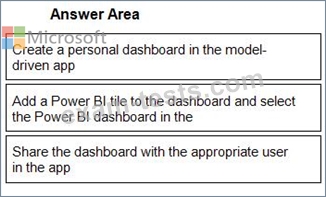
You create a report by using Power Bl Desktop and publish the report to the Power Bl service. You enable Power Bl visualization embedding in a model-driven app.
You need to configure the model-driven app to display a Power Bi tile
Which four actions should you perform in sequence? To answer, move the appropriate actions from the list of actions to the answer area and arrange them in the correct order.

You need to configure the model-driven app to display a Power Bi tile
Which four actions should you perform in sequence? To answer, move the appropriate actions from the list of actions to the answer area and arrange them in the correct order.
Question 17
You are a Dynamics 365 Customer Service help desk administrator.
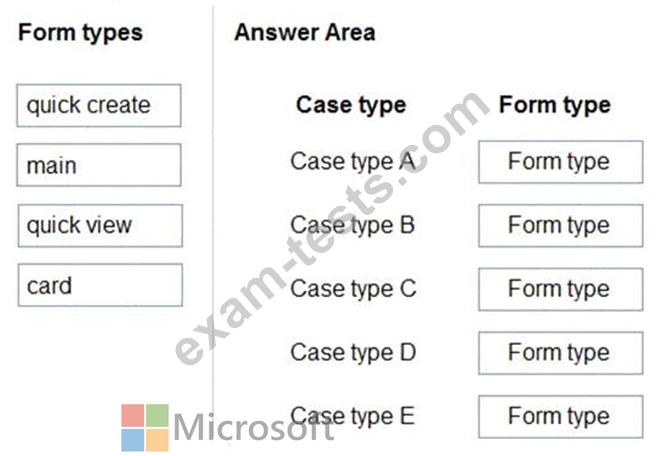
Cases entered in forms require different types of data to be stored in different types of fields.
You need to create forms for each of the following case types:

Which form types should you create? To answer, drag the appropriate form types to the meet the data entry requirements. Each source may be used once, more than once, or not at all. You may need to drag the split bar between panes or scroll to view content.
NOTE: Each correct selection is worth one point.
Cases entered in forms require different types of data to be stored in different types of fields.
You need to create forms for each of the following case types:
Which form types should you create? To answer, drag the appropriate form types to the meet the data entry requirements. Each source may be used once, more than once, or not at all. You may need to drag the split bar between panes or scroll to view content.
NOTE: Each correct selection is worth one point.


Question 18
You are a Dynamics 365 Customer Service developer.
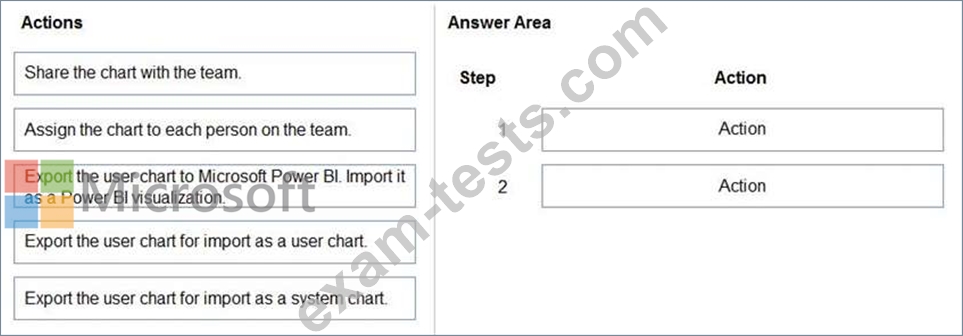
A salesperson creates a chart.
You need to ensure that the chart is available to all users on the team.
Which actions should the salesperson perform? To answer, drag the appropriate actions to the correct users. Each action may be used once, more than once, or not at all. You may need to drag the split bar between panes or scroll to view content.
NOTE: Each correct selection is worth one point.
A salesperson creates a chart.
You need to ensure that the chart is available to all users on the team.
Which actions should the salesperson perform? To answer, drag the appropriate actions to the correct users. Each action may be used once, more than once, or not at all. You may need to drag the split bar between panes or scroll to view content.
NOTE: Each correct selection is worth one point.

Question 19
You implement an editable grid for the Account entity.
The business team provides the following list of features that they would like you to implement:
Group by or sort columns in the current view.
Configure a business rule to show an error message.
Edit values in calculated fields.
Edit the Address composite field.
Use the editable grid on mobile phones.
Which actions can you perform? To answer, select the appropriate options in the answer area.
NOTE: Each correct selection is worth one point.

The business team provides the following list of features that they would like you to implement:
Group by or sort columns in the current view.
Configure a business rule to show an error message.
Edit values in calculated fields.
Edit the Address composite field.
Use the editable grid on mobile phones.
Which actions can you perform? To answer, select the appropriate options in the answer area.
NOTE: Each correct selection is worth one point.

Question 20
The sales manager receives a list of leads from a partner company monthly. The field names that are provided do not match the fields in Dynamics 365. A data map does not exist.
You need to import the leads without changing the data from the partner company.
What should you do?
You need to import the leads without changing the data from the partner company.
What should you do?