

Question 6
HOTSPOT
How should you distribute the reports to the board? To answer, select the appropriate options in the answer area. NOTE: Each correct selection is worth one point.
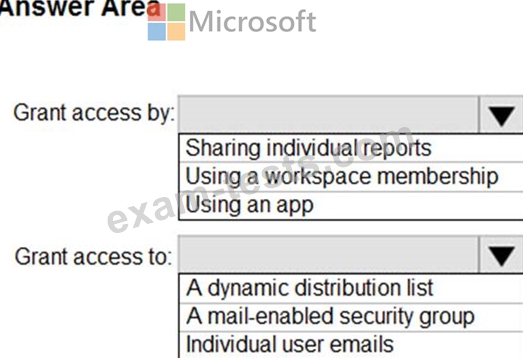
How should you distribute the reports to the board? To answer, select the appropriate options in the answer area. NOTE: Each correct selection is worth one point.

Question 7
Note: This question is part of a series of questions that present the same scenario. Each question in the series contains a unique solution that might meet the stated goals. Some question sets might have more than one correct solution, while others might not have a correct solution.
After you answer a question in this scenario, you will NOT be able to return to it. As a result, these questions will not appear in the review screen.
You have several reports and dashboards in a workspace.
You need to grant all organizational users read access to a dashboard and several reports.
Solution: You create an Azure Active Directory group that contains all the users. You share each report and dashboard to the group.
Does this meet the goal?
After you answer a question in this scenario, you will NOT be able to return to it. As a result, these questions will not appear in the review screen.
You have several reports and dashboards in a workspace.
You need to grant all organizational users read access to a dashboard and several reports.
Solution: You create an Azure Active Directory group that contains all the users. You share each report and dashboard to the group.
Does this meet the goal?
Question 8
HOTSPOT
You have two tables named Customers and Invoice in a Power BI model.
The Customers table contains the following fields:
* CustomerID
* Customer City
* Customer State
* Customer Name
* Customer Address 1
* Customer Address 2
* Customer Postal Code
The Invoice table contains the following fields:
* Order ID
* Invoice ID
* Invoice Date
* Customer ID
* Total Amount
* Total Item Count
The Customers table is related to the Invoice table through the Customer ID columns. A customer can have many invoices within one month.
The Power BI model must provide the following information:
* The number of customers invoiced in each state last month
* The average invoice amount per customer in each postal code
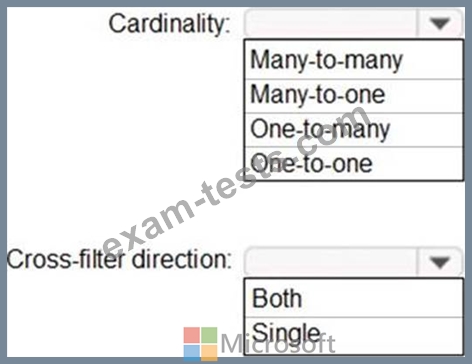
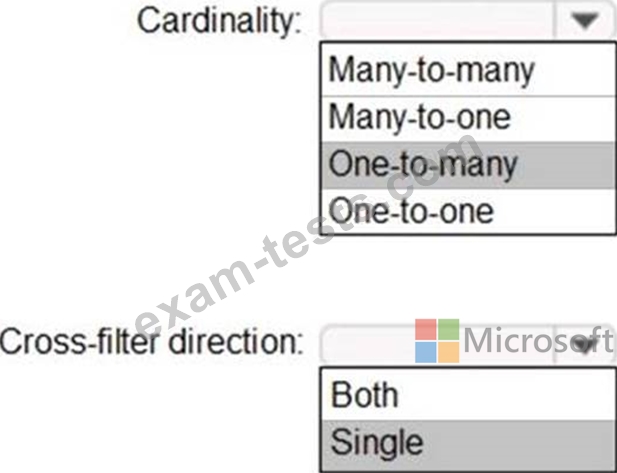
You need to define the relationship from the Customers table to the Invoice table. The solution must optimize query performance.
What should you configure? To answer, select the appropriate options in the answer area. NOTE: Each correct selection is worth one point.
You have two tables named Customers and Invoice in a Power BI model.
The Customers table contains the following fields:
* CustomerID
* Customer City
* Customer State
* Customer Name
* Customer Address 1
* Customer Address 2
* Customer Postal Code
The Invoice table contains the following fields:
* Order ID
* Invoice ID
* Invoice Date
* Customer ID
* Total Amount
* Total Item Count
The Customers table is related to the Invoice table through the Customer ID columns. A customer can have many invoices within one month.
The Power BI model must provide the following information:
* The number of customers invoiced in each state last month
* The average invoice amount per customer in each postal code
You need to define the relationship from the Customers table to the Invoice table. The solution must optimize query performance.
What should you configure? To answer, select the appropriate options in the answer area. NOTE: Each correct selection is worth one point.
Question 9
You have an API that returns more than 100 columns. The following is a sample of column names.
client_notified_timestamp
client_notified_source
client_notified_sourceid
client_notified_value
client_responded_timestamp
client_responded_source
client_responded_sourceid
client_responded_value
You plan to include only a subset of the returned columns.
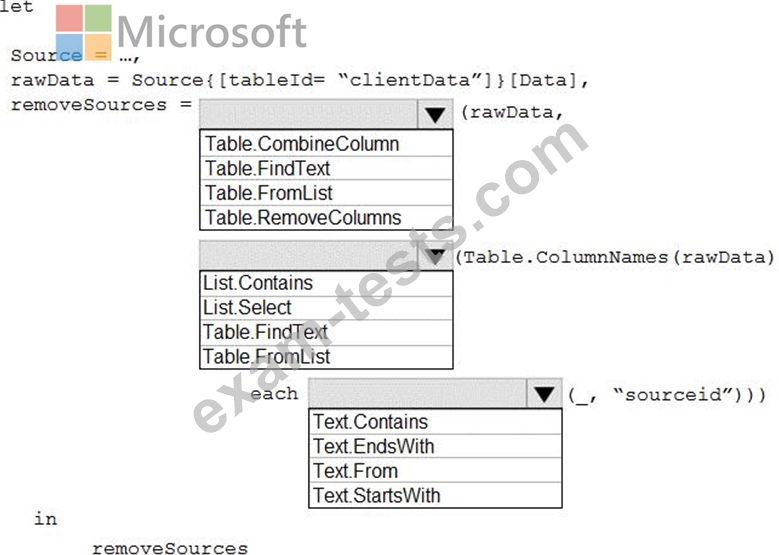
You need to remove any columns that have a suffix of sourceid.
How should you complete the Power Query M code? To answer, select the appropriate options in the answer area.
NOTE: Each correct selection is worth one point.
client_notified_timestamp
client_notified_source
client_notified_sourceid
client_notified_value
client_responded_timestamp
client_responded_source
client_responded_sourceid
client_responded_value
You plan to include only a subset of the returned columns.
You need to remove any columns that have a suffix of sourceid.
How should you complete the Power Query M code? To answer, select the appropriate options in the answer area.
NOTE: Each correct selection is worth one point.

Question 10
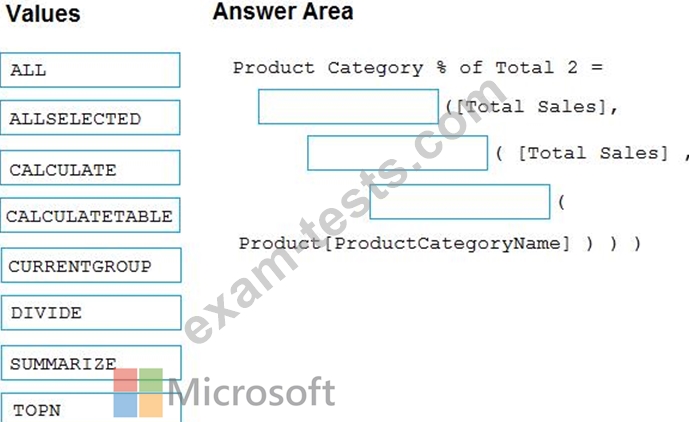
You have a Microsoft Power BI data model that contains three tables named Sales, Product, and Date.
The Sales table has an existing measure named [Total Sales] that sums the total sales from the Sales table.
You need to write a calculation that returns the percentage of total sales that a selected ProductCategoryName value represents. The calculation must respect any slicers on ProductCategoryName and must show the percentage of visible total sales. For example, if there are four ProductCategoryName values, and a user filters one out, a table showing ProductCategoryName and the calculation must sum up to 100 percent.
How should you complete the calculation? To answer, drag the appropriate values to the correct targets. Each value may be used once, more than once, or not at all. You may need to drag the split bar between panes or scroll to view content.
NOTE: Each correct selection is worth one point.
The Sales table has an existing measure named [Total Sales] that sums the total sales from the Sales table.
You need to write a calculation that returns the percentage of total sales that a selected ProductCategoryName value represents. The calculation must respect any slicers on ProductCategoryName and must show the percentage of visible total sales. For example, if there are four ProductCategoryName values, and a user filters one out, a table showing ProductCategoryName and the calculation must sum up to 100 percent.
How should you complete the calculation? To answer, drag the appropriate values to the correct targets. Each value may be used once, more than once, or not at all. You may need to drag the split bar between panes or scroll to view content.
NOTE: Each correct selection is worth one point.
