

Question 56
You use Azure Sentinel to monitor irregular Azure activity.
You create custom analytics rules to detect threats as shown in the following exhibit.
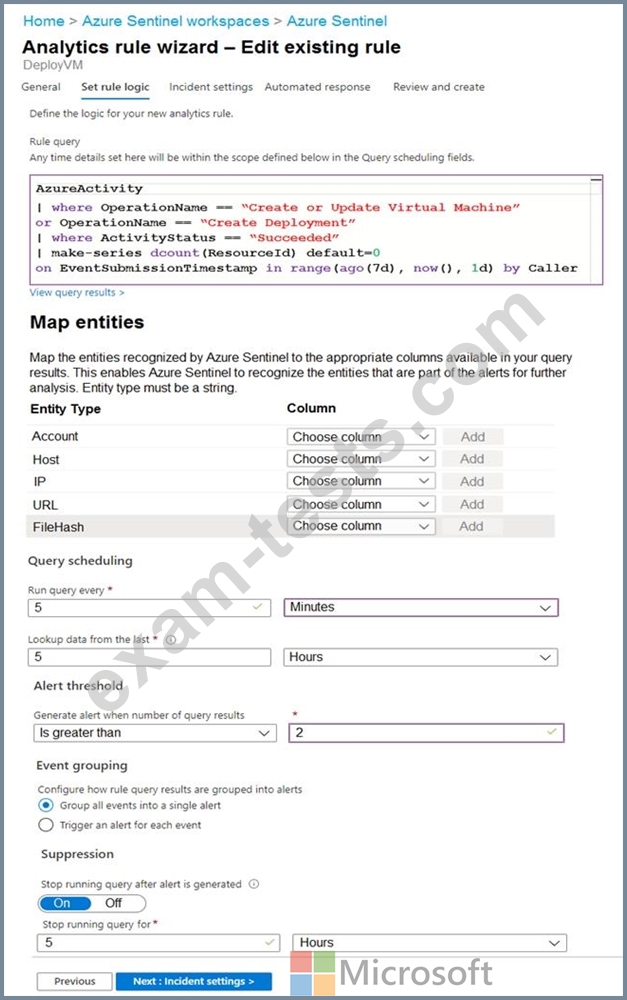
You do NOT define any incident settings as part of the rule definition.
Use the drop-down menus to select the answer choice that completes each statement based on the information presented in the graphic.
NOTE: Each correct selection is worth one point.
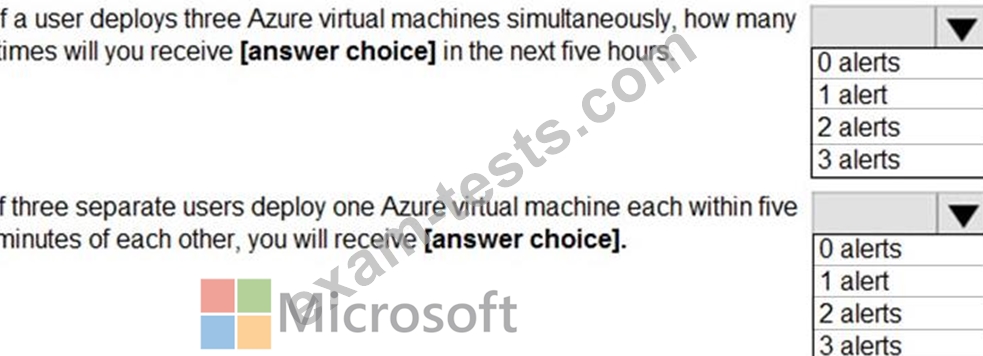
You create custom analytics rules to detect threats as shown in the following exhibit.
You do NOT define any incident settings as part of the rule definition.
Use the drop-down menus to select the answer choice that completes each statement based on the information presented in the graphic.
NOTE: Each correct selection is worth one point.

Question 57
You have on-premises servers that run Windows Server.
You have a Microsoft Sentinel workspace named SW1. SW1 is configured to collect Windows Security log entries from the servers by using the Azure Monitor Agent data connector.
You plan to limit the scope of collected events to events 4624 and 462S only.
You need to use a PowerShell script to validate the syntax of the filter applied to the connector.
How should you complete the script? To answer, select the appropriate options in the answer area.
NOTE: Each correct selection is worth one point.

You have a Microsoft Sentinel workspace named SW1. SW1 is configured to collect Windows Security log entries from the servers by using the Azure Monitor Agent data connector.
You plan to limit the scope of collected events to events 4624 and 462S only.
You need to use a PowerShell script to validate the syntax of the filter applied to the connector.
How should you complete the script? To answer, select the appropriate options in the answer area.
NOTE: Each correct selection is worth one point.


Question 58
You have an Azure subscription that contains a quest user named Userl and a Microsoft Sentinel workspace named workspacel.
You need to ensure that User1 can triage Microsoft Sentinel incidents in workspace1. The solution must use the principle of least privilege.
Which roles should you assign to User1? To answer, select the appropriate options in the answer area.
NOTE: Each correct selection is worth one point.

You need to ensure that User1 can triage Microsoft Sentinel incidents in workspace1. The solution must use the principle of least privilege.
Which roles should you assign to User1? To answer, select the appropriate options in the answer area.
NOTE: Each correct selection is worth one point.

Question 59
You have two Microsoft Entra tenants named Tenantl and Tenant2. Each tenant is linked to an Azure subscription. Tenant! contains a group named Group1. Tenant2 contains a group named Group2.
You need to implement Microsoft Sentinel for each tenant. The solution must meet the following requirements:
* Ensure that Group1 can manage security incidents for Tenantl and Tenant2 in a single workspace.
* Ensure that Group2 can manage security incidents only for Tenant2.
* Minimize the use of guest accounts.
* Minimize administrative effort.
* Minimize costs.
What should you include in the solution?
You need to implement Microsoft Sentinel for each tenant. The solution must meet the following requirements:
* Ensure that Group1 can manage security incidents for Tenantl and Tenant2 in a single workspace.
* Ensure that Group2 can manage security incidents only for Tenant2.
* Minimize the use of guest accounts.
* Minimize administrative effort.
* Minimize costs.
What should you include in the solution?
Question 60
Hotspot Question
You have a Microsoft 365 E5 subscription that is linked to a Microsoft Entra tenant named contoso.com.
You need to query Microsoft Graph activity logs to identify changes to the roles in contoso.com.
How should you complete the KQL query? To answer, select the appropriate options in the answer area.
NOTE: Each correct selection is worth one point

You have a Microsoft 365 E5 subscription that is linked to a Microsoft Entra tenant named contoso.com.
You need to query Microsoft Graph activity logs to identify changes to the roles in contoso.com.
How should you complete the KQL query? To answer, select the appropriate options in the answer area.
NOTE: Each correct selection is worth one point
