

Question 171
You have an Azure AD tenant named contoso.com that has Email one-time passcode for guests set to Yes.
You invite the guest users shown in the following table.

Which users will receive a one-time passcode, and how long will the passcode be valid? To answer, select the appropriate options in the answer area.
NOTE: Each correct selection is worth one point.

You invite the guest users shown in the following table.
Which users will receive a one-time passcode, and how long will the passcode be valid? To answer, select the appropriate options in the answer area.
NOTE: Each correct selection is worth one point.


Question 172
Your network contains an on-premises Active Directory domain named contoso.com. The domain contains the objects shown in the following table.

You install Azure AD Connect. You configure the Domain and OU filtering settings as shown in the Domain and OU Filtering exhibit. (Click the Domain and OU Filtering tab.)

You configure the Filter users and devices settings as shown in the Filter Users and Devices exhibit. (Click the Filter Users and Devices tab.)

For each of the following statements, select Yes if the statement is true. Otherwise, select No.

You install Azure AD Connect. You configure the Domain and OU filtering settings as shown in the Domain and OU Filtering exhibit. (Click the Domain and OU Filtering tab.)
You configure the Filter users and devices settings as shown in the Filter Users and Devices exhibit. (Click the Filter Users and Devices tab.)
For each of the following statements, select Yes if the statement is true. Otherwise, select No.


Question 173
You have an on-premises datacenter that contains the hosts shown in the following table.
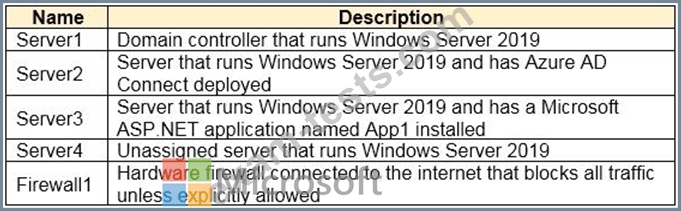
You have an Azure Active Directory (Azure AD) tenant that syncs to the Active Directory forest. Multi-factor authentication (MFA) is enforced for Azure AD.
You need to ensure that you can publish App1 to Azure AD users.
What should you configure on Server and Firewall1? To answer, select the appropriate options in the answer area.
NOTE: Each correct selection is worth one point.
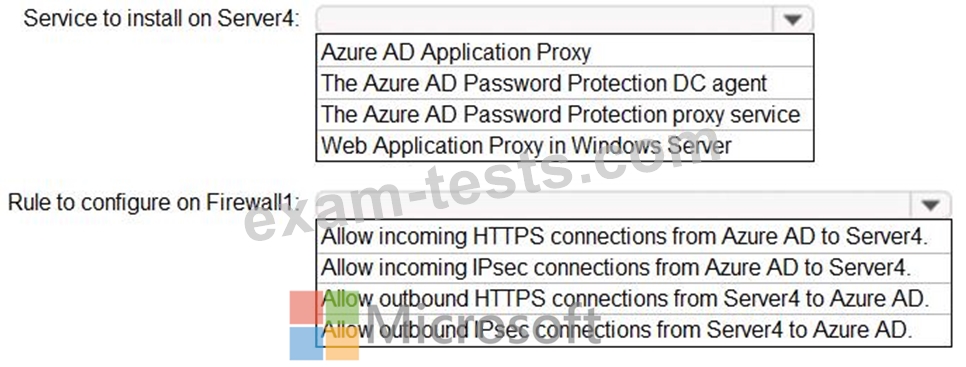
You have an Azure Active Directory (Azure AD) tenant that syncs to the Active Directory forest. Multi-factor authentication (MFA) is enforced for Azure AD.
You need to ensure that you can publish App1 to Azure AD users.
What should you configure on Server and Firewall1? To answer, select the appropriate options in the answer area.
NOTE: Each correct selection is worth one point.

Question 174
You have a Microsoft 365 tenant.
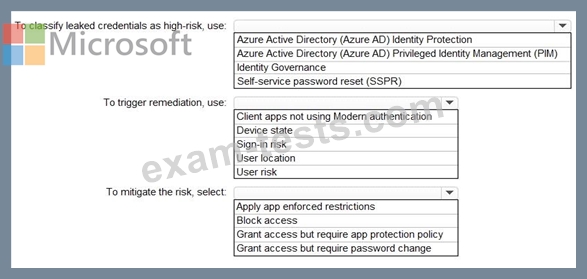
You need to identify users who have leaked credentials. The solution must meet the following requirements.
* Identity sign-Ins by users who ate suspected of having leaked credentials.
* Rag the sign-ins as a high risk event.
* Immediately enforce a control to mitigate the risk, while still allowing the user to access applications.
What should you use? To answer, select the appropriate options in the answer area.
NOTE: Each correct selection is worth one point.
You need to identify users who have leaked credentials. The solution must meet the following requirements.
* Identity sign-Ins by users who ate suspected of having leaked credentials.
* Rag the sign-ins as a high risk event.
* Immediately enforce a control to mitigate the risk, while still allowing the user to access applications.
What should you use? To answer, select the appropriate options in the answer area.
NOTE: Each correct selection is worth one point.

Question 175
You have an Azure AD tenant that contains the users shown in the following table.

The User settings for enterprise applications have the following configuration.
* Users can consent to apps accessing company data on their behalf:
* Users can consent to apps accessing company data for the groups they
* Users can request admin consent to apps they are unable to consent to: Yes
* Who can review admin consent requests: Admin2, User2
User1 attempts to add an app that requires consent to access company data.
Which user can provide consent?
The User settings for enterprise applications have the following configuration.
* Users can consent to apps accessing company data on their behalf:
* Users can consent to apps accessing company data for the groups they
* Users can request admin consent to apps they are unable to consent to: Yes
* Who can review admin consent requests: Admin2, User2
User1 attempts to add an app that requires consent to access company data.
Which user can provide consent?