

Question 141
You have 2,500 users who are assigned Microsoft Office 365 Enterprise E3 licenses. The licenses are assigned to individual users.
From the Groups blade in the Azure Active Directory admin center, you assign Microsoft 365 Enterprise E5 licenses to the users.
You need to remove the Office 365 Enterprise E3 licenses from the users by using the least amount of administrative effort.
What should you use?
From the Groups blade in the Azure Active Directory admin center, you assign Microsoft 365 Enterprise E5 licenses to the users.
You need to remove the Office 365 Enterprise E3 licenses from the users by using the least amount of administrative effort.
What should you use?
Question 142
You have an Azure subscription that contains a user named User! and two resource groups named RG1 and RG2.
You need to ensure that User1 can perform the following tasks:
* View all resources.
* Restart virtual machines.
* Create virtual machines in RG1 only.
* Create storage accounts in RG1 only.
What is the minimum number of role-based access control (RBAC) role assignment* required?
You need to ensure that User1 can perform the following tasks:
* View all resources.
* Restart virtual machines.
* Create virtual machines in RG1 only.
* Create storage accounts in RG1 only.
What is the minimum number of role-based access control (RBAC) role assignment* required?
Question 143
Hotspot Question
You have a Microsoft 365 E5 subscription that contains three groups named Group1, Group2, and Group3, and the users shown in the following table.

You create a Conditional Access policy named CA1 that has the following settings:
- Users
- Include
-- Users and groups: Group1
- Exclude
-- Users and groups: Group2
-- Directory roles: Global Administrator
- Target resources
-- Include: All cloud apps
- Access controls
-- Grant: Require multifactor authentication
You create a Conditional Access policy named CA2 that has the following settings:
- Users
- Include
-- Users and groups: Group2
- Exclude
-- Users and groups: Group3
- Target resources
-- Include: All cloud apps
- Access controls
-- Grant: Block access
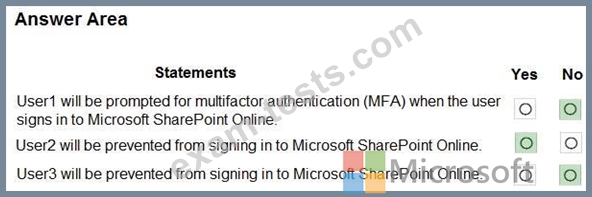
For each of the following statements, select Yes if the statement is true. Otherwise, select No.
NOTE: Each correct selection is worth one point.
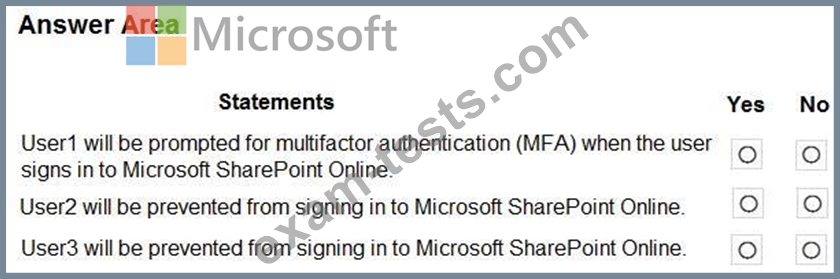
You have a Microsoft 365 E5 subscription that contains three groups named Group1, Group2, and Group3, and the users shown in the following table.
You create a Conditional Access policy named CA1 that has the following settings:
- Users
- Include
-- Users and groups: Group1
- Exclude
-- Users and groups: Group2
-- Directory roles: Global Administrator
- Target resources
-- Include: All cloud apps
- Access controls
-- Grant: Require multifactor authentication
You create a Conditional Access policy named CA2 that has the following settings:
- Users
- Include
-- Users and groups: Group2
- Exclude
-- Users and groups: Group3
- Target resources
-- Include: All cloud apps
- Access controls
-- Grant: Block access
For each of the following statements, select Yes if the statement is true. Otherwise, select No.
NOTE: Each correct selection is worth one point.
Question 144
You have an Azure subscription that contains a user named User1. You need to meet the following requirements:
* Prevent User1 from being added as an owner of newly registered apps.
* Ensure that User1 can manage the application proxy settings.
* Ensure that User2 can register apps.
* Use the principle of least privilege.
Which role should you assign to User1?
* Prevent User1 from being added as an owner of newly registered apps.
* Ensure that User1 can manage the application proxy settings.
* Ensure that User2 can register apps.
* Use the principle of least privilege.
Which role should you assign to User1?
Question 145
Your network contains an on-premises Active Directory domain that syncs to an Azure Active Directory (Azure AD) tenant.
Users sign in to computers that run Windows 10 and are joined to the domain.
You plan to implement Azure AD Seamless Single Sign-On (Azure AD Seamless SSO).
You need to configure the Windows 10 computers to support Azure AD Seamless SSO.
What should you do?
Users sign in to computers that run Windows 10 and are joined to the domain.
You plan to implement Azure AD Seamless Single Sign-On (Azure AD Seamless SSO).
You need to configure the Windows 10 computers to support Azure AD Seamless SSO.
What should you do?