

Question 106
You have an Azure AD tenant that contains multiple storage accounts.
You plan to deploy multiple Azure App Service apps that will require access to the storage accounts.
You need to recommend an identity solution to provide the apps with access to the storage accounts. The solution must minimize administrative effort.
Which type of identity should you recommend, and what should you recommend using to control access to the storage accounts? To answer, select the appropriate options in the answer area.

You plan to deploy multiple Azure App Service apps that will require access to the storage accounts.
You need to recommend an identity solution to provide the apps with access to the storage accounts. The solution must minimize administrative effort.
Which type of identity should you recommend, and what should you recommend using to control access to the storage accounts? To answer, select the appropriate options in the answer area.


Question 107
Note: This question is part of a series of questions that present the same scenario. Each question in the series contains a unique solution that might meet the stated goals. Some question sets might have more than one correct solution, while others might not have a correct solution.
After you answer a question in this section, you will NOT be able to return to it. As a result, these questions will not appear in the review screen.
You have a Microsoft 365 tenant.
All users must use the Microsoft Authenticator app for multi-factor authentication (MFA) when accessing Microsoft 365 services.
Some users report that they received an MFA prompt on their Microsoft Authenticator app without initiating a sign-in request.
You need to block the users automatically when they report an MFA request that they did not Initiate.
Solution: From the Azure portal, you configure the Fraud alert settings for multi-factor authentication (MFA).
Does this meet the goal?
After you answer a question in this section, you will NOT be able to return to it. As a result, these questions will not appear in the review screen.
You have a Microsoft 365 tenant.
All users must use the Microsoft Authenticator app for multi-factor authentication (MFA) when accessing Microsoft 365 services.
Some users report that they received an MFA prompt on their Microsoft Authenticator app without initiating a sign-in request.
You need to block the users automatically when they report an MFA request that they did not Initiate.
Solution: From the Azure portal, you configure the Fraud alert settings for multi-factor authentication (MFA).
Does this meet the goal?
Question 108
You have an on-premises datacenter that contains the hosts shown in the following table.
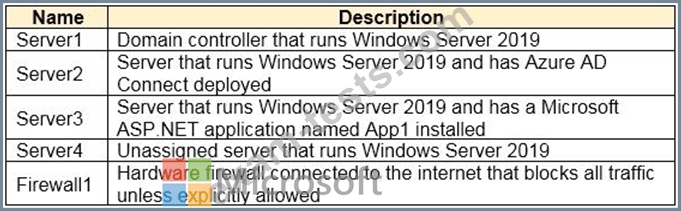
You have an Azure Active Directory (Azure AD) tenant that syncs to the Active Directory forest. Multi-factor authentication (MFA) is enforced for Azure AD.
You need to ensure that you can publish App1 to Azure AD users.
What should you configure on Server and Firewall1? To answer, select the appropriate options in the answer area.
NOTE:Each correct selection is worth one point.

You have an Azure Active Directory (Azure AD) tenant that syncs to the Active Directory forest. Multi-factor authentication (MFA) is enforced for Azure AD.
You need to ensure that you can publish App1 to Azure AD users.
What should you configure on Server and Firewall1? To answer, select the appropriate options in the answer area.
NOTE:Each correct selection is worth one point.

Question 109
You have a Microsoft Entra tenant that contains the users shown in the following table.

You have a user risk policy that has the following settings:
* Assignments:
o Include: Group1
o Exclude: Group2
* Sign-in risk Medium and above
* Access controls:
o Grant access: Require password change
When the users attempt to sign in. user risk levels are detected as shown in the following table.

For each of the following statements, select Yes if the statement is true. Otherwise, select No.

You have a user risk policy that has the following settings:
* Assignments:
o Include: Group1
o Exclude: Group2
* Sign-in risk Medium and above
* Access controls:
o Grant access: Require password change
When the users attempt to sign in. user risk levels are detected as shown in the following table.
For each of the following statements, select Yes if the statement is true. Otherwise, select No.


Question 110
You have an Azure AD tenant.
You deploy a new enterprise application named App1.
When users attempt to provide App1 with access to the tenant, the attempt fails.
You need to ensure that the users can request admin consent for App1. The solution must follow the principle of least privilege.
What should you do first?
You deploy a new enterprise application named App1.
When users attempt to provide App1 with access to the tenant, the attempt fails.
You need to ensure that the users can request admin consent for App1. The solution must follow the principle of least privilege.
What should you do first?