Question 331
You have an Azure Active Directory (Azure AD) tenant that contains the objects shown in the following table.

Which objects can you add as eligible in Azure Privileged identity Management (PIM) for an Azure AD role?
Which objects can you add as eligible in Azure Privileged identity Management (PIM) for an Azure AD role?
Question 332
You have a Microsoft 365 E5 subscription and an Azure subscription. You need to meet the following requirements:
* Ensure that users can sign in to Azure virtual machines by using their Microsoft 365 credentials.
* Delegate the ability to create new virtual machines.
What should you use for each requirement? To answer, drag the appropriate features to the correct requirements. Each feature may be used once, more than once, or not at all. You may need to drag the split bar between panes or scroll to view content.

* Ensure that users can sign in to Azure virtual machines by using their Microsoft 365 credentials.
* Delegate the ability to create new virtual machines.
What should you use for each requirement? To answer, drag the appropriate features to the correct requirements. Each feature may be used once, more than once, or not at all. You may need to drag the split bar between panes or scroll to view content.

Question 333
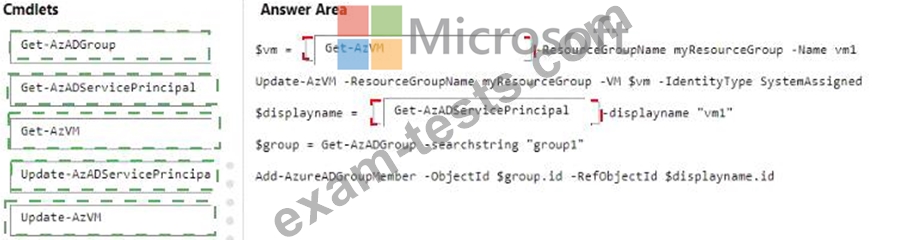
You have an Azure subscription that is linked to a Microsoft Entra tenant named contoso.com. The subscription contains a group named Group1 and a virtual machine named VM1.
You need to meet the following requirements:
* Enable a system-assigned managed identity for VM1.
* AddVM1 to Group1.
How should you complete the PowerShell script? To answer, drag the appropriate cmdlets to the correct targets. Each cmdlet may be used once, more than once, or not at all. You may need to drag the split bar between panes or scroll to view content.
NOTE: Each correct selection is worth one point.

You need to meet the following requirements:
* Enable a system-assigned managed identity for VM1.
* AddVM1 to Group1.
How should you complete the PowerShell script? To answer, drag the appropriate cmdlets to the correct targets. Each cmdlet may be used once, more than once, or not at all. You may need to drag the split bar between panes or scroll to view content.
NOTE: Each correct selection is worth one point.