

Question 6
You have a Microsoft 365 E5 tenant.
You purchase a cloud app named App1.
You need to enable real-time session-level monitoring of App1 by using Microsoft Cloud app Security.
Which four actions should you perform in sequence? To answer, move the appropriate actions from the list of actions to the answer area and arrange them in the correct order.

You purchase a cloud app named App1.
You need to enable real-time session-level monitoring of App1 by using Microsoft Cloud app Security.
Which four actions should you perform in sequence? To answer, move the appropriate actions from the list of actions to the answer area and arrange them in the correct order.

Question 7
You have an Azure AD tenant that contains the users shown in the following table.

The User settings for enterprise applications have the following configuration.
* Users can consent to apps accessing company data on their behalf:
* Users can consent to apps accessing company data for the groups they
* Users can request admin consent to apps they are unable to consent to: Yes
* Who can review admin consent requests: Admin2, User2
User1 attempts to add an app that requires consent to access company data.
Which user can provide consent?
The User settings for enterprise applications have the following configuration.
* Users can consent to apps accessing company data on their behalf:
* Users can consent to apps accessing company data for the groups they
* Users can request admin consent to apps they are unable to consent to: Yes
* Who can review admin consent requests: Admin2, User2
User1 attempts to add an app that requires consent to access company data.
Which user can provide consent?
Question 8
You have a Microsoft Entra tenant that contains the users shown in the following table.
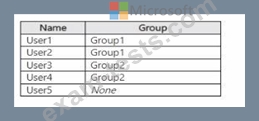
You have an administrative unit named Au1.Group1, User2, and User3are members of Au1.
User5 is assigned the User Administrator role for Au1.
For which users can User5 reset passwords?
You have an administrative unit named Au1.Group1, User2, and User3are members of Au1.
User5 is assigned the User Administrator role for Au1.
For which users can User5 reset passwords?
Question 9
Hotspot Question
You have an on-premises datacenter that contains the hosts shown in the following table.

You have an Azure Active Directory (Azure AD) tenant that syncs to the Active Directory forest.
Multi-factor authentication (MFA) is enforced for Azure AD.
You need to ensure that you can publish App1 to Azure AD users.
What should you configure on Server and Firewall1? To answer, select the appropriate options in the answer area.
NOTE: Each correct selection is worth one point.

You have an on-premises datacenter that contains the hosts shown in the following table.
You have an Azure Active Directory (Azure AD) tenant that syncs to the Active Directory forest.
Multi-factor authentication (MFA) is enforced for Azure AD.
You need to ensure that you can publish App1 to Azure AD users.
What should you configure on Server and Firewall1? To answer, select the appropriate options in the answer area.
NOTE: Each correct selection is worth one point.

Question 10
You have a Microsoft 365 E5 subscription and an Azure subscription. You need to meet the following requirements:
* Ensure that users can sign in to Azure virtual machines by using their Microsoft 365 credentials.
* Delegate the ability to create new virtual machines.
What should you use for each requirement? To answer, drag the appropriate features to the correct requirements. Each feature may be used once, more than once, or not at all. You may need to drag the split bar between panes or scroll to view content.

* Ensure that users can sign in to Azure virtual machines by using their Microsoft 365 credentials.
* Delegate the ability to create new virtual machines.
What should you use for each requirement? To answer, drag the appropriate features to the correct requirements. Each feature may be used once, more than once, or not at all. You may need to drag the split bar between panes or scroll to view content.
