

Question 286
You have an Azure Active Directory (Azure AD) tenant that contains cloud-based enterprise apps.
You need to group related apps into categories in the My Apps portal.
What should you create?
You need to group related apps into categories in the My Apps portal.
What should you create?
Question 287
You have a Microsoft Entra tenant that contains two remote networks named RemoteNetworkl and RemoteNetwork2 and the users shown in the following table.

You have the devices shown in the following table.

You have the devices shown in the following table.


Question 288
You have a Microsoft 365 tenant that uses the domain named fabrikam.com. The Guest invite settings for Azure Active Directory (Azure AD) are configured as shown in the exhibit. (Click theExhibittab.)

A user named [email protected] shares a Microsoft SharePoint Online document library to the users shown in the following table.

Which users will be emailed a passcode?
A user named [email protected] shares a Microsoft SharePoint Online document library to the users shown in the following table.
Which users will be emailed a passcode?
Question 289
Case Study 1 - Contoso, Ltd
Overview
Contoso, Ltd. is a consulting company that has a main office in Montreal and branch offices in London and Seattle.
Contoso has a partnership with a company named Fabrikam, Inc. Fabrikam has an Azure Active Directory (Azure AD) tenant named fabrikam.com.
Existing Environment. Existing Environment
The on-premises network of Contoso contains an Active Directory domain named contoso.com.
The domain contains an organizational unit (OU) named Contoso_Resources. The Contoso_Resources OU contains all users and computers.
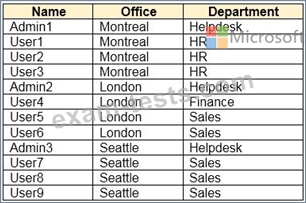
The contoso.com Active Directory domain contains the users shown in the following table.
Existing Environment. Microsoft 365/Azure Environment
Contoso has an Azure AD tenant named contoso.com that has the following associated licenses:
* Microsoft Office 365 Enterprise E5
* Enterprise Mobility + Security
* Windows 10 Enterprise E3
* Project Plan 3
Azure AD Connect is configured between Azure AD and Active Directory Domain Services (AD DS). Only the Contoso_Resources OU is synced.
Helpdesk administrators routinely use the Microsoft 365 admin center to manage user settings.
User administrators currently use the Microsoft 365 admin center to manually assign licenses. All users have all licenses assigned besides the following exceptions:
* The users in the London office have the Microsoft 365 Phone System license unassigned.
* The users in the Seattle office have the Yammer Enterprise license unassigned.
Security defaults are disabled for contoso.com.
Contoso uses Azure AD Privileged Identity Management (PIM) to protect administrative roles.
Existing Environment. Problem Statements
Contoso identifies the following issues:
* Currently, all the helpdesk administrators can manage user licenses throughout the entire Microsoft 365 tenant.
* The user administrators report that it is tedious to manually configure the different license requirements for each Contoso office.
* The helpdesk administrators spend too much time provisioning internal and guest access to the required Microsoft 365 services and apps.
* Currently, the helpdesk administrators can perform tasks by using the User administrator role without justification or approval.
* When the Logs node is selected in Azure AD, an error message appears stating that Log Analytics integration is not enabled.
Requirements. Planned Changes
Contoso plans to implement the following changes:
* Implement self-service password reset (SSPR).
* Analyze Azure audit activity logs by using Azure Monitor.
* Simplify license allocation for new users added to the tenant.
* Collaborate with the users at Fabrikam on a joint marketing campaign.
* Configure the User administrator role to require justification and approval to activate.
* Implement a custom line-of-business Azure web app named App1. App1 will be accessible from the internet and authenticated by using Azure AD accounts.
* For new users in the marketing department, implement an automated approval workflow to provide access to a Microsoft SharePoint Online site, group, and app.
Contoso plans to acquire a company named Adatum Corporation. One hundred new ADatum users will be created in an Active Directory OU named Adatum. The users will be located in London and Seattle.
Requirement. Technical Requirements
Contoso identifies the following technical requirements:
* All users must be synced from AD DS to the contoso.com Azure AD tenant.
* App1 must have a redirect URI pointed to https://contoso.com/auth- response.
* License allocation for new users must be assigned automatically based on the location of the user.
* Fabrikam users must have access to the marketing department's SharePoint site for a maximum of 90 days.
* Administrative actions performed in Azure AD must be audited. Audit logs must be retained for one year.
* The helpdesk administrators must be able to manage licenses for only the users in their respective office.
* Users must be forced to change their password if there is a probability that the users' identity was compromised.
Question
Hotspot Question
You need to meet the technical requirements for license management by the helpdesk administrators.
What should you create first, and which tool should you use? To answer, select the appropriate options in the answer area.
NOTE: Each correct selection is worth one point.

Overview
Contoso, Ltd. is a consulting company that has a main office in Montreal and branch offices in London and Seattle.
Contoso has a partnership with a company named Fabrikam, Inc. Fabrikam has an Azure Active Directory (Azure AD) tenant named fabrikam.com.
Existing Environment. Existing Environment
The on-premises network of Contoso contains an Active Directory domain named contoso.com.
The domain contains an organizational unit (OU) named Contoso_Resources. The Contoso_Resources OU contains all users and computers.
The contoso.com Active Directory domain contains the users shown in the following table.
Existing Environment. Microsoft 365/Azure Environment
Contoso has an Azure AD tenant named contoso.com that has the following associated licenses:
* Microsoft Office 365 Enterprise E5
* Enterprise Mobility + Security
* Windows 10 Enterprise E3
* Project Plan 3
Azure AD Connect is configured between Azure AD and Active Directory Domain Services (AD DS). Only the Contoso_Resources OU is synced.
Helpdesk administrators routinely use the Microsoft 365 admin center to manage user settings.
User administrators currently use the Microsoft 365 admin center to manually assign licenses. All users have all licenses assigned besides the following exceptions:
* The users in the London office have the Microsoft 365 Phone System license unassigned.
* The users in the Seattle office have the Yammer Enterprise license unassigned.
Security defaults are disabled for contoso.com.
Contoso uses Azure AD Privileged Identity Management (PIM) to protect administrative roles.
Existing Environment. Problem Statements
Contoso identifies the following issues:
* Currently, all the helpdesk administrators can manage user licenses throughout the entire Microsoft 365 tenant.
* The user administrators report that it is tedious to manually configure the different license requirements for each Contoso office.
* The helpdesk administrators spend too much time provisioning internal and guest access to the required Microsoft 365 services and apps.
* Currently, the helpdesk administrators can perform tasks by using the User administrator role without justification or approval.
* When the Logs node is selected in Azure AD, an error message appears stating that Log Analytics integration is not enabled.
Requirements. Planned Changes
Contoso plans to implement the following changes:
* Implement self-service password reset (SSPR).
* Analyze Azure audit activity logs by using Azure Monitor.
* Simplify license allocation for new users added to the tenant.
* Collaborate with the users at Fabrikam on a joint marketing campaign.
* Configure the User administrator role to require justification and approval to activate.
* Implement a custom line-of-business Azure web app named App1. App1 will be accessible from the internet and authenticated by using Azure AD accounts.
* For new users in the marketing department, implement an automated approval workflow to provide access to a Microsoft SharePoint Online site, group, and app.
Contoso plans to acquire a company named Adatum Corporation. One hundred new ADatum users will be created in an Active Directory OU named Adatum. The users will be located in London and Seattle.
Requirement. Technical Requirements
Contoso identifies the following technical requirements:
* All users must be synced from AD DS to the contoso.com Azure AD tenant.
* App1 must have a redirect URI pointed to https://contoso.com/auth- response.
* License allocation for new users must be assigned automatically based on the location of the user.
* Fabrikam users must have access to the marketing department's SharePoint site for a maximum of 90 days.
* Administrative actions performed in Azure AD must be audited. Audit logs must be retained for one year.
* The helpdesk administrators must be able to manage licenses for only the users in their respective office.
* Users must be forced to change their password if there is a probability that the users' identity was compromised.
Question
Hotspot Question
You need to meet the technical requirements for license management by the helpdesk administrators.
What should you create first, and which tool should you use? To answer, select the appropriate options in the answer area.
NOTE: Each correct selection is worth one point.

Question 290
You have a Microsoft 365 E5 subscription that contains two users named User1 and User2.
You need to ensure that User1 can create access reviews for groups, and that User2 can review the history report for all the completed access reviews. The solution must use the principle of least privilege.
Which role should you assign to each user? To answer, drag the appropriate roles to the correct users. Each role may be used once, more than once, or not at all. You may need to drag the split bar between panes or scroll to view content NOTE: Each correct selection is worth one point.

You need to ensure that User1 can create access reviews for groups, and that User2 can review the history report for all the completed access reviews. The solution must use the principle of least privilege.
Which role should you assign to each user? To answer, drag the appropriate roles to the correct users. Each role may be used once, more than once, or not at all. You may need to drag the split bar between panes or scroll to view content NOTE: Each correct selection is worth one point.

