
- Home
- ISC Certification
- SSCP Exam
- ISC.SSCP.v2022-08-26.q999 Practice Test

Question 26
Which of the following would best describe certificate path validation?
Correct Answer: A
Section: Cryptography
Explanation/Reference:
With the advent of public key cryptography (PKI), it is now possible to communicate securely with untrusted parties over the Internet without prior arrangement. One of the necessities arising from such communication is the ability to accurately verify someone's identity (i.e. whether the person you are communicating with is indeed the person who he/she claims to be). In order to be able to perform identity check for a given entity, there should be a fool-proof method of "binding" the entity's public key to its unique domain name (DN).
A X.509 digital certificate issued by a well known certificate authority (CA), like Verisign, Entrust, Thawte, etc., provides a way of positively identifying the entity by placing trust on the CA to have performed the necessary verifications. A X.509 certificate is a cryptographically sealed data object that contains the entity's unique DN, public key, serial number, validity period, and possibly other extensions.
The Windows Operating System offers a Certificate Viewer utility which allows you to double-click on any certificate and review its attributes in a human-readable format. For instance, the "General" tab in the Certificate Viewer Window (see below) shows who the certificate was issued to as well as the certificate's issuer, validation period and usage functions.
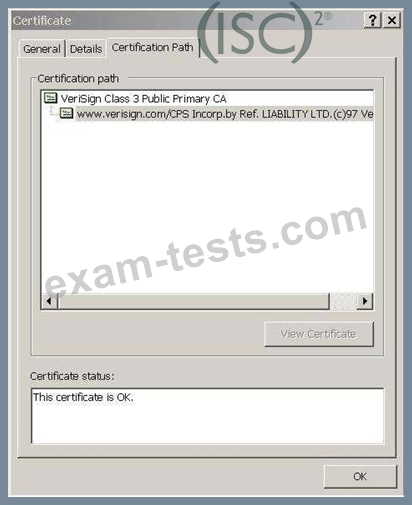
Certification Path graphic
The "Certification Path" tab contains the hierarchy for the chain of certificates. It allows you to select the certificate issuer or a subordinate certificate and then click on "View Certificate" to open the certificate in the Certificate Viewer.
Each end-user certificate is signed by its issuer, a trusted CA, by taking a hash value (MD5 or SHA-1) of ASN.1 DER (Distinguished Encoding Rule) encoded object and then encrypting the resulting hash with the issuer's private key (CA's Private Key) which is a digital signature. The encrypted data is stored in the
"signatureValue" attribute of the entity's (CA) public certificate.
Once the certificate is signed by the issuer, a party who wishes to communicate with this entity can then take the entity's public certificate and find out who the issuer of the certificate is. Once the issuer's of the certificate (CA) is identified, it would be possible to decrypt the value of the "signatureValue" attribute in the entity's certificate using the issuer's public key to retrieve the hash value. This hash value will be compared with the independently calculated hash on the entity's certificate. If the two hash values match, then the information contained within the certificate must not have been altered and, therefore, one must trust that the CA has done enough background check to ensure that all details in the entity's certificate are accurate.
The process of cryptographically checking the signatures of all certificates in the certificate chain is called "key chaining". An additional check that is essential to key chaining is verifying that the value of the
"subjectKeyIdentifier" extension in one certificate matches the same in the subsequent certificate.
Similarly, the process of comparing the subject field of the issuer certificate to the issuer field of the subordinate certificate is called "name chaining". In this process, these values must match for each pair of adjacent certificates in the certification path in order to guarantee that the path represents unbroken chain of entities relating directly to one another and that it has no missing links.
The two steps above are the steps to validate the Certification Path by ensuring the validity of all certificates of the certificate chain to the root certificate as described in the two paragraphs above.
Reference(s) used for this question:
FORD, Warwick & BAUM, Michael S., Secure Electronic Commerce: Building the Infrastructure for Digital Signatures and Encryption (2nd Edition), 2000, Prentice Hall PTR, Page 262.
and
https://www.tibcommunity.com/docs/DOC-2197
Explanation/Reference:
With the advent of public key cryptography (PKI), it is now possible to communicate securely with untrusted parties over the Internet without prior arrangement. One of the necessities arising from such communication is the ability to accurately verify someone's identity (i.e. whether the person you are communicating with is indeed the person who he/she claims to be). In order to be able to perform identity check for a given entity, there should be a fool-proof method of "binding" the entity's public key to its unique domain name (DN).
A X.509 digital certificate issued by a well known certificate authority (CA), like Verisign, Entrust, Thawte, etc., provides a way of positively identifying the entity by placing trust on the CA to have performed the necessary verifications. A X.509 certificate is a cryptographically sealed data object that contains the entity's unique DN, public key, serial number, validity period, and possibly other extensions.
The Windows Operating System offers a Certificate Viewer utility which allows you to double-click on any certificate and review its attributes in a human-readable format. For instance, the "General" tab in the Certificate Viewer Window (see below) shows who the certificate was issued to as well as the certificate's issuer, validation period and usage functions.
Certification Path graphic
The "Certification Path" tab contains the hierarchy for the chain of certificates. It allows you to select the certificate issuer or a subordinate certificate and then click on "View Certificate" to open the certificate in the Certificate Viewer.
Each end-user certificate is signed by its issuer, a trusted CA, by taking a hash value (MD5 or SHA-1) of ASN.1 DER (Distinguished Encoding Rule) encoded object and then encrypting the resulting hash with the issuer's private key (CA's Private Key) which is a digital signature. The encrypted data is stored in the
"signatureValue" attribute of the entity's (CA) public certificate.
Once the certificate is signed by the issuer, a party who wishes to communicate with this entity can then take the entity's public certificate and find out who the issuer of the certificate is. Once the issuer's of the certificate (CA) is identified, it would be possible to decrypt the value of the "signatureValue" attribute in the entity's certificate using the issuer's public key to retrieve the hash value. This hash value will be compared with the independently calculated hash on the entity's certificate. If the two hash values match, then the information contained within the certificate must not have been altered and, therefore, one must trust that the CA has done enough background check to ensure that all details in the entity's certificate are accurate.
The process of cryptographically checking the signatures of all certificates in the certificate chain is called "key chaining". An additional check that is essential to key chaining is verifying that the value of the
"subjectKeyIdentifier" extension in one certificate matches the same in the subsequent certificate.
Similarly, the process of comparing the subject field of the issuer certificate to the issuer field of the subordinate certificate is called "name chaining". In this process, these values must match for each pair of adjacent certificates in the certification path in order to guarantee that the path represents unbroken chain of entities relating directly to one another and that it has no missing links.
The two steps above are the steps to validate the Certification Path by ensuring the validity of all certificates of the certificate chain to the root certificate as described in the two paragraphs above.
Reference(s) used for this question:
FORD, Warwick & BAUM, Michael S., Secure Electronic Commerce: Building the Infrastructure for Digital Signatures and Encryption (2nd Edition), 2000, Prentice Hall PTR, Page 262.
and
https://www.tibcommunity.com/docs/DOC-2197
Question 27
Which of the following will a Business Impact Analysis NOT identify?
Correct Answer: C
Explanation/Reference:
Source: TIPTON, Hal, (ISC)2, Introduction to the CISSP Exam presentation.
Source: TIPTON, Hal, (ISC)2, Introduction to the CISSP Exam presentation.
Question 28
______________ is a Unix security scanning tool developed at Texas A&M university.
Correct Answer: D
Question 29
How often should a Business Continuity Plan be reviewed?
Correct Answer: C
As stated in SP 800-34 Rev. 1: To be effective, the plan must be maintained in a ready state that accurately reflects system requirements, procedures, organizational structure, and policies. During the Operation/Maintenance phase of the SDLC, information systems undergo frequent changes because of shifting business needs, technology upgrades, or new internal or external policies.
As a general rule, the plan should be reviewed for accuracy and completeness at an organization-defined frequency (at least once a year for the purpose of the exam) or whenever significant changes occur to any element of the plan. Certain elements, such as contact lists, will require more frequent reviews.
Remember, there could be two good answers as specified above. Either once a year or whenever significant changes occur to the plan. You will of course get only one of the two presented within you exam.
Reference(s) used for this question: NIST SP 800-34 Revision 1
Topic 4, Risk, Response and Recovery
As a general rule, the plan should be reviewed for accuracy and completeness at an organization-defined frequency (at least once a year for the purpose of the exam) or whenever significant changes occur to any element of the plan. Certain elements, such as contact lists, will require more frequent reviews.
Remember, there could be two good answers as specified above. Either once a year or whenever significant changes occur to the plan. You will of course get only one of the two presented within you exam.
Reference(s) used for this question: NIST SP 800-34 Revision 1
Topic 4, Risk, Response and Recovery
Question 30
What is malware that can spread itself over open network connections?
Correct Answer: A
Explanation/Reference:
Computer worms are also known as Network Mobile Code, or a virus-like bit of code that can replicate itself over a network, infecting adjacent computers.
A computer worm is a standalone malware computer program that replicates itself in order to spread to other computers. Often, it uses a computer network to spread itself, relying on security failures on the target computer to access it. Unlike a computer virus, it does not need to attach itself to an existing program. Worms almost always cause at least some harm to the network, even if only by consuming bandwidth, whereas viruses almost always corrupt or modify files on a targeted computer.
A notable example is the SQL Slammer computer worm that spread globally in ten minutes on January 25,
2003. I myself came to work that day as a software tester and found all my SQL servers infected and actively trying to infect other computers on the test network.
A patch had been released a year prior by Microsoft and if systems were not patched and exposed to a
376 byte UDP packet from an infected host then system would become compromised.
Ordinarily, infected computers are not to be trusted and must be rebuilt from scratch but the vulnerability could be mitigated by replacing a single vulnerable dll called sqlsort.dll.
Replacing that with the patched version completely disabled the worm which really illustrates to us the importance of actively patching our systems against such network mobile code.
The following answers are incorrect:
- Rootkit: Sorry, this isn't correct because a rootkit isn't ordinarily classified as network mobile code like a worm is. This isn't to say that a rootkit couldn't be included in a worm, just that a rootkit isn't usually classified like a worm. A rootkit is a stealthy type of software, typically malicious, designed to hide the existence of certain processes or programs from normal methods of detection and enable continued privileged access to a computer. The term rootkit is a concatenation of "root" (the traditional name of the privileged account on Unix operating systems) and the word "kit" (which refers to the software components that implement the tool). The term "rootkit" has negative connotations through its association with malware.
- Adware: Incorrect answer. Sorry but adware isn't usually classified as a worm. Adware, or advertising- supported software, is any software package which automatically renders advertisements in order to generate revenue for its author. The advertisements may be in the user interface of the software or on a screen presented to the user during the installation process. The functions may be designed to analyze which Internet sites the user visits and to present advertising pertinent to the types of goods or services featured there. The term is sometimes used to refer to software that displays unwanted advertisements.
- Logic Bomb: Logic bombs like adware or rootkits could be spread by worms if they exploit the right service and gain root or admin access on a computer.
The following reference(s) was used to create this question:
The CCCure CompTIA Holistic Security+ Tutorial and CBT
and
http://en.wikipedia.org/wiki/Rootkit
and
http://en.wikipedia.org/wiki/Computer_worm
and
http://en.wikipedia.org/wiki/Adware
Computer worms are also known as Network Mobile Code, or a virus-like bit of code that can replicate itself over a network, infecting adjacent computers.
A computer worm is a standalone malware computer program that replicates itself in order to spread to other computers. Often, it uses a computer network to spread itself, relying on security failures on the target computer to access it. Unlike a computer virus, it does not need to attach itself to an existing program. Worms almost always cause at least some harm to the network, even if only by consuming bandwidth, whereas viruses almost always corrupt or modify files on a targeted computer.
A notable example is the SQL Slammer computer worm that spread globally in ten minutes on January 25,
2003. I myself came to work that day as a software tester and found all my SQL servers infected and actively trying to infect other computers on the test network.
A patch had been released a year prior by Microsoft and if systems were not patched and exposed to a
376 byte UDP packet from an infected host then system would become compromised.
Ordinarily, infected computers are not to be trusted and must be rebuilt from scratch but the vulnerability could be mitigated by replacing a single vulnerable dll called sqlsort.dll.
Replacing that with the patched version completely disabled the worm which really illustrates to us the importance of actively patching our systems against such network mobile code.
The following answers are incorrect:
- Rootkit: Sorry, this isn't correct because a rootkit isn't ordinarily classified as network mobile code like a worm is. This isn't to say that a rootkit couldn't be included in a worm, just that a rootkit isn't usually classified like a worm. A rootkit is a stealthy type of software, typically malicious, designed to hide the existence of certain processes or programs from normal methods of detection and enable continued privileged access to a computer. The term rootkit is a concatenation of "root" (the traditional name of the privileged account on Unix operating systems) and the word "kit" (which refers to the software components that implement the tool). The term "rootkit" has negative connotations through its association with malware.
- Adware: Incorrect answer. Sorry but adware isn't usually classified as a worm. Adware, or advertising- supported software, is any software package which automatically renders advertisements in order to generate revenue for its author. The advertisements may be in the user interface of the software or on a screen presented to the user during the installation process. The functions may be designed to analyze which Internet sites the user visits and to present advertising pertinent to the types of goods or services featured there. The term is sometimes used to refer to software that displays unwanted advertisements.
- Logic Bomb: Logic bombs like adware or rootkits could be spread by worms if they exploit the right service and gain root or admin access on a computer.
The following reference(s) was used to create this question:
The CCCure CompTIA Holistic Security+ Tutorial and CBT
and
http://en.wikipedia.org/wiki/Rootkit
and
http://en.wikipedia.org/wiki/Computer_worm
and
http://en.wikipedia.org/wiki/Adware
- Other Version
- 11728ISC.SSCP.v2024-11-11.q999
- 15415ISC.SSCP.v2024-05-23.q965
- 22617ISC.SSCP.v2022-01-29.q657
- 36ISC.Prepawaypdf.SSCP.v2021-11-05.by.harvey.888q.pdf
- Latest Upload
- 202Snowflake.DEA-C01.v2026-09-04.q215
- 159HP.HPE0-V27.v2026-09-04.q127
- 182NAHQ.CPHQ.v2026-09-03.q481
- 118SAP.C-S4CPB-2602.v2026-09-02.q7
- 113Cisco.700-805.v2026-09-02.q86
- 163MSSC.CLT-4.0.v2026-09-02.q43
- 131Fitness.NCSF-CPT.v2026-09-02.q18
- 194Google.Generative-AI-Leader.v2026-09-02.q77
- 140PECB.ISO-14001-Lead-Auditor.v2026-09-01.q39
- 129Google.GCP-DE.v2026-09-01.q27