Which of the following are unstructured documents?
Correct Answer: D
Unstructured documents are those that do not have a predefined format or layout, and therefore cannot be easily processed by traditional methods. They often contain free-form text, images,tables, and other elements that vary from document to document. Examples of unstructured documents include contracts, agreements, emails, letters, reports, articles, and so on. UiPath Document Understanding is a solution that enables the processing of unstructured documents using AI-powered models and RPA workflows1. The other options are not correct because they are examples of structured or semi-structured documents. Structured documents are those that have a fixed format or layout, and can be easily processed by rules-based methods. They often contain fields, labels, and values that are consistent across documents. Examples of structured documents include banking forms, tax forms, surveys, identity cards, and so on. Semi-structured documents are those that have some elements of structure, but also contain variations or unstructured content. They often require a combination of rules-based and AI-powered methods to process. Examples of semi- structured documents include invoices, receipts, purchase orders, medical bills, and so on2. References: 1: Unstructured Data Analysis with AI, RPA, and OCR | UiPath 2: Structured, semi structured, unstructured sample documents for UiPath document understanding - Studio - UiPath Community Forum
Question 22
What does the Export stage of the Document Understanding Framework do?
Correct Answer: A
According to the UiPath documentation portal1, the Export stage of the Document Understanding Framework is the final stage of the document processing workflow, where the extracted data is converted to a dataset or to a customized format, such as Excel, JSON, or XML. The Export stage enables you to easily export data for training ML models, using the Export files dialog box in Data Manager or Document Manager. The Export stage also allows you to export the schema of the fields and their configurations, which can be imported into a different session. The Export stage supports different export options, such as current search results, all labeled, schema, or all. The Export stage also provides validation rules, such as requiring at least 10 labeled documents or pages for each field, and at least one document for each classification option1. Therefore, option A is the correct answer, as it describes the main function and benefit of the Export stage. Option B is incorrect, as it refers to the Data Validation stage, which is the previous stage of the document processing workflow, where a human can review and correct the extracted data using the Validation Station or the Present Validation Station activities2. Option C is incorrect, as it refers to the Classification stage, which is the second stage of the document processing workflow, where the document is classified as one of the predefined document types using the Classify Document Scope activity and a classifier of choice3. Option D is incorrect, as it refers to the Digitization stage, which is the first stage of the document processing workflow, where the text is extracted out of the image document using OCR (Optical Character Recognition) using the Digitize Document activity and an OCR engine of choice. References: 1 Document Understanding - Export Documents 2 Document Understanding - Data Validation 3 Document Understanding - Classification Document Understanding - Digitization
Question 23
What happens during the Classify stage of the Document Understanding Framework?
Correct Answer: D
According to the UiPath documentation, the Classify stage of the Document Understanding Framework is used to automatically determine what document types are found within a digitized file. The document types are defined in the project taxonomy, which is a collection of all the labels and fields applied to the documents in a dataset. The Classify stage uses one or more classifiers, which are algorithms that assign document types to files based on their content and structure. The classifiers can be configured and executed using the Classify Document Scope activity, which also allows for document type filtering, taxonomy mapping, and minimum confidence threshold settings. The Classify stage outputs the classification information in a unified manner, irrespective of the source of classification. The documents that are classified are then sent to the next stage of the framework, which is Data Extraction. The documents that are not classified or skipped are either excluded from further processing or sent to Action Center for human validation and correction. References: Document Understanding - Document Classification Overview Document Understanding - Introduction Generative Extraction & Classification using Document Understanding in Cross-Platform Projects (Public Preview)
Question 24
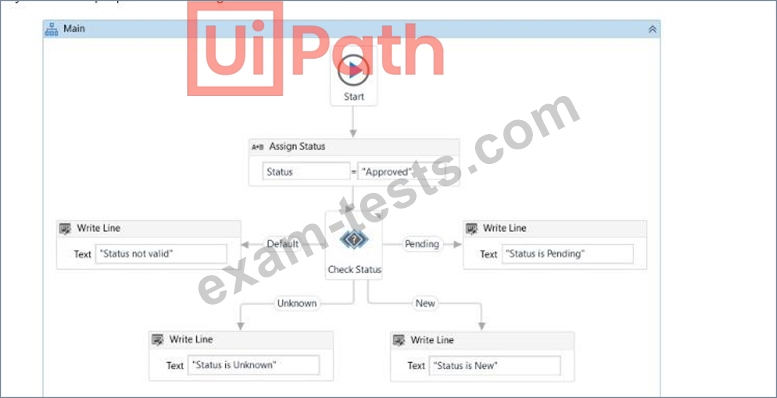
What will be displayed in the Output panel after running the workflow below?
Correct Answer: A
From the provided workflow: The Assign Status activity sets the variable Status to the value "Approved". The Check Status activity evaluates the value of Status against defined conditions. It has branches for "Pending", "New", and "Unknown". The "Default" branch is triggered if none of these conditions match the value of Status. Since "Approved" does not match "Pending", "New", or "Unknown", the Default branch will execute. The Write Line activity in the Default branch outputs "Status not valid." to the Output panel.
Question 25
When is it recommended to use Main-ActionCenter in the context of the Document Understanding Process?
Correct Answer: B
Main-ActionCenter is a workflow that allows you to create and manage Document Understanding actions in Action Center, which is a web application that enables human intervention in automation processes. You can use Main-ActionCenter when you want to test your Document Understanding process locally, or when you want to implement an attended process that requires human validation or classification of documents. Main- ActionCenter is not recommended for unattended processes, as they do not involve human interaction. References: Action Center - Document Understanding activities, Document Understanding Process 22.10 now in General Availability!, How to Start a UiPath Document Understanding Project