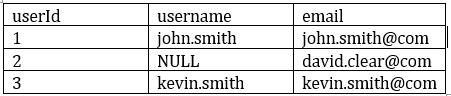
What could be the expected output of query SELECT COUNT (DISTINCT *) FROM user on this table
Correct Answer: B
Explanation The answer is 2, Count(DISTINCT *) removes rows with any column with a NULL value
Question 27
A data engineering team has a time-consuming data ingestion job with three data sources. Each notebook takes about one hour to load new data. One day, the job fails because a notebook update introduced a new required configuration parameter. The team must quickly fix the issue and load the latest data from the failing source. Which action should the team take?
Correct Answer: A
Comprehensive and Detailed Explanation From Exact Extract of Databricks Data Engineer Documents: The repair run capability in Databricks Jobs allows re-execution of failed tasks without re-running successful ones. When a parameterized job fails due to missing or incorrect task configuration, engineers can perform a repair run to fix inputs or parameters and resume from the failed state. This approach saves time, reduces cost, and ensures workflow continuity by avoiding unnecessary recomputation. Additionally, updating the task definition with the missing parameter prevents future runs from failing. Running the job manually (B) loses run context; (C) alone does not prevent recurrence; (D) delays resolution. Thus, A follows the correct operational and recovery practice.
Question 28
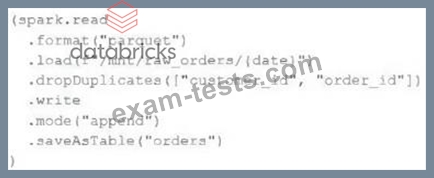
An upstream source writes Parquet data as hourly batches to directories named with the current date. A nightly batch job runs the following code to ingest all data from the previous day as indicated by thedatevariable: Assume that the fieldscustomer_idandorder_idserve as a composite key to uniquely identify each order. If the upstream system is known to occasionally produce duplicate entries for a single order hours apart, which statement is correct?
Correct Answer: B
Explanation This is the correct answer because the code uses the dropDuplicates method to remove any duplicate records within each batch of data before writing to the orders table. However, this method does not check for duplicates across different batches or in the target table, so it is possible that newly written records may have duplicates already present in the target table. To avoid this, a better approach would be to use Delta Lake and perform an upsert operation usingmergeInto. Verified References: [Databricks Certified Data Engineer Professional], under "Delta Lake" section; Databricks Documentation, under "DROP DUPLICATES" section.
Question 29
An upstream system has been configured to pass the date for a given batch of data to the Databricks Jobs API as a parameter. The notebook to be scheduled will use this parameter to load data with the following code: df = spark.read.format("parquet").load(f"/mnt/source/(date)") Which code block should be used to create the date Python variable used in the above code block?
Correct Answer: E
The code block that should be used to create the date Python variable used in the above code block is: dbutils.widgets.text("date", "null") date = dbutils.widgets.get("date") This code block uses the dbutils.widgets API to create and get a text widget named "date" that can accept a string value as a parameter1. The default value of the widget is "null", which means that if no parameter is passed, the date variable will be "null". However, if a parameter is passed through the Databricks Jobs API, the date variable will be assigned the value of the parameter. For example, if the parameter is "2021-11-01", the date variable will be "2021-11-01". This way, the notebook can use the date variable to load data from the specified path. The other options are not correct, because: * Option A is incorrect because spark.conf.get("date") is not a valid way to get a parameter passed through the Databricks Jobs API. The spark.conf API is used to get or set Spark configuration properties, not notebook parameters2. * Option B is incorrect because input() is not a valid way to get a parameter passed through the Databricks Jobs API. The input() function is used to get user input from the standard input stream, not from the API request3. * Option C is incorrect because sys.argv1 is not a valid way to get a parameter passed through the Databricks Jobs API. The sys.argv list is used to get the command-line arguments passed to a Python script, not to a notebook4. * Option D is incorrect because dbutils.notebooks.getParam("date") is not a valid way to get a parameter passed through the Databricks Jobs API. The dbutils.notebooks API is used to get or set notebook parameters when running a notebook as a job or as a subnotebook, not when passing parameters through the API5. References: Widgets, Spark Configuration, input(), sys.argv, Notebooks
Question 30
Two of the most common data locations on Databricks are the DBFS root storage and external object storage mounted with dbutils.fs.mount(). Which of the following statements is correct?
Correct Answer: A
DBFS is a file system protocol that allows users to interact with files stored in object storage using syntax and guarantees similar to Unix file systems1. DBFS is not a physical file system, but a layer over the object storage that provides a unified view of data across different data sources1. By default, the DBFS root is accessible to all users in the workspace, and the access to mounted data sources depends on the permissions of the storage account or container2. Mounted storage volumes do not need to have full public read and write permissions, but they do require a valid connection string or access key to be provided when mounting3. Both the DBFS root and mounted storage can be accessed when using %sh in a Databricks notebook, as long as the cluster has FUSE enabled4. The DBFS root does not store files in ephemeral block volumes attached to the driver, but in the object storage associated with the workspace1. Mounted directories will persist saved data to external storage between sessions, unless they are unmounted or deleted3. References: DBFS, Work with files on Azure Databricks, Mounting cloudobject storage on Azure Databricks, Access DBFS with FUSE
Newest Databricks-Certified-Professional-Data-Engineer Exam PDF Dumps shared by BraindumpsPass.com for Helping Passing Databricks-Certified-Professional-Data-Engineer Exam! BraindumpsPass.com now offer the updated Databricks-Certified-Professional-Data-Engineer exam dumps, the BraindumpsPass.com Databricks-Certified-Professional-Data-Engineer exam questions have been updated and answers have been corrected get the latest BraindumpsPass.com Databricks-Certified-Professional-Data-Engineer pdf dumps with Exam Engine here: