Question 41
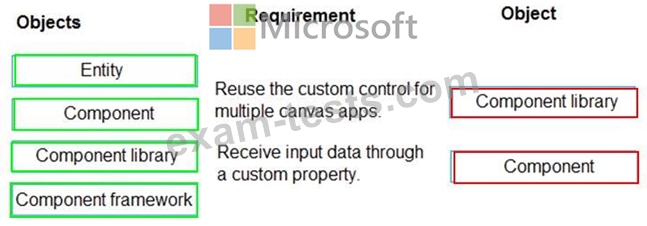
A company is building multiple Power Apps apps to support a mobile sales team.
The apps must all share a common control that has custom properties.
You need to create a solution for the apps.
Which objects should you use? To answer, drag the appropriate objects to the correct requirements. Each object may be used once, more than once, or not at all. You may need to drag the split bar between panes or scroll to view content.
NOTE: Each correct selection is worth one point.

The apps must all share a common control that has custom properties.
You need to create a solution for the apps.
Which objects should you use? To answer, drag the appropriate objects to the correct requirements. Each object may be used once, more than once, or not at all. You may need to drag the split bar between panes or scroll to view content.
NOTE: Each correct selection is worth one point.
Question 42
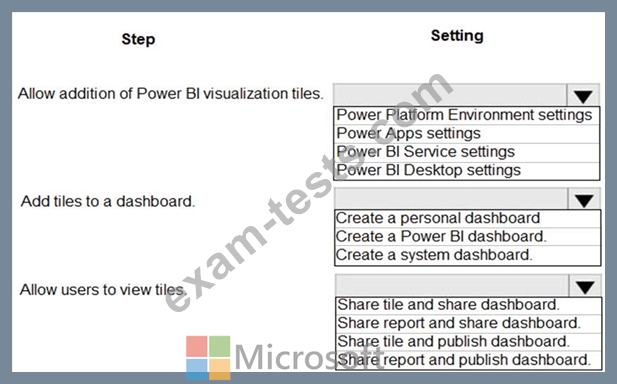
A company uses a model-driven app. You create a Power BI sales report.
The executive of the company wants all users to see tiles from the report in the model-driven app.
You need to ensure all users can see the tiles.
What should you do? To answer, select the appropriate options in the answer area.
NOTE: Each correct selection is worth one point.
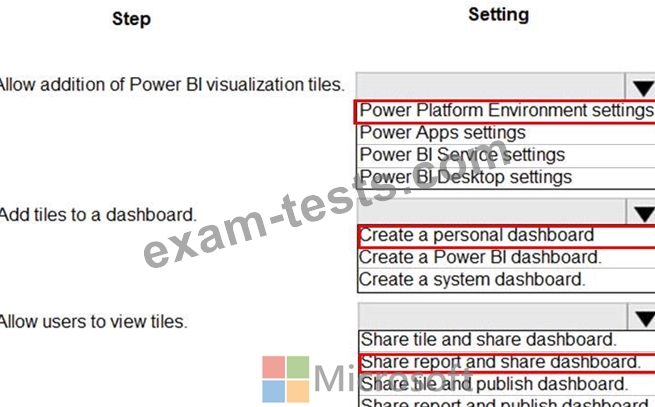
The executive of the company wants all users to see tiles from the report in the model-driven app.
You need to ensure all users can see the tiles.
What should you do? To answer, select the appropriate options in the answer area.
NOTE: Each correct selection is worth one point.
Question 43
You are creating a canvas app.
You need to display a limited list of choices to the end user. You must standardize the values and appearance of the list across all forms.
Which two actions should you perform? Each correct answer presents part of the solution.
NOTE: Each correct selection is worth one point.
You need to display a limited list of choices to the end user. You must standardize the values and appearance of the list across all forms.
Which two actions should you perform? Each correct answer presents part of the solution.
NOTE: Each correct selection is worth one point.
Question 44
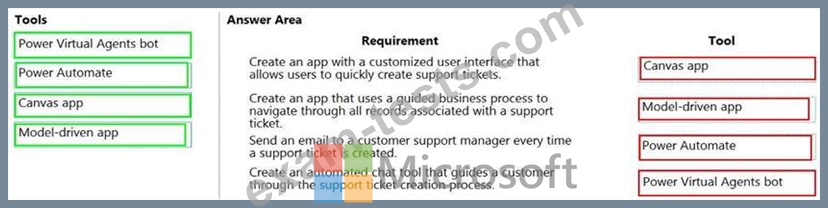
You plan to create apps for a company.
You need to identify the Power Platform tools required.
What should you use? To answer, drag the appropriate tools to the correct requirements. Each tool may be used once, more than once, or not at all. You may need to drag the split bar between panes or scroll to view content.
NOTE: Each correct selection is worth one point.

You need to identify the Power Platform tools required.
What should you use? To answer, drag the appropriate tools to the correct requirements. Each tool may be used once, more than once, or not at all. You may need to drag the split bar between panes or scroll to view content.
NOTE: Each correct selection is worth one point.
Question 45
A company creates a Power Apps app that allows service representatives to record information about on-site client visits. Service representatives perform a one-hour site visit with each client each quarter.
Service representatives use the app to perform the following activities:
View their scheduled visits for the day.
Record notes from service visits.
Schedule service technicians for issues uncovered during site visits.
Scan and upload service quote forms to a folder named Service Quote folder on Microsoft OneDrive once the customer has signed a service quote.
Service quotes that are over $10,000 are automatically sent to the service manager for review and approval.
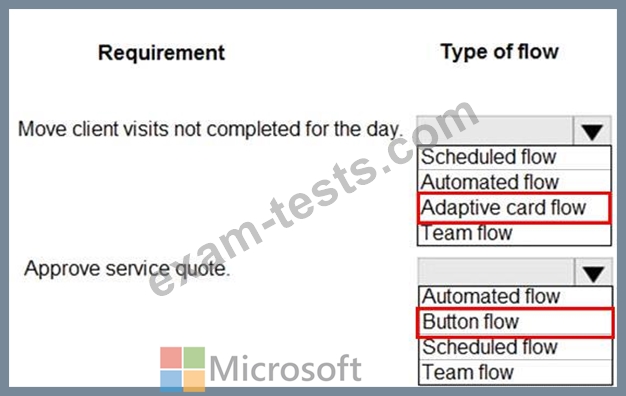
Visits that are not closed at the end of the day are automatically moved to the following day unless it is the last day of the quarter. All client visits not performed for the quarter are escalated to the service manager for follow-up.
You need to create flows to meet the requirements.
Which type of flows should you use? To answer, select the appropriate options in the answer area.
NOTE: Each correct selection is worth one point.

Service representatives use the app to perform the following activities:
View their scheduled visits for the day.
Record notes from service visits.
Schedule service technicians for issues uncovered during site visits.
Scan and upload service quote forms to a folder named Service Quote folder on Microsoft OneDrive once the customer has signed a service quote.
Service quotes that are over $10,000 are automatically sent to the service manager for review and approval.
Visits that are not closed at the end of the day are automatically moved to the following day unless it is the last day of the quarter. All client visits not performed for the quarter are escalated to the service manager for follow-up.
You need to create flows to meet the requirements.
Which type of flows should you use? To answer, select the appropriate options in the answer area.
NOTE: Each correct selection is worth one point.