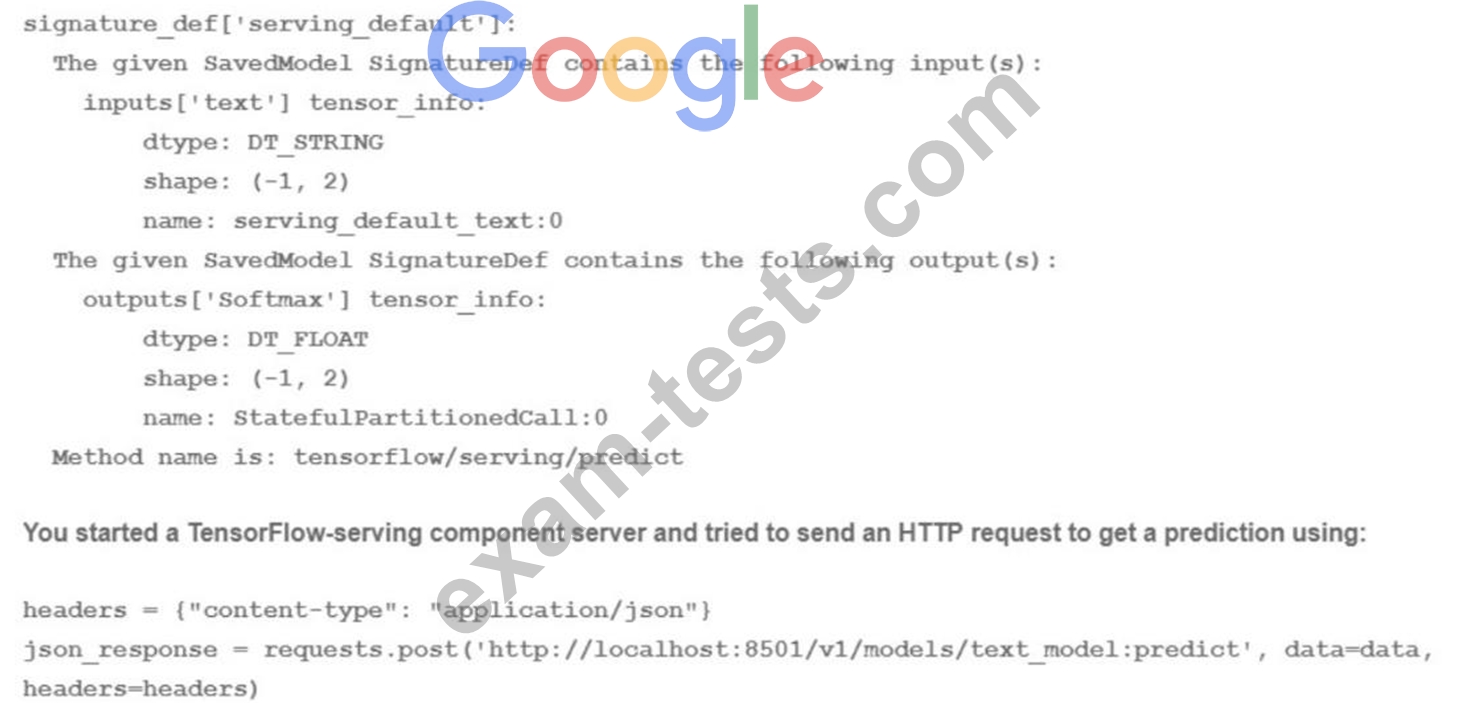
Your team has been tasked with creating an ML solution in Google Cloud to classify support requests for one of your platforms. You analyzed the requirements and decided to use TensorFlow to build the classifier so that you have full control of the model's code, serving, and deployment. You will use Kubeflow pipelines for the ML platform. To save time, you want to build on existing resources and use managed services instead of building a completely new model. How should you build the classifier?
Correct Answer: C
Transfer learning is a technique that leverages the knowledge and weights of a pre-trained model and adapts them to a new task or domain1. Transfer learning can save time and resources by avoiding training a model from scratch, and can also improve the performance and generalization of the model by using a larger and more diverse dataset2. AI Platform provides several established text classification models that can be used for transfer learning, such as BERT, ALBERT, or XLNet3. These models are based on state-of-the-art natural language processing techniques and can handle various text classification tasks, such as sentiment analysis, topic classification, or spam detection4. By using one of these models on AI Platform, you can customize the model's code, serving, and deployment, and use Kubeflow pipelines for the ML platform. Therefore, using an established text classification model on AI Platform to perform transfer learning is the best option for this use case. Reference: Transfer Learning - Machine Learning's Next Frontier A Comprehensive Hands-on Guide to Transfer Learning with Real-World Applications in Deep Learning Text classification models Text Classification with Pre-trained Models in TensorFlow
Question 68
You are training a deep learning model for semantic image segmentation with reduced training time. While using a Deep Learning VM Image, you receive the following error: The resource 'projects/deeplearning-platforn/zones/europe-west4-c/acceleratorTypes/nvidia-tesla-k80' was not found. What should you do?
Correct Answer: B
The error message indicates that the selected GPU type (nvidia-tesla-k80) is not available in the selected region (europe-west4-c). This can happen when the GPU type is not supported in the region, or when the GPU quota is exhausted in the region. To avoid this error, you should ensure that the required GPU is available in the selected region before creating a Deep Learning VM Image. You can use the following steps to check the GPU availability and quota: * To check the GPU availability, you can use the gcloud compute accelerator-types list command with the --filter flag to specify the GPU type and the region. For example, to check the availability of nvidia-tesla-k80 in europe-west4-c, you can run: gcloud compute accelerator-types list --filter="name=nvidia-tesla-k80 AND zone:europe-west4-c" * If the command returns an empty result, it means that the GPU type is not supported in the region. You can either choose a different GPU type or a different region that supports the GPU type. You can use the same command without the --filter flag to list all the available GPU types and regions. For example, to list all the available GPU types in europe-west4-c, you can run: gcloud compute accelerator-types list --filter="zone:europe-west4-c" * To check the GPU quota, you can use the gcloud compute regions describe command with the --format flag to specify the region and the quota metric. For example, to check the quota for nvidia-tesla-k80 in europe-west4-c, you can run: gcloud compute regions describe europe-west4-c --format="value(quotas.NVIDIA_K80_GPUS)" * If the command returns a value of 0, it means that the GPU quota is exhausted in the region. You can either request more quota from Google Cloud or choose a different region that has enough quota for the GPU type. References: * Troubleshooting | Deep Learning VM Images | Google Cloud * Checking GPU availability * Checking GPU quota
Question 69
An agency collects census information within a country to determine healthcare and social program needs by province and city. The census form collects responses for approximately 500 questions from each citizen. Which combination of algorithms would provide the appropriate insights? (Choose two.)
Correct Answer: C,D
Explanation/Reference: Explanation: The PCA and K-means algorithms are useful in collection of data using census form.
Question 70
You are developing a model to predict whether a failure will occur in a critical machine part. You have a dataset consisting of a multivariate time series and labels indicating whether the machine part failed You recently started experimenting with a few different preprocessing and modeling approaches in a Vertex Al Workbench notebook. You want to log data and track artifacts from each run. How should you set up your experiments?
Correct Answer: A
The option A is the most suitable solution for logging data and tracking artifacts from each run of a model development experiment in a Vertex AI Workbench notebook. Vertex AI Workbench is a service that allows you to create and run interactive notebooks on Google Cloud. You can use Vertex AI Workbench to experiment with different preprocessing and modeling approaches for your time series prediction problem. You can also use the Vertex AI TensorBoard instance and the Vertex AI SDK to create an experiment and associate the TensorBoard instance. TensorBoard is a tool that allows you to visualize and monitor the metrics and artifacts of your ML experiments. You can use the Vertex AI SDK to create an experiment object, which is a logical grouping of runs that share a common objective. You can also use the Vertex AI SDK to associate the experiment object with a TensorBoard instance, which is a managed service that hosts a TensorBoard web app. By using the Vertex AI TensorBoard instance and the Vertex AI SDK, you can easily set up and manage your experiments, and access the TensorBoard web app from the Vertex AI console. You can also use the log_time_series_metrics function and the log_metrics function to log data and track artifacts from each run. The log_time_series_metrics function is a function that allows you to log the time series data, such as the multivariate time series and the labels, to the TensorBoard instance. The log_metrics function is a function that allows you to log the scalar metrics, such as the loss values, to the TensorBoard instance. By using these functions, you can record the data and artifacts from each run of your experiment, and compare them in the TensorBoard web app. You can also use the TensorBoard web app to visualize the data and artifacts, such as the time series plots, the scalar charts, the histograms, and the distributions. By using the Vertex AI TensorBoard instance, the Vertex AI SDK, and the log functions, you can log data and track artifacts from each run of your experiment in a Vertex AI Workbench notebook. References: * Vertex AI Workbench documentation * Vertex AI TensorBoard documentation * Vertex AI SDK documentation * log_time_series_metrics function documentation * log_metrics function documentation * [Preparing for Google Cloud Certification: Machine Learning Engineer Professional Certificate]