

Question 176
You implement the planned changes for SSPR.
What occurs when User3 attempts to use SSPR? To answer, select the appropriate options in the answer area.
NOTE: Each correct selection is worth one point.

What occurs when User3 attempts to use SSPR? To answer, select the appropriate options in the answer area.
NOTE: Each correct selection is worth one point.

Question 177
Your network contains an on-premises Active Directory domain that syncs to an Azure Active Directory (Azure AD) tenant.
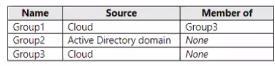
The tenant contains the groups shown in the following table.
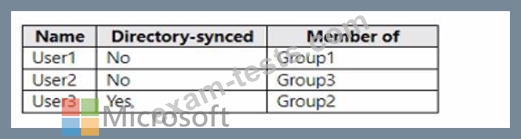
The tenant contains the users shown in the following table.
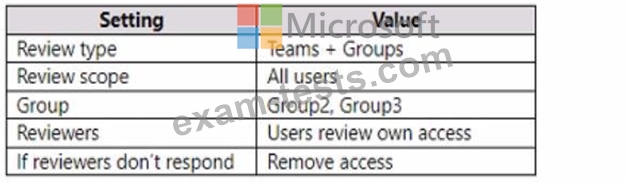
You create an access review as shown in the following table.
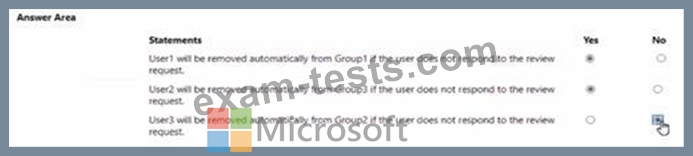
For each of the following statements, select Yes if the statement is true. Otherwise, select No.
NOTE: Each correct selection is worth one point.

The tenant contains the groups shown in the following table.
The tenant contains the users shown in the following table.
You create an access review as shown in the following table.
For each of the following statements, select Yes if the statement is true. Otherwise, select No.
NOTE: Each correct selection is worth one point.

Question 178
You work for a company named Contoso, Ltd. that has a Microsoft Entra tenant named contoso.com.
Contoso is working on a project with the following two partner companies:
- A company named A. Datum Corporation that has a Microsoft Entra
tenant named adatum.com.
- A company named Fabrikam, Inc. that has a Microsoft Entra tenant
named fabrikam.com.
When you attempt to invite a new guest user from adatum.com to contoso.com, you receive an error message.
You can successfully invite a new guest user from fabnkam.com to contoso.com.
You need to be able to invite new guest users from adatum.com to contoso.com.
What should you configure?
Contoso is working on a project with the following two partner companies:
- A company named A. Datum Corporation that has a Microsoft Entra
tenant named adatum.com.
- A company named Fabrikam, Inc. that has a Microsoft Entra tenant
named fabrikam.com.
When you attempt to invite a new guest user from adatum.com to contoso.com, you receive an error message.
You can successfully invite a new guest user from fabnkam.com to contoso.com.
You need to be able to invite new guest users from adatum.com to contoso.com.
What should you configure?
Question 179
You have an Azure AD tenant that contains the users shown in the following table.

User2 reports that he can only configure multi-factor authenticating (MFA) to use the Microsoft Authenticator app.
You need to ensure that User2 can configure alternate MFA methods.
Which configuration is required, and which user should perform the configuration? To answer, select the appropriate options in the answer area.

User2 reports that he can only configure multi-factor authenticating (MFA) to use the Microsoft Authenticator app.
You need to ensure that User2 can configure alternate MFA methods.
Which configuration is required, and which user should perform the configuration? To answer, select the appropriate options in the answer area.

Question 180
You have a Microsoft 365 E5 subscription that contains three users named User1, User2, and User3.
You have two Azure AD roles that have the Activation settings shown in the following table.

The Azure AD roles have the Assignment settings shown in the following table.

The Azure AD roles have the eligible users shown in the following table.

For each of the following statements, select Yes if the statement is true. Otherwise, select No.
NOTE: Each correct selection is worth one point.

You have two Azure AD roles that have the Activation settings shown in the following table.
The Azure AD roles have the Assignment settings shown in the following table.
The Azure AD roles have the eligible users shown in the following table.
For each of the following statements, select Yes if the statement is true. Otherwise, select No.
NOTE: Each correct selection is worth one point.

